


Netduma Fraser
-
Posts
87510 -
Joined
-
Days Won
1947
Everything posted by Netduma Fraser
-
That's the R3, that's fine I don't need that information, I mean a picture of what the R3 is plugged into - the ISP cable you said about
-
Thanks for the reminder, will now remind Alex
-

HybridVPN on XR450 no longer loading
Netduma Fraser replied to dissonant's topic in NETGEAR Nighthawk Support (XR range)
Oh I see, thank you, all this talk on configs I misunderstood which you were referring to - if you upload a router config it will reboot the router with your then previously saved settings, this is normal. If you upload the config captured when you had that VPN issue then yes restoring that config could then bring the issue back so it would be best to resolve the issue, setup everything then download a fresh config. Also I would not recommend restoring a config captured from a different firmware version. -
You need to select the custom/polygon filter instead of the radius and then you should have the option:
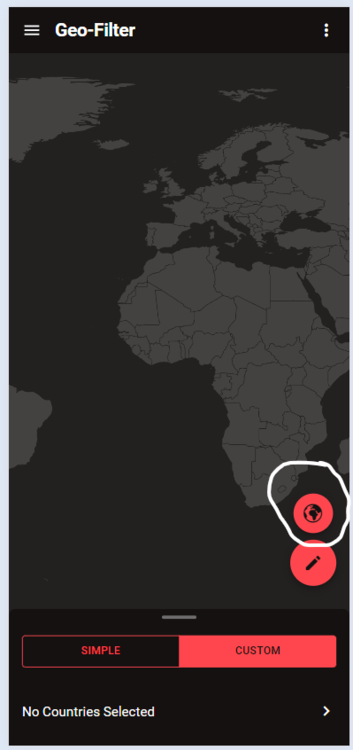
-
Could you clarify please?
-
Could you resync the cloud and try again please?
-
NEW R3 FIRMWARE - DumaOS 4.0.290
Netduma Fraser replied to Netduma Jack B's topic in Netduma R3 Support
Just use speedtest.net for this, did you factory reset after the update? -
Try with 5GHz instead - WiFi is subject to interference so: Use a WiFi analyzer to find the least congested channel and change to that Experiment with the widths to see what gives better results Ensure it's in an elevated position - not on a metal surface Ensure there aren't any electrical / wireless devices e.g headphones etc within close proximity ~3 feet if possible Set the antennae to this position _ | | _
-
R3 loses ppoe connection every 24 hrs
Netduma Fraser replied to extremeborg's topic in Netduma R3 Support
I'll have to pass that log on to a colleague to have a look at, no indication I can see, I'll get back to you -
HybridVPN on XR450 no longer loading
Netduma Fraser replied to dissonant's topic in NETGEAR Nighthawk Support (XR range)
That's uptime 6 minutes so it does indicate it rebooted, could you provide the config you're using that causes it please? -
Thanks for the request, I'll add it to the list to be looked into
-
Added you both!
-
Can't log into dumaos.com after latest firmware update
Netduma Fraser replied to PattPatt17's topic in Community Discussion
While connected to the router via a wired Windows PC, open command prompt, type ipconfig press enter and then post a screenshot of the results here please. -
NEW R3 FIRMWARE - DumaOS 4.0.290
Netduma Fraser replied to Netduma Jack B's topic in Netduma R3 Support
Where are you testing the speeds? How long does that take to happen? -
Can't log into dumaos.com after latest firmware update
Netduma Fraser replied to PattPatt17's topic in Community Discussion
Use http://192.168.77.1 can you access that way? Also it's not dumaos.com if that is what you were trying -
Can't log into dumaos.com after latest firmware update
Netduma Fraser replied to PattPatt17's topic in Community Discussion
What do you see when you try to login? If it's not accepting the credentials you'll need to do a factory reset -
NEW R3 FIRMWARE - DumaOS 4.0.290
Netduma Fraser replied to Netduma Jack B's topic in Netduma R3 Support
Do you know if you were connecting using HTTPS or HTTP? What do you see via the app when you can't login exactly? There will be something triggering it - for example if you put the PS5 in a standby state that would do it What do you see when you try to login? -
R3 loses ppoe connection every 24 hrs
Netduma Fraser replied to extremeborg's topic in Netduma R3 Support
Do provide the log when you can, might be worth setting a static WAN IP if your public IP stays the same, otherwise may be best to use the DMZ instead for the moment until we figure it out -
Basically the same thing, are you able to connect it via ethernet at all? Have you split the WiFi bands? If not do that and connect it to 2.4 or 5GHz then, set the reserved IP again (it may appear as a different device) then check again.
-
That is probably a serial number not a model number but you've said you're just using a cable? Can you provide a picture of the physical setup please? Okay so you are now getting internet through the router?
-
R3 loses ppoe connection every 24 hrs
Netduma Fraser replied to extremeborg's topic in Netduma R3 Support
Could you get the log when it happens please? Most likely if it's happening on that schedule your IP may be renewing then - how long do you leave it before rebooting - does it come back naturally? -
NEW R3 FIRMWARE - DumaOS 4.0.290
Netduma Fraser replied to Netduma Jack B's topic in Netduma R3 Support
Is the Geo-Filter running if you check the desktop web view? -
HybridVPN on XR450 no longer loading
Netduma Fraser replied to dissonant's topic in NETGEAR Nighthawk Support (XR range)
If you look at the uptime on the router does that show that it has just been rebooted? I would be surprised if it is rebooting and wasn't just a disconnect/reconnect to the VPN -
NEW R3 FIRMWARE - DumaOS 4.0.290
Netduma Fraser replied to Netduma Jack B's topic in Netduma R3 Support
Continue anyway and it should then load correctly What device did you use to access it? -
NEW R3 FIRMWARE - DumaOS 4.0.290
Netduma Fraser replied to Netduma Jack B's topic in Netduma R3 Support
Did you reset after the update to .290? It is a big jump so would be good to do one then
.png)
