Netduma Fraser
-
Posts
87510 -
Joined
-
Days Won
1947
Everything posted by Netduma Fraser
-
Presumably there is less of a population in ranked, I don't know what your rank is but if it's higher that will be an even lower population, then you limit that just to your platform and then limiting it just to a small area - yeah it's a lot of restricting going on at once so it makes sense why it would take so long because there probably isn't many games available that meets all those criteria. You'd either need to re-enable cross play or increase your radius to encompass more servers.
-
Yeah I was just asking if you had disabled it as that would explain it. I'll check with a dev and get back to you.
-
I've given you Early Access, please try the firmware here: https://forum.netduma.com/topic/56332-r3-disconnections/?do=findComment&comment=423952
-

NEW XR500 BETA FIRMWARE: 3.3.535
Netduma Fraser replied to Netduma Lew's topic in NETGEAR Nighthawk Support (XR range)
That's to do with the cloud, a big cloud update is incoming once testing has passed. What do you mean X device? We're aware of the IPv6/PPPoE I'm not sure when that will be sorted. How are you restarting the router? Are you sure it's not the view of Bandwidth Allocation that has reverted and if you change it, the allocation is still there? That one is on NG, I've been on at them a long time about that, I don't think they're going to fix that to be honest. -
Thank you for that, I'm not a dev but I just compared yours to mine and there are some distinct differences where yours doesn't work and mine does. I'll have to pass the log onto a dev to look into it more closely but have you disabled DPI in troubleshooting settings at all?
-
You could do that as it's very unlikely you'll need to control anything now. You don't need speeds that high for gaming by the way so I'd suggest downgrading speeds personally if there is a cheaper option, it's what I'd do.
-
Could you resync again and then grab the log please? I'm fairly convinced that for some reason you're not able to download the cloud updates properly which is what is causing the issue. The logs should tell us more.
-
Resync the cloud from the Device Manager and Geo-Filter pages then check again please
-
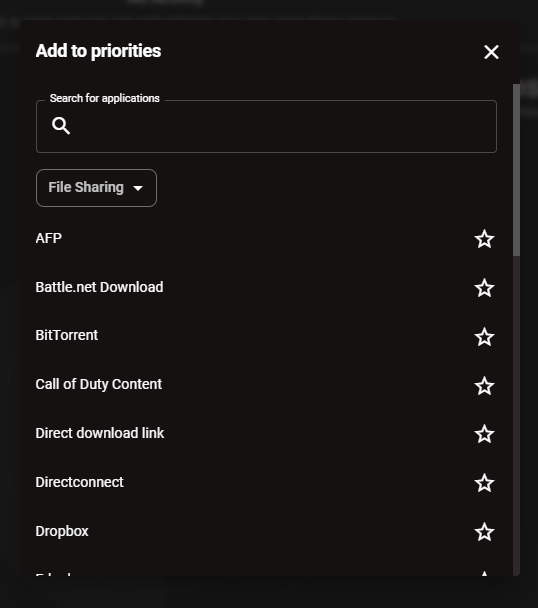
Go to add a activity priority on SmartBOOST, go to File Sharing and check for Call of Duty Content - you don't need to use it.
-
Update is taking a while.
Netduma Fraser replied to LokiD's topic in NETGEAR Nighthawk Support (XR range)
Clear your browser cache/cookies, it may have updated but the number is cached on the old one. If it didn't upgrade make sure you upgrade via ethernet and see if it works then -
Check for "Call of Duty Content" in the File Sharing category on SmartBOOST, do you have that?
-
Update is taking a while.
Netduma Fraser replied to LokiD's topic in NETGEAR Nighthawk Support (XR range)
While connected to the router via a wired Windows PC, open command prompt, type ipconfig press enter and then post a screenshot of the results here please. The router address may have changed to prevent a conflict with your ISP modem, in which case it would have changed to 10.0.0.1 can you access that way? -
Whitelisting Mac
Netduma Fraser replied to Jeofel08's topic in Feature Ideas & Improvements for DumaOS
I'll add it to the request list! -
There isn't actually an official meaning for this that's documented and I've not seen it before. Best guess is it's a failed update - do you notice any pattern to what has prompted it?
-
Wifi connection to Xbox Series X
Netduma Fraser replied to FrankTheFreak's topic in Netduma R3 Support
Metal is what I was checking for really, that could as you say cause interference, try the above suggestions, see if that helps, if not would it be possible just to move it back into that room it seems to run from and check if it is better? I get other routers didn't have a problem but also the one router you did mention has a significant hardware advantage. -
That's a firmware update, you can do that if you wish to, would probably be a good idea! We also did get that alternate cloud version for you so if you do do the update that should trigger during setup and download it, then see if you have a different experience.
-
Ping Optimizer stays at 100% Doesn't test lower %
Netduma Fraser replied to PUBzZz's topic in Netduma R3 Support
I think it's probably the service we use for the speedtest servers that's having an issue, I've raised it with the team and we're looking into it. You'll need to set speeds/Congestion Control manually for the moment. -
I've given you Early Access, do what you need to do to gain access like a factory reset, then get upgraded to the EA firmware: https://forum.netduma.com/forum/151-netduma-r3-early-access/
-
Netduma R3 : Internet interruption every 5 minutes
Netduma Fraser replied to Noxduma's topic in Netduma R3 Support
Great to hear, thanks for the update! -
Currently waiting on a few patches from the OEMs
-
Added!
-
Ping Optimizer stays at 100% Doesn't test lower %
Netduma Fraser replied to PUBzZz's topic in Netduma R3 Support
Can you run the test then get the logs right after please? -
Wifi connection to Xbox Series X
Netduma Fraser replied to FrankTheFreak's topic in Netduma R3 Support
It could be interference, not necessarily due to the other devices working but could you provide a description of where it is or better yet a picture? -
That's good to hear, hopefully it continues!
-
Disable GeoLatency Disable PingAssist (set it to 0,0) Enable Strict Mode Disable Fast Search Use Simple instead of Custom radius Then restart game or wait 10 minutes (in the lobby in the game). If that doesn't work, reboot PC/Console and it should work then.
.png)