


Netduma Fraser
-
Posts
86509 -
Joined
-
Days Won
1867
Everything posted by Netduma Fraser
-

Ethernet port (1) / access to internet not working?
Netduma Fraser replied to RedBearNAaron's topic in Netduma R3 Support
Ideally if you can grab the log when the issue next happens that would be really helpful so we can see what may be happening. -
NEW R3 FIRMWARE - DumaOS 4.0.290
Netduma Fraser replied to Netduma Jack B's topic in Netduma R3 Support
Have you got it set to automatic network settings for ethernet? Have you tried with a different cable/port? Have you blocked the device on the Device Manager? -
The game doesn't use P2P so those servers will actually be misclassified as peers. Given you're on that pre DumaOS version I doubt you'll be getting the latest cloud updates that would fix that.
-
NEW XR500 BETA FIRMWARE: 3.3.535
Netduma Fraser replied to Netduma Lew's topic in NETGEAR Nighthawk Support (XR range)
That's entirely up to NG, as far as I am aware it was/is going to be, I just don't have a timeframe on that. -
Looking to buy a router for Warzone
Netduma Fraser replied to Kaycey's topic in Call of Duty Support
Hello, welcome to the forum! | am I able to buy a Netduma, plug it into the Ethernet port in my room and then connect it to my PC, even though I cannot access my main router settings? Yes you can do that which would then allow you 4 devices to connect via ethernet and then provide WiFi for any other devices like your phone. | Would I still be able to access the features of Netduma without any issues? So a bit of a yes/no/maybe answer. The Geo-Filter would work absolutely fine, no issues there and will allow you to then force the closest servers possible which may help improve your game experience. It sounds like you don't have many devices if you're just plugging the PC directly into the wall so it may not apply much to you but QoS wouldn't be very effective as it can't control the entire network (the other residents in your building). So if you just want it for the Geo-Filter and WiFi, Adblocker etc then it will work just as well on a normal connection, you just wouldn't be able to use QoS with much affect. Then again it also depends on how the internet in your building is setup, e.g. if they have a 10Gbps network and everyone has a hard limit of 100Mbps each that no one else can steal away from you then QoS would work as it is effectively controlling the entirety of the connection available to you but if it's a free for all then no. -
Added
-
Is it safe to come back to R3 now? Is it stable?
Netduma Fraser replied to Chaiyoabc's topic in Netduma R3 Support
Keep us posted! -
Cleaned up in what sense? What's the issue you're having with the DumaOS 3 version?
-
As in it gives you the option to allow/deny every time? It will do that, it's just part of the ping section. If the PS5 is set to a console in the Device Manager it should just add automatically.
-
Can't Connect to the Dublin Server
Netduma Fraser replied to stokoe1011's topic in Call of Duty Support
There is one in the US but it doesn't really matter overall since it doesn't affect your game ping and is just used to ensure you've bought the game etc. If you provide the ID of it when it doesn't show as allowed we can take a look. -
The hardware is 10+ years old, making 2023/4 software work on it would be very difficult and not viable either unfortunately
-
There isn't really anything else that could be affecting it - how did you disable QoS exactly? Do you have the PC selected on the Geo-Filter? What do you mean heavy browsing?
-
Added https://forum.netduma.com/forum/144-netduma-r2-early-access/
-
Welcome R2 owners! We want your feedback!
Netduma Fraser replied to Netduma Alex's topic in Netduma R2 Support
I don't believe it's possible for us to disable the LEDs unfortunately. We're looking into the second issue and will improve it if possible. -
Port scan as well, have you disabled that one?
-
Can't Connect to the Dublin Server
Netduma Fraser replied to stokoe1011's topic in Call of Duty Support
The Dublin server is an authentication server, not a game server so it can't be played on, the UK server in this instance will be the closest to you -
Disable the protection options in Settings please and see if that resolves it
-
Yes in Settings > WAN > Advanced:
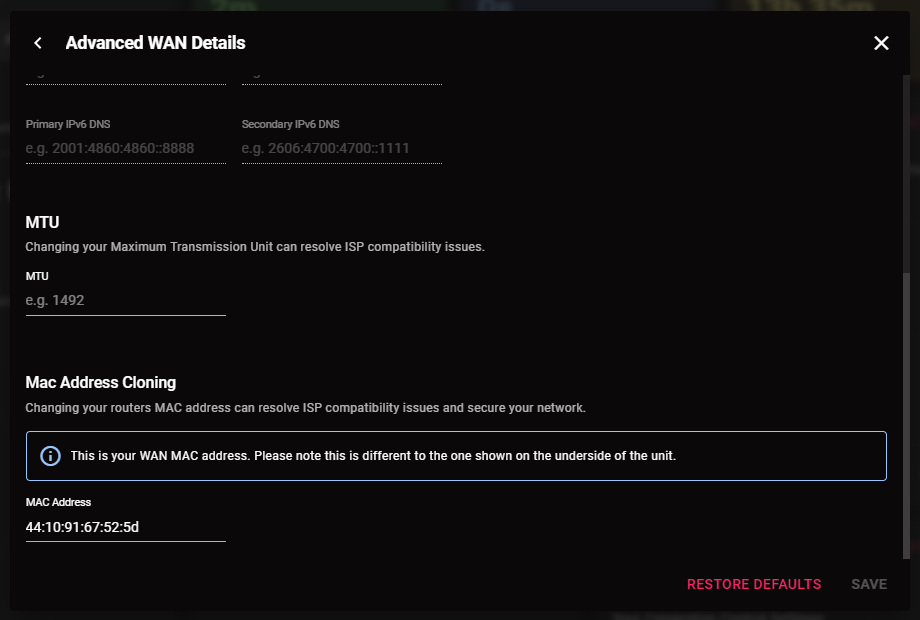
-
If for example you mean from your ISP modem/router then yes you may see that - the DNS on the router will apply to all devices connected to it but it won't always show that on the device itself.
-
Added
-
The allow/deny option is a more permanent allow/block setting, you do not need to set this every time - if you have been doing this and therefore denying a lot of servers that will be contributing to the longer wait times. It won't be able to ping/stabilize every server either. If you're using a console it will just add automatically, if you're using a PC it will ask you what game you want to use. By the latter statement does that mean you're trying to force servers further away from you? If so that will be why it's taking longer, your ping will be higher and you've got a bigger group it has to account for/find space for. I've given you Early Access so you can try the firmware there: https://forum.netduma.com/forum/151-netduma-r3-early-access/
-
Using old school R1 firmware, really trying to make me rack my brain today huh! Make sure you have strict mode enabled and Ping Assist set to 0, then restart the game and try again please.
-
As long as the R3 is connected to an internet source via ethernet you can connect it however you wish, connect it to the box on the wall, ONT, existing ISP modem/router - whatever is easier/possible with your connection.
-
Geo Filter not showing up my PC on Black Ops 6 Multiplayer
Netduma Fraser replied to Sameer's topic in Netduma R3 Support
Make sure you do the workaround: Quit the application/game/client completely Remove device from the Geo-Filter Give PC PlayStation Device Type in the Device Manager Resync from the Geo-Filter Map menu Re-add the device to the Geo-Filter with the manual option Set up the Geo-Filter how you like Wait 2 minutes Boot up application/game/client and then it will work correctly. -
I mean I'm not in marketing but it's a common business practice
.png)

