


Netduma Fraser
-
Posts
86482 -
Joined
-
Days Won
1864
Everything posted by Netduma Fraser
-
Good to hear! As above, they can be unreliable at the moment, so setting manually would be best. Speedtest.net once for your full speed or just enter what you pay for if you know you get that. Then start with 70% for Download/upload for Congestion Control (Ping Optimizer > Advanced) and experiment from there to find what works best for you.
-
Do a factory reset from the interface, close the interface/tab, wait 5 minutes then access, go through Setup and see if it continues please
-

Geo filtro não está funcionado no jogo Pubg.
Netduma Fraser replied to Hugo Alves de Almeida's topic in Netduma R3 Support
Have you ever been able to play on US servers for ranked? I would imagine they look at ping more heavily in ranked play and so as the ping is very high it may be very difficult for you to get a game. I know they were also experimenting with a ping limit/ping method for matchmaking back in 2018 so that may also be effecting it. Your settings are correct so in terms of the router it's doing everything it can. -
Better ping from a further away server.
Netduma Fraser replied to jame0174's topic in Call of Duty Support
No worries, do keep us updated, would be interested to hear what they find. -
I've given you Early Access so you can upgrade to that version to see if it is improved https://forum.netduma.com/forum/151-netduma-r3-early-access/
-
Better ping from a further away server.
Netduma Fraser replied to jame0174's topic in Call of Duty Support
Good to hear! If the VPN isn't applying to your device then it's just a coincidence unless the ports being used are the same and its getting confused but its unlikely -
That's correct for full speeds so fingers crossed it stays that way this time, if not let us know!
-
Thanks for that, it all seems fine. Are you seeing it on all devices or just the specific PC you're using? Do you get higher speeds over WiFi? How have you set Congestion Control?
-
Better ping from a further away server.
Netduma Fraser replied to jame0174's topic in Call of Duty Support
Thanks! If it's blocking an authentication server then it may try and connect you via a different route which could cause it. After allowing it do you notice its improved? -
Could you provide a screenshot of the WAN & LAN pages when the issue happens please?
-
Better ping from a further away server.
Netduma Fraser replied to jame0174's topic in Call of Duty Support
The Ireland server connection should be allowed, it's for authentication, if it's actually blocking it then add that to the allow list and it should be better. If you could give us the ID we can whitelist it. -
Better ping from a further away server.
Netduma Fraser replied to jame0174's topic in Call of Duty Support
So the first one is New Jersey but close enough and the second one is in Illinois so both are pretty much correct. It is then very bizarre that you're not getting a better ping to the server closest to you, that's likely an ISP routing issue that isn't something we could resolve. You could go to them about it and see if they can investigate, if so the IP for the NYC server is: 64.176.200.193 -
It's the Windows Task Manager
-
Disable BI in Settings > Troubleshooting > Advanced and see if its better please
-
Better ping from a further away server.
Netduma Fraser replied to jame0174's topic in Call of Duty Support
They can be mislocated on both, if you provide the ID I can check where it is supposed to be -
Better ping from a further away server.
Netduma Fraser replied to jame0174's topic in Call of Duty Support
It's likely the server is mislocated on the map, if you provide the ID for it we can get it corrected -
Okay good to hear, thanks for the update, I'll pass it on to the team to investigate
-
Could you disable BI in Settings > Troubleshooting > Advanced, reboot from the interface then try again please
-
Okay so when you play a game and the little globe icon here, you have that set to Europe?
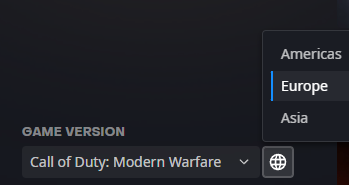
-
The whole purpose of the router is to allow you to get the best connection possible and give you the freedom to have more choice in the servers you play on. We've never advertised it as something to get you easier games. You're referring to HybridVPN which is in settings, as normal you'll need a VPN subscription from a 3rd party VPN provider that supports OpenVPN or Wireguard configuration files to use it.
-
Good to hear, thanks for the update!
-
Solicitação de participação no programa beta do Duma R3
Netduma Fraser replied to Luiz Fernando's topic in Netduma R3 Support
Added, let us know how you get on https://forum.netduma.com/forum/151-netduma-r3-early-access/- 1 reply
-
- 1
-
.png)
-
It looks like you're in the UK but trying to connect to the Americas on Battle.net, do you get the same issue when selecting EU?
-
Are you using a VPN at all?
-
Netduma losing internet at arandom times
Netduma Fraser replied to gearsniper550's topic in Netduma R3 Support
Its in Settings > Troubleshooting > Advanced