Netduma Fraser
-
Posts
87501 -
Joined
-
Days Won
1946
Everything posted by Netduma Fraser
-
 We'll be testing the game this week so we'll be able to get better compatibility and then it should work as expected
 -
New Owner Netduma R2 - Setup question
Netduma Fraser replied to kamilradom1910's topic in Netduma R2 Support
If you are only interested in the Geo-Filter and you don't care about QoS then you can connect it to the Asus. If you care about the QoS then you should connect it to the Hub 4 otherwise the R2 can't control the network effectively. -
Thanks, I'll pass that onto the team, meanwhile here is the file: default-list.txt
-
Priorizzare La connessione per il Gaming
Netduma Fraser replied to shinigami_93's topic in Netduma R2 Support
È meglio pubblicare in Accesso anticipato ma il controllo della congestione è ancora disponibile, puoi trovarlo nell'opzione ping e questo risolverà il problema. -
Bad Hit Reg. Latency 1 second behind the enemy movements.
Netduma Fraser replied to Oguzhan's topic in Call of Duty Support
Yes I'd suggest using DumaOS Classified Games in that scenario. It doesn't really matter too much as the traffic used is minimal so you won't notice any issues even if other devices are being prioritized at the same time. -
Nothing yet, I'm trying to get a date for when he is able to do it
-
When did it first start occurring, after changing a setting etc? Are you using a browser based Adblocker? Are you accessing the interface using HTTPS/is the browser forcing HTTPS?
-
That's brilliant to hear, thanks for letting us know!
-
Yeah, something we're looking into currently
-
Yep that's the place! Would suggest having the ISP modem/router handling it though otherwise QoS won't work properly on the XR for upload
-
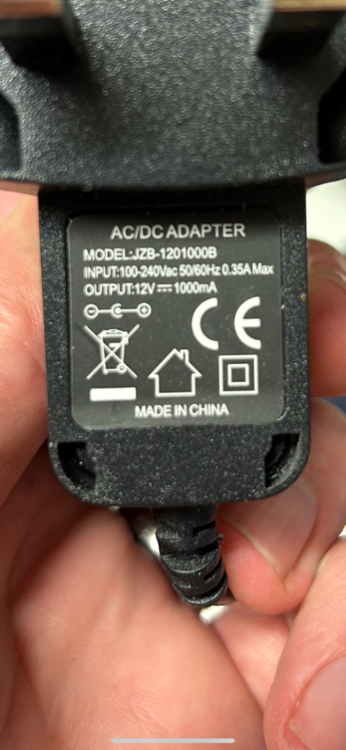
We don't sell one specifically or have a recommendation on specifically where to get one but these are the specs: With a cable diameter of 2.0mm. A good electronics store near you should have one or you could look online for something that matches.
- 1 reply
-
- 1
-
.png)
-
QOS limiting to speed on XR1000
Netduma Fraser replied to OFirebird's topic in NETGEAR Nighthawk Support (XR range)
You have the speeds set to 100/100, you need to update the bandwidth speeds then it will work correctly with QoS on. -
Problems with new Nighthawk 1000 Xr
Netduma Fraser replied to Furious's topic in NETGEAR Nighthawk Support (XR range)
Could you take a screenshot of the QoS page, Internet Setup page and System Information page please? What do you mean by "Also why many times my router admin page changes location"? Are you definitely still accessing the interface via HTTP? -
Updates on eFootball 2024
Netduma Fraser replied to euphidra's topic in NETGEAR Nighthawk Support (XR range)
Yes you can, as the console isn't your only device using UPnP would be better for your other devices but I don't think I've ever seen anyone have issues without it and using the DMZ instead so it's up to you. -
Moderate or Strict Nat Type or Teredo IP İssue
Netduma Fraser replied to Osman's topic in Netduma R2 Support
Great to hear that and thanks for posting the solution! You're welcome! -
Could you provide the log from the System Information page when this next happens please? I've also given you access to Early Access which you can find here: https://forum.netduma.com/forum/144-netduma-r2-early-access/
-
Glad to hear it seems to resolve itself, to me it would indicate something like the ethernet cable connecting your the devices to the router or WiFi interference given it's not occurring on everything
-
Updates on eFootball 2024
Netduma Fraser replied to euphidra's topic in NETGEAR Nighthawk Support (XR range)
You don't need DMZ if UPnP opens the NAT for you as they could conflict. No further update unfortunately, he will do it as soon as he can. -
NEW XR500 BETA FIRMWARE: 3.3.535
Netduma Fraser replied to Netduma Lew's topic in NETGEAR Nighthawk Support (XR range)
As you know we don't give out any ETAs, wanting to get the XR1000 on this first I think -
QOS limiting to speed on XR1000
Netduma Fraser replied to OFirebird's topic in NETGEAR Nighthawk Support (XR range)
Could you provide a screenshot of your QoS page please? It's more likely to do with the way it's setup -
Could you complete a Connection Benchmark test and provide a screenshot of the results please as well as a screenshot of your QoS page?
-
Problems with new Nighthawk 1000 Xr
Netduma Fraser replied to Furious's topic in NETGEAR Nighthawk Support (XR range)
Yes you can choose the Basic > Games Console option for PC and that will prioritize all your games. Otherwise with the Advanced Setup you would need to look up the ports the game uses and make multiple rules to account for them - like you would if you were going to port forward. How did you set the Upload limits, via Bandwidth Allocation or using Congestion Control? -
Moderate or Strict Nat Type or Teredo IP İssue
Netduma Fraser replied to Osman's topic in Netduma R2 Support
Could you follow the CG-NAT part at the bottom of this guide and provide a screenshot of the results please? https://support.netduma.com/en/support/solutions/articles/16000076587-dumaos-optimal-settings-guide-open-nat -
You will need to sign up here: https://forum.netduma.com/topic/39415-introducing-early-access/ if you want to try it. Could you explain more about the issue you're having, is it just disconnecting from the internet or does it prevent interface access as well?
-
Bad Hit Reg. Latency 1 second behind the enemy movements.
Netduma Fraser replied to Oguzhan's topic in Call of Duty Support
You can prioritize multiple things that's fine but there is no need to prioritize the same thing 3 different ways for example. You can prioritize and port forward that's fine, they perform different functions.