Netduma Fraser
-
Posts
87501 -
Joined
-
Days Won
1946
Everything posted by Netduma Fraser
-

ANNOUNCEMENT: Introducing the Netduma R3
Netduma Fraser replied to Netduma Lew's topic in News & Announcements
We will be revealing more information on features like this in the coming weeks Yes you can split the bands Yes HybridVPN is still apart of the software and can be used as long as you have an OpenVPN or Wireguard config file from your provider We're still working on improving it at the moment so it's not set in stone but I'd say in the current state probably 600 WiFi 6 is more about how well the router can cope with a lot of devices all connected to the WiFi at once, ensuring they get great speeds and stability so it will work with split bands I don't think we have plans for other algorithms given our direction with SmartQoS which is better than a normal algorithm -
NEW XR500 BETA FIRMWARE: 3.3.535
Netduma Fraser replied to Netduma Lew's topic in NETGEAR Nighthawk Support (XR range)
That's correct, no DumaOS routers currently have ports higher than 1Gbps -
Control de congestión.
Netduma Fraser replied to LeGenD's topic in NETGEAR Nighthawk Support (XR range)
Antes dijiste que te estaba dando 560 independientemente del porcentaje, ahora te está dando velocidades más bajas, presumiblemente de acuerdo con tu configuración de porcentaje, ¿no? -
Okay thanks for letting us know, I'll pass it onto the team to take a look.
-
ANNOUNCEMENT: Introducing the Netduma R3
Netduma Fraser replied to Netduma Lew's topic in News & Announcements
The XR1000 just uses WiFi 6 not 6E - doesn't have 6GHz As with the current Geo-Filter you can force different areas No you need a VPN subscription from a provider It would be just as good if not better! -
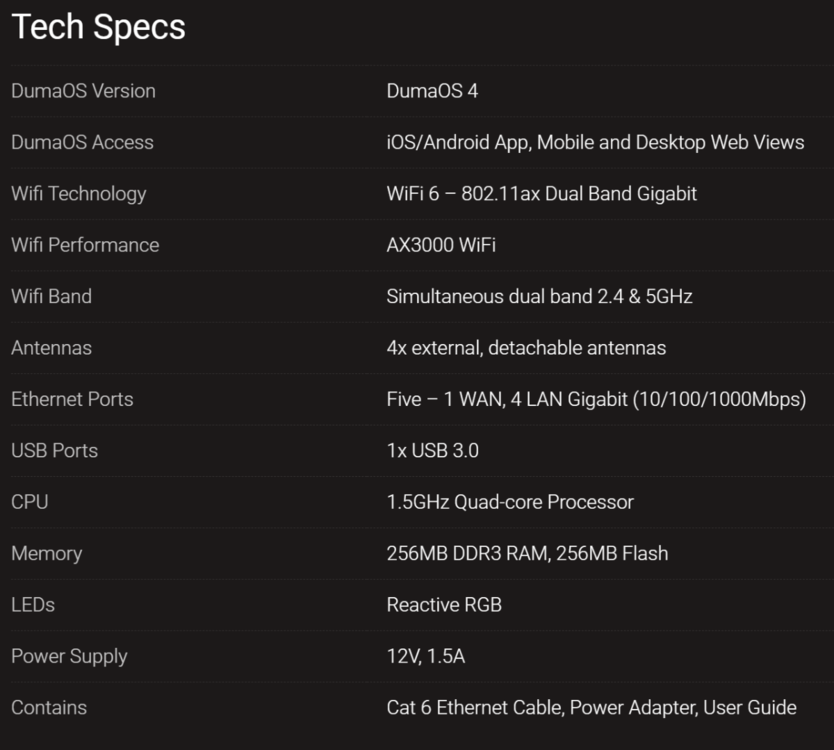
You can find it lower down on this page: https://netduma.com/order/netduma-r3/ but for ease:
-
ANNOUNCEMENT: Introducing the Netduma R3
Netduma Fraser replied to Netduma Lew's topic in News & Announcements
That's probably to do with the inclusion of Armor or viewing via HTTPS, the R2 or any of the other XR routers don't have that issue and they run later versions of DumaOS. Unfortunately not but it will receive 3.3, you can sign up here to be informed when it goes to closed beta: https://forms.gle/oL9ZCHn8tDKHpLbW6 -
ANNOUNCEMENT: Introducing the Netduma R3
Netduma Fraser replied to Netduma Lew's topic in News & Announcements
Concerning in what way exactly? It's not meant to be a direct comparison to that router, just an example as it's what people know, the R3 does have an extra CPU core though and is from what I've just checked £100 cheaper than the XR1000 currently. Yes it's final spec. -
XR1000 firware and duma os 3.3
Netduma Fraser replied to AnarchyAli's topic in NETGEAR Nighthawk Support (XR range)
We haven't added anyone to the section yet, we can add you now but the beta won't be available yet -
Parece que el chip WiFi está defectuoso, no hay otra razón por la que no pueda funcionar. Lo siento, no pudimos ayudarte a solucionarlo.
-
Yes it will get DumaOS 4 at a later date
-
ANNOUNCEMENT: Introducing the Netduma R3
Netduma Fraser replied to Netduma Lew's topic in News & Announcements
Thanks! Yes it works for devices instead of activity as well. Sorry to hear that, we could do higher speed ports, WiFi 7, all the latest tech but with that would come a huge price increase. We've always been about getting the most bang for your buck and we feel we've done that here. The vast majority of our community would not be able to actually make use of those features, so then they're paying over the odds to try the new software and other improvements. It doesn't make sense for us to do that at this time, we're only now just getting internet speeds faster than 1Gbps in the UK so it would be quite hard for us to actually test this or get much meaningful feedback. I covered it a little on the previous page, this is by no means a complete list but some of the immediate improvements: Improved antennae Improved ventilation Addition of WPS Addition of power button Overall increased hardware specs (it's actually better than the XR1000 if you're familiar) Completely new software Functional RGB - it actually has a purpose as you can see the router is actively prioritizing gaming for example Even if you're not sold on the R3 that's okay as you'll get to experience DumaOS 4 at a later date on your R2 so still something to be excited about! -
Control de congestión.
Netduma Fraser replied to LeGenD's topic in NETGEAR Nighthawk Support (XR range)
No hemos cambiado nada, puede ser la DMZ si no reiniciaste previamente. Me alegra saber que está funcionando nuevamente. Si el problema vuelve a ocurrir, proporcione esas capturas de pantalla. -
XR1000 firware and duma os 3.3
Netduma Fraser replied to AnarchyAli's topic in NETGEAR Nighthawk Support (XR range)
You'll be given access to a closed beta section that will contain the 3.3 update for XR1000. -
Yes that's correct!
-
We haven't specifically tested with this game so that could be the reason but if you disable QoS fully in the Congestion Control menu does it then work?
-
ANNOUNCEMENT: Introducing the Netduma R3
Netduma Fraser replied to Netduma Lew's topic in News & Announcements
Well currently we haven't started porting it to the R2 so it could be awhile before you see it so you'll get it sooner with the R3. Features such as the dynamic RGB based on what is being prioritized will only be on the R3 as the R2 doesn't have RGB. Plus generally the R3 has much better hardware - better than the XR1000 if you're familiar with that so it will generally run a lot better as it was made on the R3. -
No we won't as we already have the launch discount
-
ANNOUNCEMENT: Introducing the Netduma R3
Netduma Fraser replied to Netduma Lew's topic in News & Announcements
We've got the launch discount so our community can get it earlier at the cheapest price possible so we can't give any further discounts. If there is a favorite influencer who happens to work with us then perhaps you can get a little discount 🤔 Great to hear that! They will be shipping on a first purchased basis so it's very hard to say for certain, depends on the volume of orders/if we sell out but most likely you would still get it this year. Not quite, with another feature we're bringing into the Geo-Filter it may interact, we're still deciding really. There won't be customization at that kind of level, however, we are allowing people to fine tune the priority levels: Also check out our new video on it: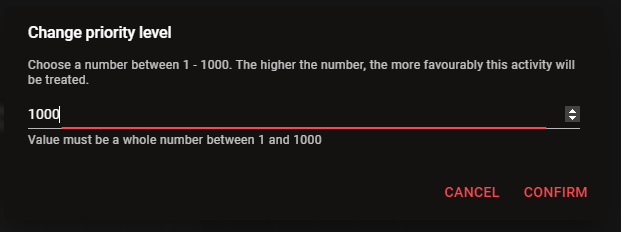
-
Yes that should work fine. DumaOS 4 will come to the R2 at a later date yes
-
It's up for pre-order at the moment, stock will arrive in December and we'll send it out on a first purchased first shipped basis. Should be with you by Christmas if all goes to plan.
-
ANNOUNCEMENT: Introducing the Netduma R3
Netduma Fraser replied to Netduma Lew's topic in News & Announcements
We will be doing something like this yes so in a potential brick situation it should be easier to recover -
ANNOUNCEMENT: Introducing the Netduma R3
Netduma Fraser replied to Netduma Lew's topic in News & Announcements
Great to hear that! Hardware wise it's actually better than the XR1000 if you're familiar with that. You're welcome, all good thanks! The box dimensions are: 43cm x 30cm x 10cm Just getting the actual router dimensions for you, will update my post when I have it. -
Lamento escuchar eso, además de intentar otro restablecimiento de fábrica, puedes intentar reinstalar el firmware con TFTP, pero puede ser complicado. Esa es la aplicación Nighthawk, no la creamos nosotros, así que no estoy seguro, pero lo dudo.
-
We can't provide any support for router software that isn't our own unfortunately but from what I know it's a tight community so I'm sure there will be lots of information out there for what you can do
.png)