


Netduma Fraser
-
Posts
87499 -
Joined
-
Days Won
1946
Everything posted by Netduma Fraser
-
So the Geo-Filter is measuring the latency to the server itself and the in game ping is showing that calculation + processing delay. All games have it but not all choose to show it in their ping calculations. As a rough guide up to ~30ms on top is okay though it can be lower so it can indicate that server is under a heavier load, in which case forcing a different server even if it has a slightly higher ping shown on the Geo-Filter might actually play better for you. It's essential the Geo-Filter is enabled before the game client (e.g. Steam etc) if on PC or the game have been launched. If you change Geo-Filter settings when you're on the game then you will need to restart the game for those changes to take effect, otherwise it will use the previous Geo-Filter settings and appear not to be working. Strict Mode should also be enabled & Fast Search should be disabled, they are by default so if you haven't changed them you can ignore it. If you have changed or want to check them can be found in the Geo-Filter menu that can be found by clicking ⋮ in the top right hand corner of the page and go to Settings. If you do these things then it will stick to the radius you've set, other than any servers on the global whitelist (for example Dublin usually) or manually allowed servers (like the Dublin servers).
-

I don't think there's any way around it!
Netduma Fraser replied to Rodolfo Lima's topic in Netduma R3 Support
What do you want it to be? I'll change it for you -
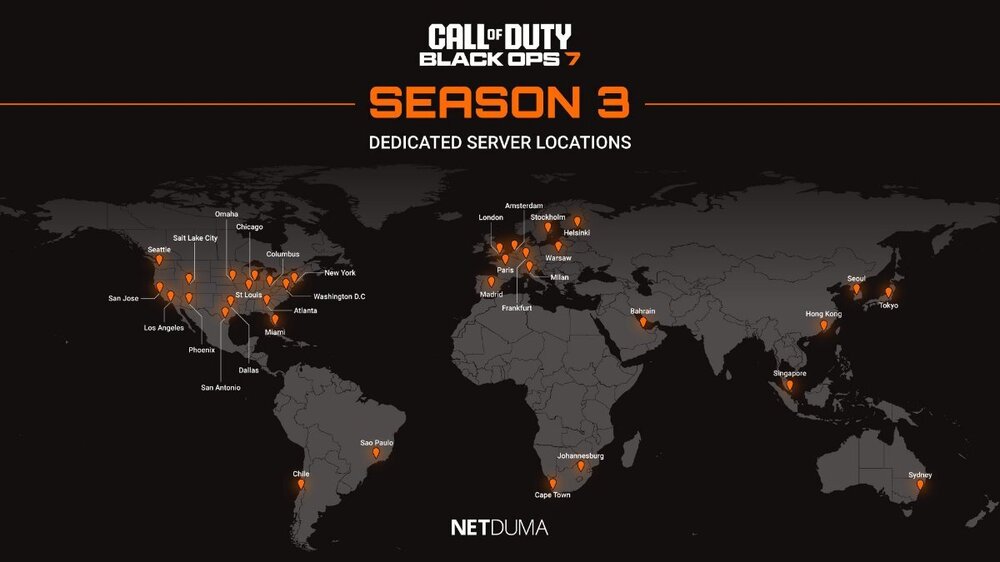
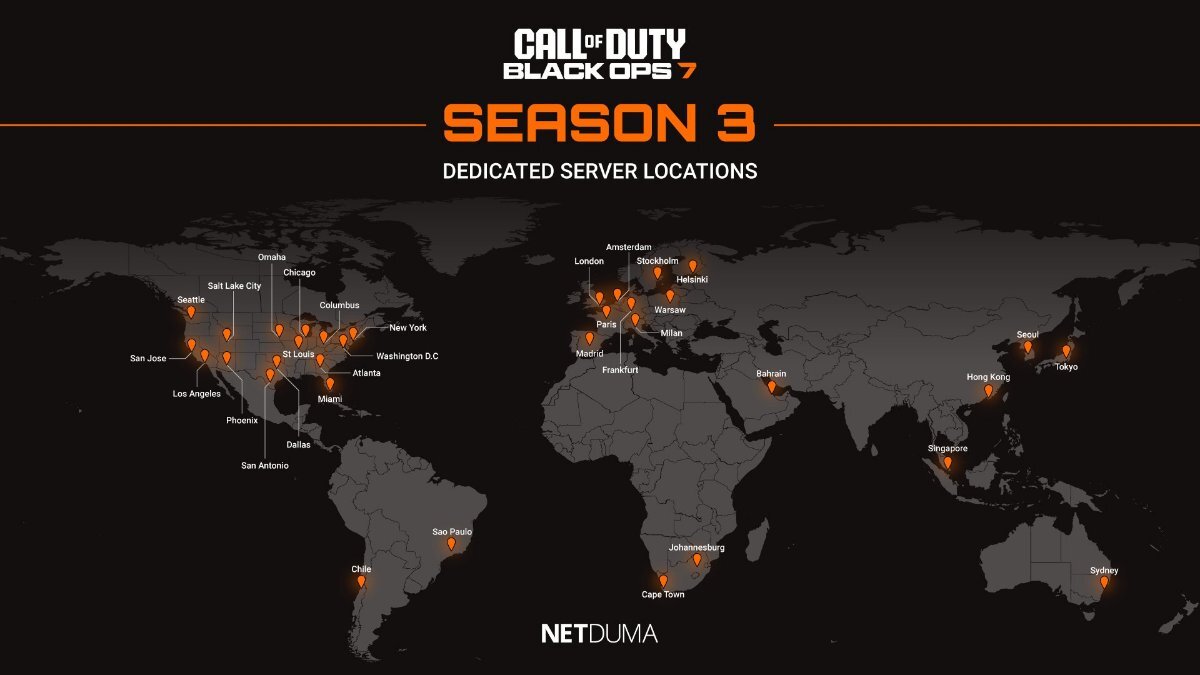
Try with 70% as that's our suggested starting point and adjust from there based on how it feels/until you don't see any spikes - keep in mind that during peak times spikes like that are more likely to occur due to ISP peak time congestion. It will always try to connect to the Dublin server as its for authentication and required for online play so if you allow it you can play with the filter enabled but you will need to do so a few times as there will be multiple servers in that location. Once you've got all the ones that appear blocked there it will work. If you block a server it should keep you connected to it until that connection has been severed and then it would be blocked. It's nothing to do with Ping Heatmap, it has a pre-compiled list of servers, they have become out of date and when they do they're unable to be pinged, by default they then show N/A -1000ms because it timed out once it hit 1000ms without a response. Everyone with Ping Heatmap is seeing the same for CoD at the moment, myself included and it will stay that way until we've updated the pre-compiled list with an updated set until they inevitably get out of date again. Here are the server locations, they never change:
-
I don't think there's any way around it!
Netduma Fraser replied to Rodolfo Lima's topic in Netduma R3 Support
Okay so an issue with your ISP or game perhaps. Click your name top right of the forum and go to account settings, you can change it there -
Is Congestion Control set to Always or Auto? Have you found 50/50 gives you the best results or just randomly set? SmartBOOST should be used so the devices/applications you care about get prioritized above traffic you don't care about as much, if there was something impacting your ping results then this would help it. Given the ping statistics you provided, you had a maximum of 442ms but over 232 successful packets your ping averaged 22ms which indicates that you only experienced a couple of quick spikes rather than a consistently high ping and so it was relatively stable overall with 2 packets lost at just under 1% that's quite acceptable and I assume they would have happened with those couple of spikes which makes sense. So far then it indicates it's more of an isolated incident of spikes rather than a persistent one. The logs contain entries that can look like issues but are normal processes, that's why it's best for a user not to try to diagnose issues solely based on logs, if issues are occurring that can't be diagnosed through normal means then logs can be looked at for more information by the devs but its very rare this is needed and the entries you've mentioned aren't anything I haven't seen before. For example the hostapd entry can occur when Ping Optimizer fails and that could occur for any number of reasons such as the server times out and so it can't set the correct Congestion Control percentages etc. Some can appear when it's not using a certain setting but it looks like an issue because that setting isn't active and fails, that's what I mean by verbose, we're not heavily restricting the output to the log, normal processes appear there that can seem troubling if you're not used to them. cfront & RTNETLINK errors weren't in the logs you provided but again they're not necessarily any immediate cause for concern.
-
I don't think there's any way around it!
Netduma Fraser replied to Rodolfo Lima's topic in Netduma R3 Support
Check direct to your ISP modem/router to see if you get the same issue because if you do then nothing you do on the R3 would make a difference as it wouldn't be the cause -
I don't think there's any way around it!
Netduma Fraser replied to Rodolfo Lima's topic in Netduma R3 Support
If you've fully disabled the Geo-Filter and it's still occurring then check direct to your ISP modem/router to see if you get the same issue Yeah it's getting outdated very quickly at the moment, the team are aware and will push another cloud when they can -
I don't think there's any way around it!
Netduma Fraser replied to Rodolfo Lima's topic in Netduma R3 Support
Very likely an authentication server is getting blocked, look on the map when that error appears, look for a blocked icon and allow it. Repeat the process as it may take a few times then it will work. If you could provide the IDs also we can get them globally whitelisted. -
The R2 was sold with DumaOS 3, DumaOS 4 wasn't advertised as a reason to buy the R2, it was developed on the R3 itself and to get it on the older R2 hardware was a challenge that we didn't need to do but wanted to for our customers. We've explained why there have been delays and this hasn't just been for the R2 either. We never promise firmware because it's always subject to change, I've said many times we don't provide ETAs. The next R2 DumaOS 4 firmware would be the final firmware so the more time we take the more stable it will be overall. Also it is a support forum so there are only people posting issues here.
-
I did miss that part, my apologies. The logs are primarily for the devs to look at if needed and as such they're quite verbose, they contain backend entries that can look like issues but are normal processes. I doubt they specifically will be causing you issues but if it ends up that they are I can pass them on for more investigation. What is the model of the modem/router the R2 is connected to and how have you set that to ensure all traffic flows to the R2? E.g R2 in its DMZ, modem/bridge mode Are ALL devices connected to the R2? What are the speeds you pay for/receive & have you entered those speeds into the router? How have you setup Congestion Control? How have you setup SmartBOOST?
-
The dublin server is an authentication server required for online play so you may need to allow servers appearing blocked there a few more times and then it should work just fine. If you could then provide the IDs we can get the cloud updated with them.
-
It keeps getting out of date, I've asked the team to update it again
-
I don't think there's any way around it!
Netduma Fraser replied to Rodolfo Lima's topic in Netduma R3 Support
If it's just during peak time when it drops for example then that's just peak time congestion so I'd say leave it at your normal speed unless you're frequently playing during that time. If so or it's happening a lot of the time then setting to around 425 for the middle ground would be a good idea -
I don't think there's any way around it!
Netduma Fraser replied to Rodolfo Lima's topic in Netduma R3 Support
It really depends how much it fluctuates, if it's significant for example frequently drops to 450 then it may be better to put in an average like 475 -
I don't think there's any way around it!
Netduma Fraser replied to Rodolfo Lima's topic in Netduma R3 Support
It's best to tell it the speeds you actually have/expect so it's working with the correct information, otherwise you are unnecessarily throttling which could have the opposite of the intended effect. -
What do you mean it's not stable/isn't working exactly? How are you determining this/what are your settings? Previous version is here: https://forum.netduma.com/topic/58424-new-r3-firmware-dumaos-40645/
-
I don't think there's any way around it!
Netduma Fraser replied to Rodolfo Lima's topic in Netduma R3 Support
If you tell me why you're reducing your speeds and lowering the percentages I can best understand and advise -
I don't think there's any way around it!
Netduma Fraser replied to Rodolfo Lima's topic in Netduma R3 Support
You don't need to lower your speed and lower your Congestion Control percentages, you should only lower Congestion Control and have you speed set as you receive/expect. Why are you reducing the speeds also? It wouldn't put a strain on the router though. -
Could you provide a video of what you're seeing please with it off when enabled?
-
I don't think there's any way around it!
Netduma Fraser replied to Rodolfo Lima's topic in Netduma R3 Support
Could you provide a video of the lag you're seeing in game along with the ping you have when that occurs? -
Good to hear you got that sorted. If you disable filtering so you can still see icons on the map, where does it place you when you get into a game?
-
Getting stuck on a Amsterdam server
Netduma Fraser replied to RichardB's topic in Call of Duty Support
No worries! Yes absolutely, they're essentially VPNs and they create encrypted tunnels between you and the destination so the router won't be able to tell properly what it is connecting to. Is that something you're using? -
NEW R3 FIRMWARE - DumaOS 4.0.540
Netduma Fraser replied to Netduma Alex's topic in Netduma R3 Support
Added https://forum.netduma.com/forum/151-netduma-r3-early-access/ -
Doesn't detect or aren't getting internet? Can you provide a screenshot of the LAN settings page please?
-
Getting stuck on a Amsterdam server
Netduma Fraser replied to RichardB's topic in Call of Duty Support
Sorry a bit of a long one but hopefully this gives you a good oversight and will help in figuring out what is happening. Allowing or denying could have impacts on your ability to filter if you allow/deny the wrong ones. Everyday filtering you don't need to add any servers to allow/deny except in these possible scenarios: Allow: Adding friends Adding servers that had a good connection that you may like to play on in the future - it won't necessarily make you connect to it more but if your radius would ordinarily block it then you could still connect Adding servers you suspect are authentication/required servers i.e. servers that appear blocked when running a console speedtest, servers that appear blocked when you're unable to sign into a game etc Deny: Blocking servers that have given you a bad connection - this will prevent you connecting to it again but remember there are multiple servers clustered in a singular location so it can appear as though you're connecting to the same place but it will be a different server in that location. So in these scenarios, if you were to allow a server that's outside your radius you could connect to it regardless of your settings, that might go against what you're trying to achieve. If you've denied a server that was actually an authentication/required server then this may prevent you playing at all or playing in a specific region. There is a possibility as well that if you've denied/allowed the wrong server that the game could relay you to a server outside your radius that would normally be blocked - this isn't something I've seen for CoD though. If you're blanket allowing anything in your radius and denying anything outside your radius that's not the best way to do it and could definitely lead to issues - anything inside will be allowed and anything outside will be blocked anyway, just temporarily. The only authentication servers I am aware of for CoD are in Ireland and Washington so I don't think the Amsterdam server is one. From your screenshot you've manually allowed a server in Ireland - an authentication server - that is correct. There are two other servers, the server you're playing on and then one that is allowed in France - not one that has been added to the allow list though. So what that tells me given that I can't see where you've placed your filter is that very likely one of the following things have happened: Geo-Latency or Ping Assist are enabled or Strict Mode is disabled The Geo-Filter wasn't enabled prior to turning on the console/game The Geo-Filter radius/settings were changed while already on the game but the game/device wasn't restarted after doing so, therefore it still thinks you can connect to the servers you were able to before Filtering isn't enabled You have set an Internet Rule to allow ALL traffic to the device thereby bypassing the Geo-Filter restrictions After looking up the ID of this Amsterdam server I can see it belongs to Cloudflare and as far as I am aware they don't use this for the gaming or authentication servers so I'm wondering if you've changed your DNS manually to 1.1.1.1 / 1.0.0.1 and the Geo-Filter is picking it up, hence why it's always showing as being connected, in which case it's more likely that server in France is the game server in your screenshot but the other aspects would still apply anyway. If you have allowed/denied something you haven't/have been blanket allowing/denying then a good thing to do if you want to of course would be to remove all the servers you've allowed/denied and see if the issue still occurs. Last but not least I've given you access to the Early Access firmware which is a big one for fixes/QOL changes including some made to the Geo-Filter so if it is caused by an actual firmware issue (which I think is unlikely) then it would probably be fixed by this version: https://forum.netduma.com/topic/60946-new-r3-firmware-dumaos-401147/

.png)