


Netduma Fraser
-
Posts
87501 -
Joined
-
Days Won
1946
Everything posted by Netduma Fraser
-

Geo filter and heatmap not working.
Netduma Fraser replied to Seomos17's topic in NETGEAR Nighthawk Support (XR range)
Look through it to see if it can indicate the cause of the issue - there isn't anything sensitive in it don't worry. It just captures background processes of the router, no internet history or anything like that. That can't be all the log, there is barely anything there, did you download it from the System Information page? -
Geo filter and heatmap not working.
Netduma Fraser replied to Seomos17's topic in NETGEAR Nighthawk Support (XR range)
Could you get the log file then please? -
Geo filter and heatmap not working.
Netduma Fraser replied to Seomos17's topic in NETGEAR Nighthawk Support (XR range)
Could you provide a picture of the back of the router, how it is connected to your ISP router please? Does force update allow it to work? If you could get that log as well please -
Geo filter and heatmap not working.
Netduma Fraser replied to Seomos17's topic in NETGEAR Nighthawk Support (XR range)
Download the latest firmware from here: https://kb.netgear.com/000066234 You should be able to access the NTGR settings from 10.0.0.1/adv_index.htm - if so then re-upgrade to that firmware version please, close tab, wait 4 minutes then try accessing normally please -
Added
-
Geo filter and heatmap not working.
Netduma Fraser replied to Seomos17's topic in NETGEAR Nighthawk Support (XR range)
Could you provide uncropped screenshots please? Helps me see if there is anything else causing it. On the System Information page on the Rapp panel, click the icon and change retries to 5. Reboot from the interface, close the interface tab, wait 4 minutes then access and see if it loads everything. If not please provide a full screenshot of a page with the error and provide the logs from the System Information page please (click on it and download then upload here) -
Geo filter and heatmap not working.
Netduma Fraser replied to Seomos17's topic in NETGEAR Nighthawk Support (XR range)
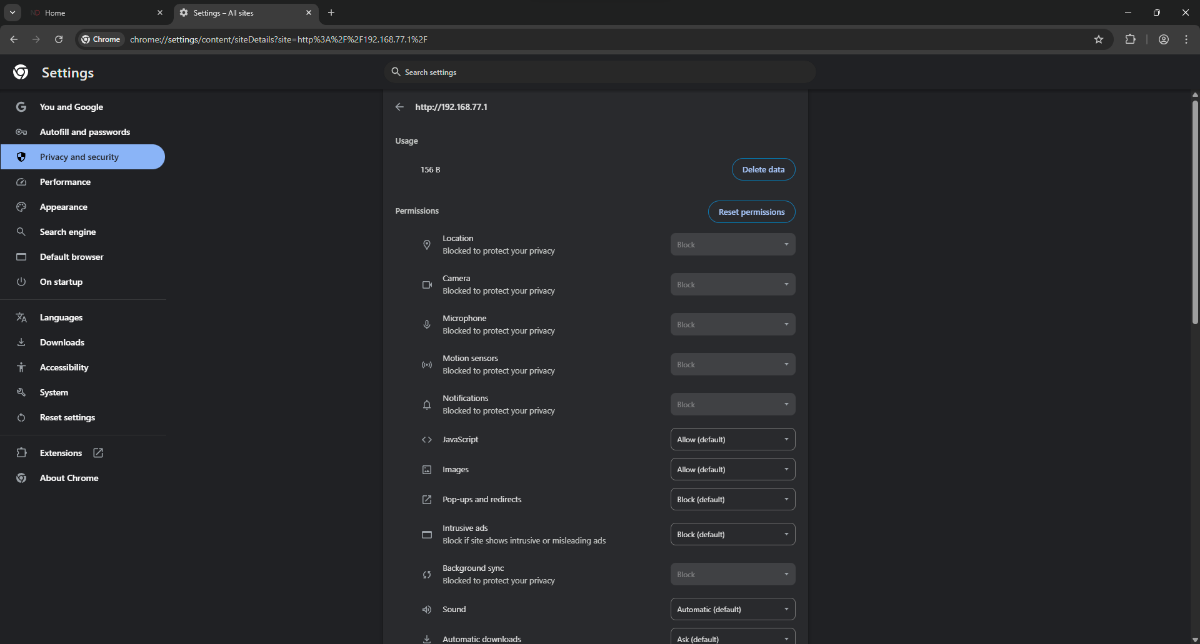
I didn't realize you're using 10.0.0.1 so make those changes on this page instead: chrome://settings/content/siteDetails?site=http%3A%2F%2F10.0.0.1%2F Also change DNS on the XR back to get from ISP -
Geo filter and heatmap not working.
Netduma Fraser replied to Seomos17's topic in NETGEAR Nighthawk Support (XR range)
The XR should be in the DMZ on the EE router so you'd need to access the EE router to put the XR in the DMZ function there. The WAN IP of the XR is found on the System Information page on the XR, that's the IP you'll need to enter into the EE DMZ. Go here: chrome://settings/content/siteDetails?site=http%3A%2F%2F192.168.1.1%2F in your web browser, it should show a page like this: If so please change these: Popups & Redirects > Allow Intrusive Ads > Allow Insecure Content > Allow Then once you've done the DMZ see if you get the same issues. The IP that was entered into the DMZ will have changed after a factory reset, you'll need to double check its correct.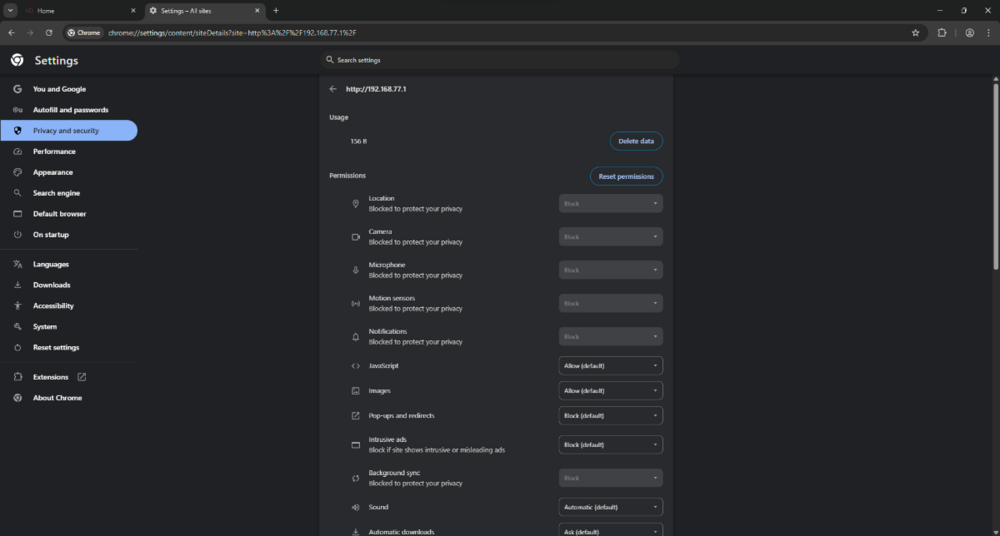
-
Geo filter and heatmap not working.
Netduma Fraser replied to Seomos17's topic in NETGEAR Nighthawk Support (XR range)
If you factory reset the XR then its likely that it is no longer in the DMZ on the EE router so you'd need to put it in it again and that should resolve it. You mean you're connecting via HTTP definitely? -
Geo filter and heatmap not working.
Netduma Fraser replied to Seomos17's topic in NETGEAR Nighthawk Support (XR range)
What is the model of the modem/router the XR is connected to and how have you set that to ensure all traffic flows to the XR? E.g XR in its DMZ, modem/bridge mode Ensure you're not accessing the interface via HTTPS - some browsers try to force this now so you may need to disable that in browser settings. Also disable Adblocker if you have one on the browser. -
^
-
Where are you measuring/seeing the packet loss and what percentage is it? Are you still using the previous settings we mentioned?
-
Okay thank you, I've passed it on to a dev to have a look
-
If that's after a reboot grab the logs again please, if not then reboot and grab the logs when it happens again please
-
Unplug that and see if you get the same issues please
-
Added You have access already https://forum.netduma.com/forum/144-netduma-r2-early-access/
-
XR1000 PPPoE
Netduma Fraser replied to fletcherjames1's topic in NETGEAR Nighthawk Support (XR range)
When you change the Congestion Control percentage for upload and do a speedtest for example you should see that the percentage and therefore speed you have restricted it to is not being adhered to on the speedtest. -
XR1000 Firmware manual update
Netduma Fraser replied to Sich's topic in NETGEAR Nighthawk Support (XR range)
The only reason for that would be that NG haven't put the firmware on the auto update server yet. However yes you can upgrade manually that is fine. The .chk file is what you need to upload to the router. -
Issues with port forwarding
Netduma Fraser replied to fiji's topic in NETGEAR Nighthawk Support (XR range)
The WAN IP from the System Information page should be the IP you put in the ISP modem. You should then also set that IP as static/reserved on the ISP modem for the XR. Otherwise after a reboot the IP could change and the DMZ will then not apply. You'll have to ensure this is correct otherwise it's very likely any port forwarding etc to get the server working will not work. Once confirmed use a online port checker to verify whether the ports you've opened are actually opened. -
Are you seeing the same with your modem? If you play during non peak times do you see the same issue?
-
Looks like there is an issue with the device connected in LAN port 2, which device is that? Do you continue to get the error with that unplugged after a reboot?
-
Added
-
What has changed physically with your setup or settings-wise prior to the issue starting? Do you get normal ping games or is it just that it initially reports it's looking for games that high? Do you encounter that with the Geo-Filter disabled? With your modem connecting directly to that no other devices can use the internet so it's very likely devices on your network are impacting you/that you'll need to fine tune Congestion Control/SmartBOOST to mitigate it
-
Use a different target like a local news website, do you see the same behavior then?
-
Is that because you have local devices accessing it setup to use an IP in that range and it would be a pain to reconfig them to use the default IP? Presumably you came from the XR with that IP set? If so that would indicate though that you have/had an ISP modem/router as it only uses 10.0.0.1 to prevent conflict with an upstream router using 192.168.1.1
.png)