

Netduma Fraser
-
Posts
87836 -
Joined
-
Days Won
1979
Everything posted by Netduma Fraser
-
It won't be doing anything at 100 so try 70 and experiment from there and you should notice a difference
-

Why i have error Problem like this, not before
Netduma Fraser replied to jorlanjorge's topic in Netduma R2 Support
You already have a port rule added, what was that one for? -
Great to hear that, thanks for the update!
-
Does it show the ping graph with the upper limit being 50 at all or 27?
-
Need your help to sort this error out on my NORD VPN
Netduma Fraser replied to jorlanjorge's topic in Netduma R2 Support
It's timing out, how far away from you is the server you're trying to connect to -
Everyone will have the issue, will require an app update to resolve
-
Disable QoS fully from the Congestion Control icon including DPI, what speeds do you get then?
-
What percentages are you using specifically for Congestion Control and do you notice any difference after adjusting them? We usually suggest starting at 70% and experimenting from there
-
geofilter not pinging warzone 3 servers
Netduma Fraser replied to rvndo's topic in Netduma R3 Support
You're likely on an old version, I've sent you .23 via a PM. You can upgrade from Settings > Troubleshooting. Once the upgrade has completed I'd recommend doing a factory reset and it should work better after that. -
Geo-Filter Not Working for The Finals
Netduma Fraser replied to DaBoy98's topic in Netduma R3 Support
Make your Geo-Filter settings, then restart game or wait 10 minutes (in the lobby in the game). If that doesn't work, reboot PC/Console and it should work then. -
NetdumaR2 nach reboot immer auf reset
Netduma Fraser replied to VeniVidiVici's topic in Netduma R2 Support
Können Sie mir die Option auf der Schnittstelle zeigen, die Sie zum Neustarten verwenden? -
Petit bug sur le gestionnaire de périphériques
Netduma Fraser replied to Nyja's topic in NETGEAR Nighthawk Support (XR range)
Sur quelle version du firmware es-tu actuellement ? -
EAFC 24 Servers. CANT connect in Spain-Italy (Geo Filter)
Netduma Fraser replied to Cobrinio's topic in Netduma R3 Support
If you're unable to connect to them even with the Geo-Filter enabled then it's likely for the reason I mentioned. Try direct to your modem as well -
It could also be found in Security or Firewall settings on the gateway
-
I'd remove the PC from the DMZ, it's basically open to the internet so a major security risk. Good advice from Dogg on this. It shouldn't matter but some routers are different, disable UPnP, port forwarding, QoS, any other features on the G3 that could be affecting the traffic. NAT Type 2 is open, Type 1 means you're connected to a modem and isn't possible to achieve behind a router
-
As above, that's how you do it!
-
I'm not too surprised, those antennae are pretty chunky! Very interesting though, how much range was gained approximately?
-
Yes that should be the case, okay so on the flip side, with just your device added and steady ping disabled do you all then get the same ping?
-
need help EA FC 24 ping improuve with R3
Netduma Fraser replied to Authentik06's topic in Netduma R3 Support
I mean you pinged the game server there while connected to the R3. So instead while you're connected to your modem do it to the game server -
I don't think we have specifically tested RingCentral so I will make a request for the team to get it classified, thanks for the report!
-
Can you provide the logs from HybridVPN when it fails please along with the OpenVPN config you're using?
-
I'm confident the team will be able to improve it!
-
That's great to hear, hope you enjoy!
-
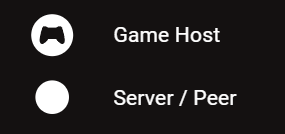
What firmware version are you on currently? There isn't a way to distinguish a peer from a server on the R3, they're shown as the same icon:
-
Does anybody know when the new firmware is suppose to drop?
Netduma Fraser replied to Zepplike's topic in Netduma R3 Support
Sent to you both via PM