.png.3273087765060f1c552428c5e92fbc07.png)
TrayDay
-
Posts
1285 -
Joined
-
Days Won
17
Everything posted by TrayDay
-
Yes, I'm going to give this a go first. Before the process of opening it up. Thanks for the heads up.
-
I've seen how the wolverine has held up quite well for those on Xbox. Also hear how well Victrix controller holds up, especially with it's naturally overclocked speeds. I play on Playstation 5, and I've gone through roughly several controllers due to stick drift. Solid controller, as plagued by its stick drift which they are 100% aware of with the introduction of the Playstation Edge Controller swappable analogs sticks. Razer does have a Playstation line of controllers. The one thing that consistently enters my mind is getting a PCB flex module and soldering it myself, and be done with stick drift for a LONG while. Glad to hear you enjoy the Razer. Certainly seems like a solid contender to 360 Controller days.
-
I'm speculating this as well. I have singled it out into moving it into an isolated area. Likewise, I also went as far as turning the right side up, think vertical, so the airflow would not be blocked, but it still persisted in the disconnects. I remember seeing someone going as far as putting cooling strips (heatsinks) on an OLD R1. Still going to look further into nonetheless. Opening and, or, modifying the cooling will indeed void any kind of warranty for the R2. I don't know how long my warranty last since I was early adopter. As, I can't remember if seeing any analytics on temperatures in the R2 menu, as I do most definitely know it shows memory statistics. Thanks for the input.
-
I'm always having internet disconnects. I don't know why it's happening to me compared to others. But, I'm waiting on the next version. Since it happens quite frequently in both versions for me. If I didn't have family on the same internet, then I would be using it. I've tried multiple factory reset and reinstallation. Default settings. I still get the internet disconnects after a few hours. It's no denying, Smart QoS is amazing. I can't wait to get back to using it.
-
WHO IS THE GOAT!! The first one was a great clutch for your squad while in the gas! Second One yet again in the GAS and come out hitting a great two piece kill. THIRD ONE. Your positioning for the right moment was a great touch. WHO IS THE GOAT! Haha, I love it. Great game. Seeing videos like this make me miss being able to use my R2.
-
What works for one person, may or may not work for others. I do agree, it doesn't make networking sense as to why fragmented or lowered MTU works in this sense. But, the thing is, we are talking about Lag Compensation here. I didn't know what LCE was. But, I did research and there are some papers that actually states how it functions. These papers are not published in a MAINLY computer software engineering, but they do give a a sense of how it functions and the MTU is mentioned. Not only that, we are also including the use of SBMM along with it. So it's pretty interesting nonetheless. The paper I'm referring to is by Yifan Zhu published '22 https://ieeexplore.ieee.org/document/9921990 But here's actual Lag Compensation for 'Multiplayer' gaming by Gabriel Gambetta https://www.gabrielgambetta.com/lag-compensation.html We are all just trying to find ways to make our online gaming experience enjoyable. Less Stress, More Fun.
-
Spectrum allows port forwarding from ANDROID/IOS app only. Of course, if you're using their router. Linked a video demonstrating this below. It does suck that many ISP in the US has gone this route. https://www.youtube.com/watch?v=7frRdlqE2XE
-
@Seye 2:41 that was a cheap move they did while inspecting. They wanted payback from all that Air Support. Lol.
-
That graph 😆 from TikTok That long range engagement at 9:00 was too nice. Late game be coming close. Way to close it out.
-
.thumb.png.b557c3bb447a49e0a75d1e277fc31813.png)
bufferbloat Issue on xr1000
TrayDay replied to ALL out's topic in NETGEAR Nighthawk Support (XR range)
I know this is counterintuitive. But, try inputting your max speeds for DL 150 and UL 50. Leave the congestion control at 100% but leave it as "ALWAYS". Basically, try to get your max speeds while also being able to utilize traffic prioritization. -
If you want to super lock in your bufferbloat. Ensure you minimise the "MAX ms" get it as low or as close as you possibly can to your "MEAN". Because, your ping is usually a single digit. But the ping SPIKES to 100+ms for download and 40+ms for upload. It's not constant, but it can happen with your current QOS/ Congestion Control setup. If someone is downloading or uploading on your network.
-
It tends to happen around midnight PST. They usually fix it in a few hours.
-
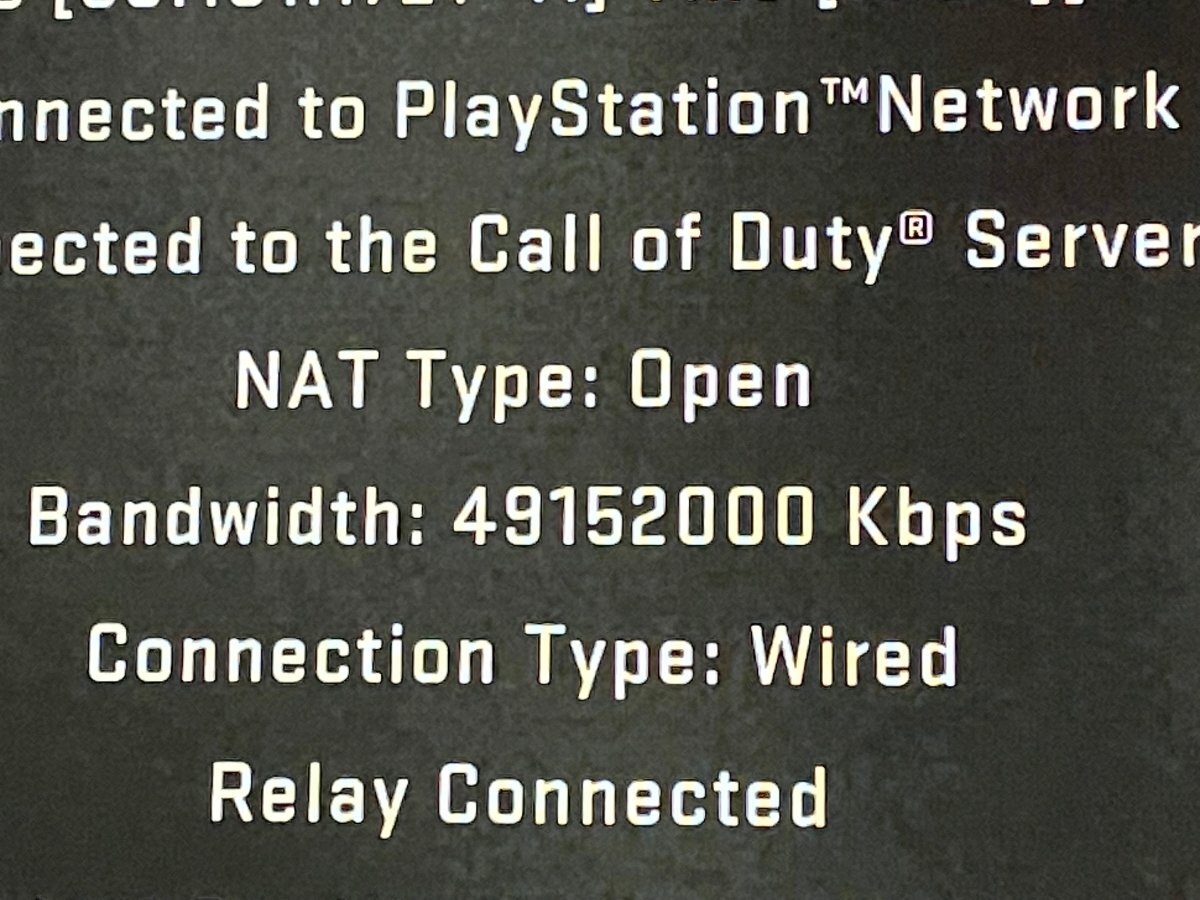
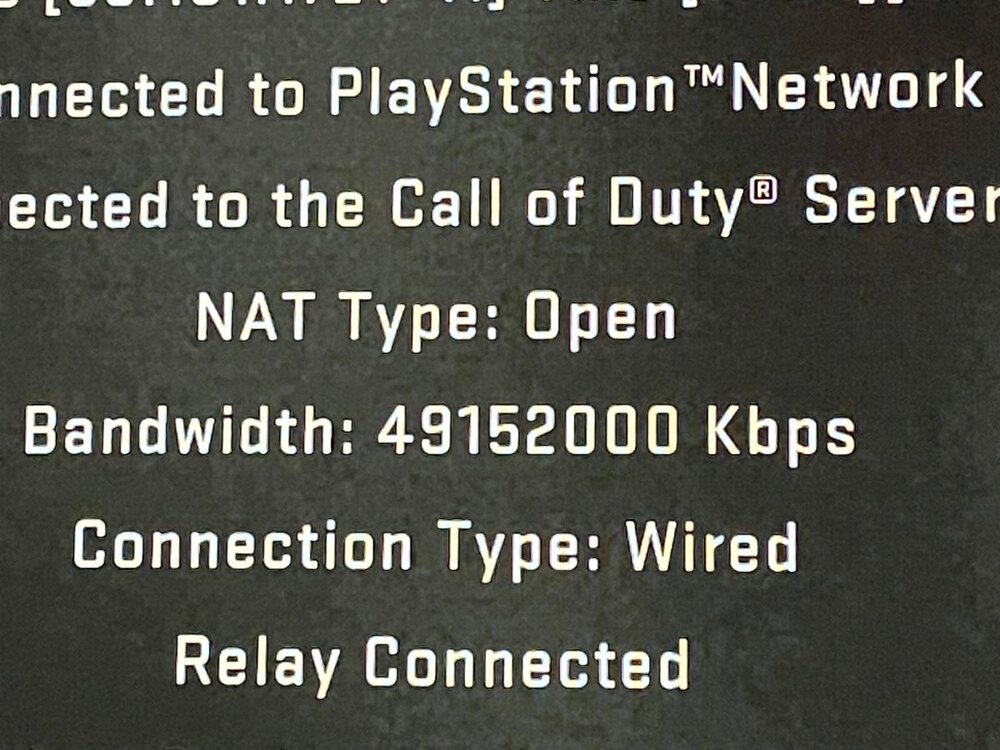
It has to be. I don't have 4.9152 Gbps or 49152000 Kbps / 49.152 Gbps . I guess some accounts are working correctly, while others are forever bugged. As it's only mentioned last year on reddit https://old.reddit.com/r/CODWarzone/comments/od35ge/help_inconsistent_bandwidth/
-
I'm on the update. Sadly, It still doesn't work bringing the Kbps In-Game to 1500 Kbps on R2, for me.
-
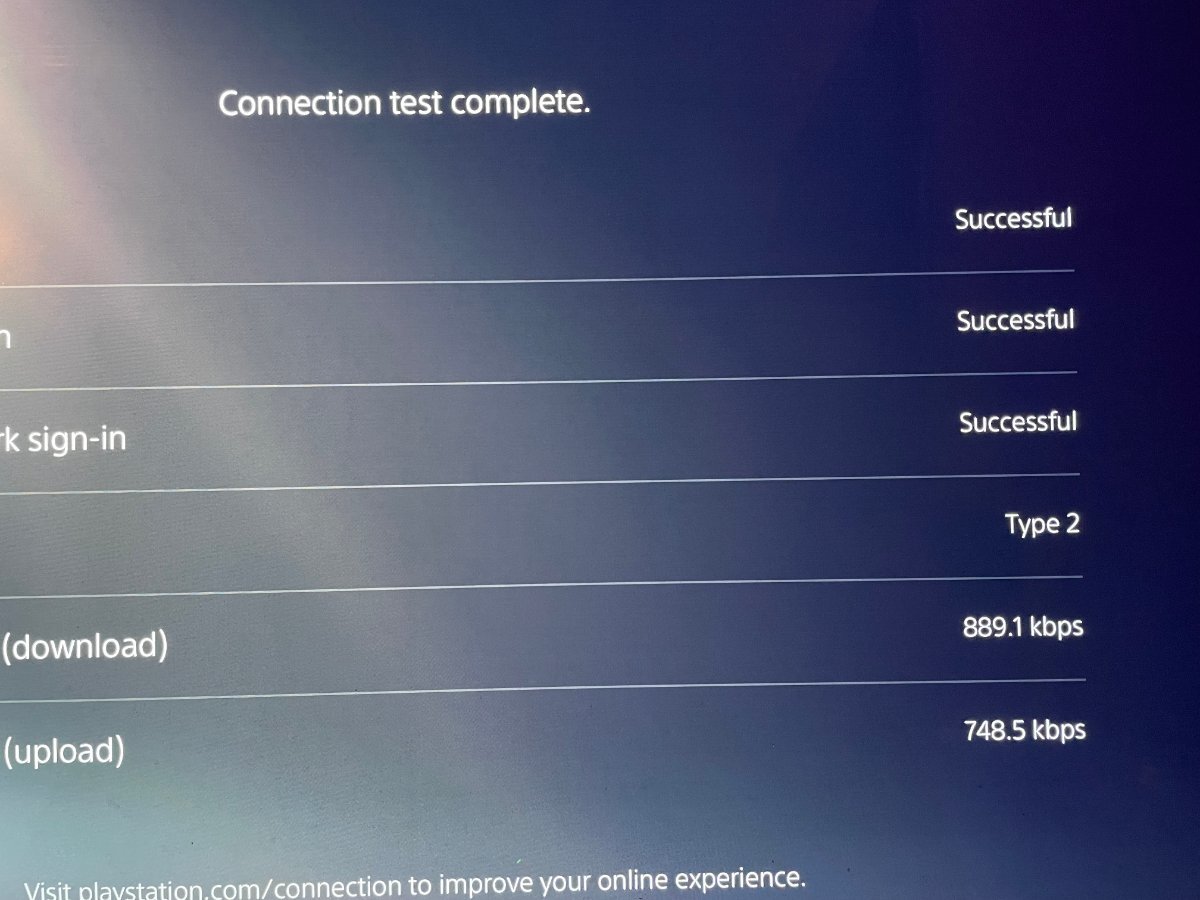
I tried and set PC bandwidth and ran speedtest Did the same on PS5 Loaded up COD on PS5 Don't know what's up with it not reading a lower bandwidth in CoD
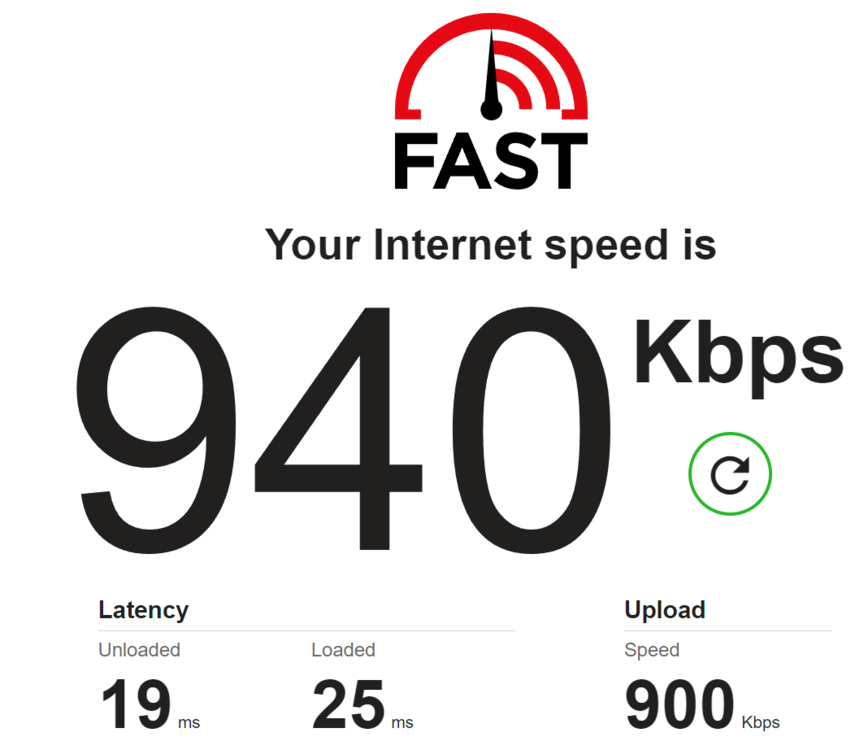
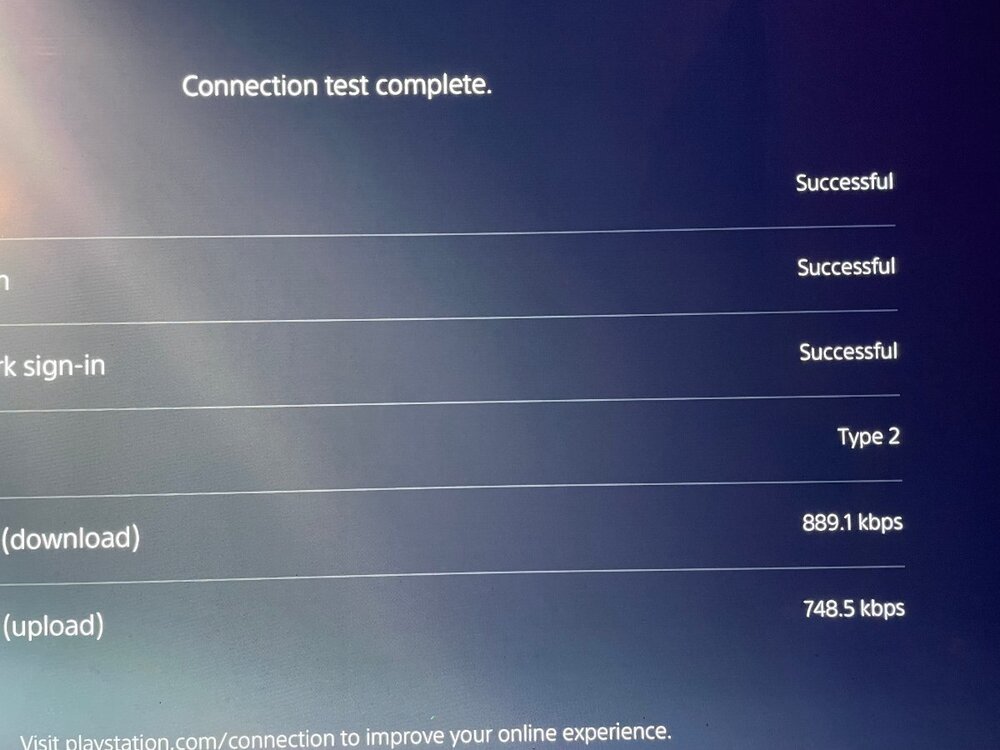
-
I was curious, and wanted to do some testing. It's the same for me as well. Change the QOS to Devices, Change Download/Upload to 1mbps to Device, unchecked "Download Share Excess" / "Upload Share Excess". Set Traffic Prioritization ports to 3074-3080 source to 1-65535 destination / Wireless type = Normal (default) also tried WAN. Also tried with Congestion Control set to both "Always" and "Auto-Enable". Nothing seem to work for me either. In game still of COD still shows 49152000 Kbps.
-
At the very least, 10 years, before upgrading the consoles to do so. WIFI 6 is implemented with current consoles. On average for households, Globally, is below 500mbps. If there was a viewpoint on where they would upgrade to. It would perhaps be 2.5gbps for consoles.
-
Yes, as of lately, he's been doing more PC gaming. I mean, he does have a nice 3080 card so why not right? Yes, you're correct. ST2084 basically converts SDR to HDR, or "ALWAYS ON HDR" in a sense on the OLED/LG. It does make the game more vibrant in colors, although, it's not true HDR it's still make the colors pop more due to giving more luminescence. I've used it a few times in trying to compare input lag with PS5 settings of HDR OFF, VRR OFF, and ALLM off. As I would also test using Motion Pro and TruMotion. As, if I'm not mistaken, PS5 can't use TruMotion without disabling ALLM from a previous PS5 Firmware update. If you enjoy the effect and vibrant colors of st2084. Keep it enabled. As some will argue of the accuracy of the colors, being to oversaturated for HDR etc etc. I don't believe there's any drawbacks other than MAYBE still images like logos, HUDS, minimaps etc being a problem if the screen doesn't change often. But again, it's a maybe.
-
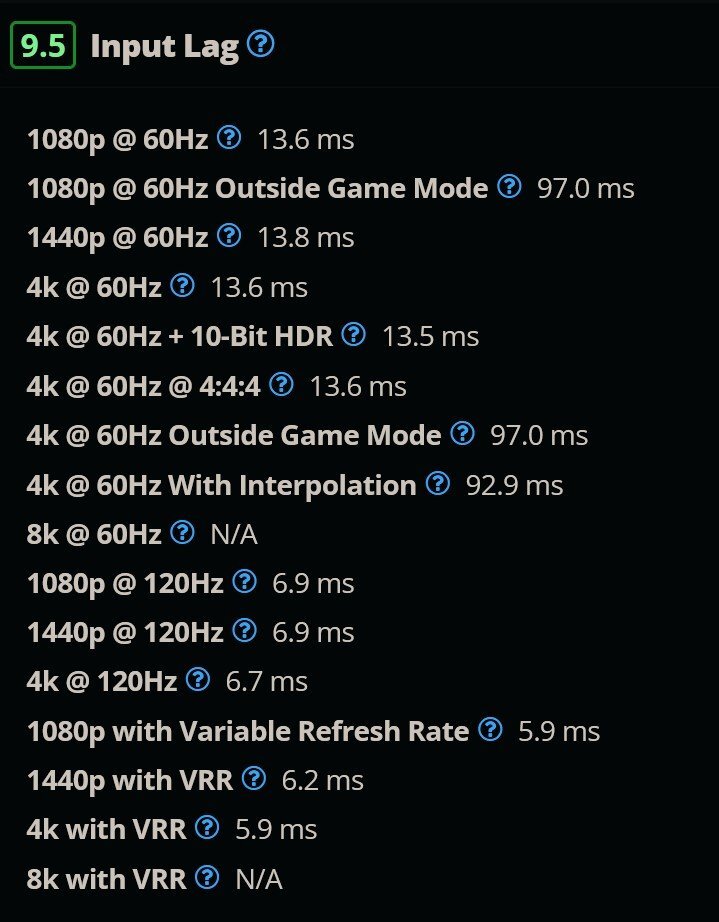
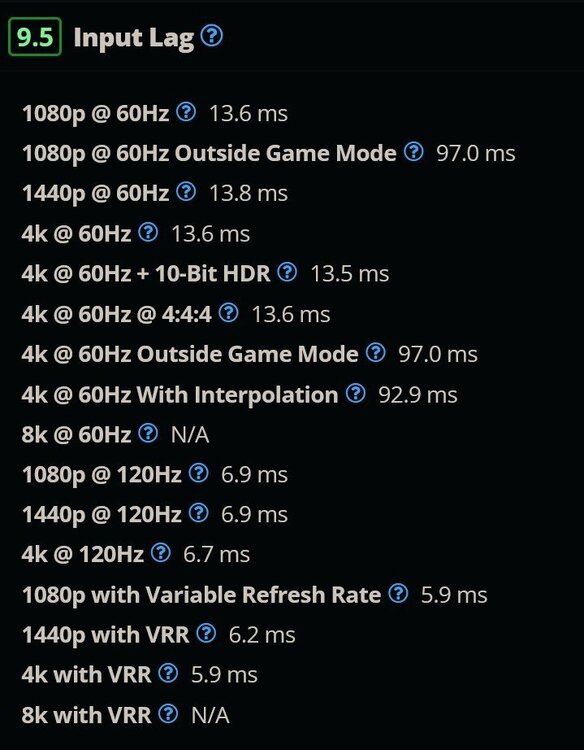
As far as TV settings, one of personal favorite channels is Plasma TV for Gaming. He uses the LG C1 and has extensively and continues to experiment and provide results with his findings regarding HDR, input lag, and visual clarity/accuracy in calibration. Although, I don't have a LG C1 but a LG CX. his information still holds up and especially in your case since you're using the same Tv. Well, I think he also recently got the C2. But still the "C" Series all use somewhat the same panels with a few tweaks here and there. Also, I sometimes utilize BFI for smoothing out motion blur similar to ULMB, LightBoost, DyAc, ELMB, etc. This is just LG's name for it. It does add some input lag depending on the settings used but it does smooth out the motion I've noticed when playing FPS games. But at the cost of brightness as well input lag of course. I would constantly switch between HIGH or OFF depending on what I'm playing either competitively or casually. It's something to get used to but it's no Motion Interpolation where input lag is abysmal. I ONLY use Motion Interpolation for single player games like Elden Ring and what seems to be a MUST for Gotham Knights 30 FPS ONLY. As a placebo effect that I do is sometimes I would lower the resolution of the TV to 720p/1080p as it's not much but input lag seems to be a .1-.2ms input lag difference. Where I would also disable HDR/VRR as well, while using Game Mode. But again, this is all placebo. You can experiment and see what results you may get. My reasoning for giving this a try is because of the results Rtings acquired in their findings and there is a difference in input lag between resolutions on LG CX as shown below. Just some ideas to try. I will add that, using HDR/VRR adds a bit more visual clarity due to color palette and VRR sometimes add just a hair bit of clarity but it's more of a eye of beholder kind of thing. Another thing I would like to add is regarding HDR on consoles. HDR or HD texture packs similar to playing LOW GRAPHIC Settings on PC sometimes can help in certain situations. Again, more placebo but some says it helps in their situations. It's all personal preference, regarding this. Below is youtube of PLasma and input lag input mentioned earlier. PLASMA TV FOR GAMING Youtube Channel https://www.youtube.com/channel/UCXm5LGcWpoq8mNykcGvvISw
-
It all depends on what signal you're using for your gaming setup Monitor or TV. Some TV does have "some" added input delay with HDR. For example, few years ago. John did a video showcasing the input delay with HDR on and OFF with his current setup at that time with his monitor. There is some input delay but it's not major, but if you want some competitive edge or you're just nit-picky about your input delay then then you turn it off but it's still minor. Another user on YouTube showed that HDCP does add a little bit of input delay but, same as John, it's minor. Some TVs/Monitors does have their own input delay. Currently, as far as TV's OLEDs seem to give the least amount delay also utilizing HDMI 2.1 for next-gen, helps with this somewhat. As @N3CR0 pointed out, trying to manipulate your connection or find some way mitigate SBMM is going to yield undesirable results and time trying to find such results. It's a 'feature' of the game that has been implemented. You can visit rtings.com to check out various TVs and Monitors input delay if you don't have a monitor device on hand to do it manually for your display to get a general idea of what input lag you may have. Here's a few sources to assist you. Monitor input lag https://www.rtings.com/monitor/tests/inputs/input-lag Television input lag https://www.rtings.com/tv/tests/inputs/input-lag John's HDR input lag test https://www.youtube.com/watch?v=k6xUNecc5Vs HDCP input lag test https://www.youtube.com/watch?v=wTQDhyCXFEs&t=53s
-
Welcome R2 owners! We want your feedback!
TrayDay replied to Netduma Alex's topic in Netduma R2 Support
I believe it's just my windows 10 on my desktop, actually. Because I've been having complications with the W10 build. Then again, it could also be the motherboard since it have all the bells and whistle features maximus viii hero. But, good news is, used both phone and laptop and made changes to QOS. All worked immediately when making the changes. So everything is working as intended. -
Welcome R2 owners! We want your feedback!
TrayDay replied to Netduma Alex's topic in Netduma R2 Support
I'm not sure if it's known or it could possibly be due to me using the ISP gateway. But, the congestion controls or QOS, is not working as intended. The only way it applies my settings on QOS. Rebooting the R2. Once I reboot the R2, it works with the settings I set in the CC but have to reboot if I want to have my changed settings to work again if changed. Haven't had any problems with the Adblocker. Only when I first enabled and visited dailymail.co.uk domain. Ads was still detected but after scrolling a bit and refreshing the page. The ads were eliminated. Just been working efficiently since. Geo Filter, Heatmap, all is working great. Thank you Netduma for such a fine product. I'm loving it! -
Welcome R2 owners! We want your feedback!
TrayDay replied to Netduma Alex's topic in Netduma R2 Support
Awesome! Glad to know it was just a bug. Yes, very much enjoying the R2! -
Welcome R2 owners! We want your feedback!
TrayDay replied to Netduma Alex's topic in Netduma R2 Support
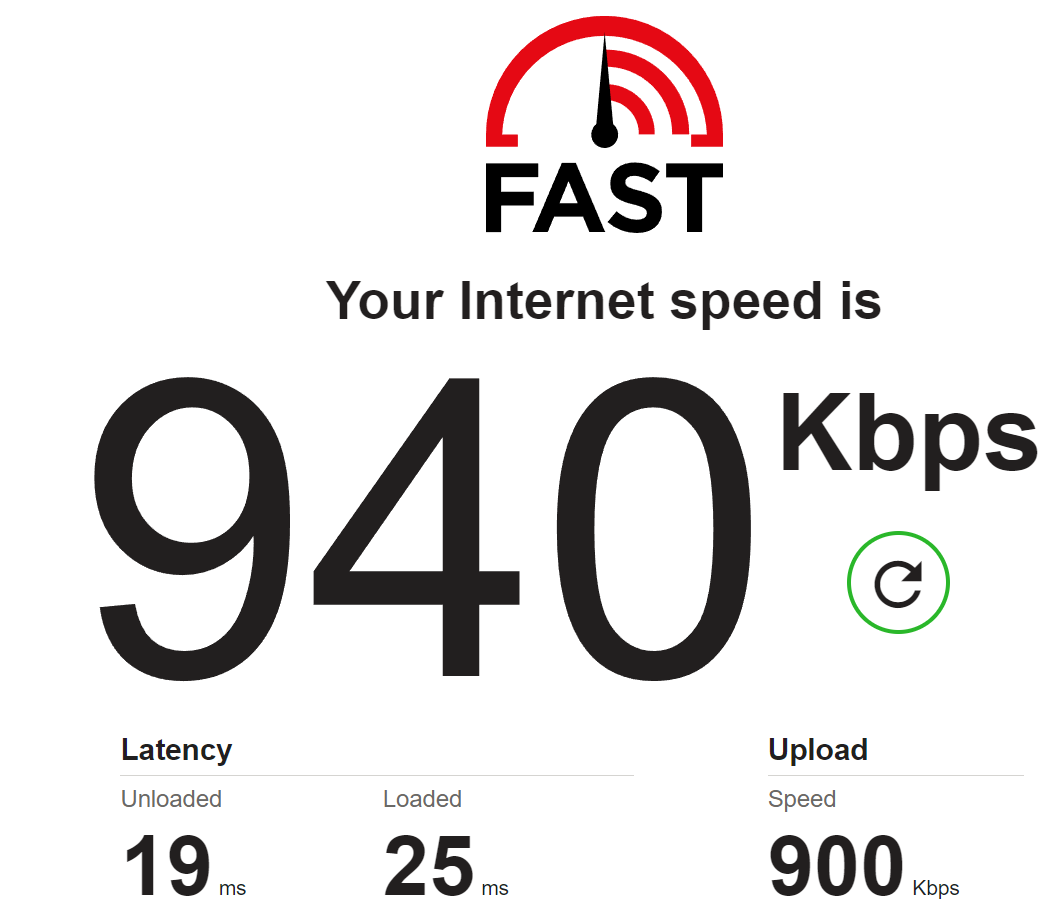
I'm still getting set up. I had a few hiccups with not being able to do my usual "dumb switch bypass method" on mitigating the use of my ISP provided gateway. Tried both using the DHCP with MAC of my gateway and also trying Static IP given from ISP. Both failed' to obtain IP. So, I opted in just using the "IP Passthrough" from my ISP Gateway firewall. Possibly just my ISP being the usual pain in these situations. But, The results, so far so good. I've been able to pull a my bandwidth package Download 1000 and Upload 800-950+ on the few speeds tests I've ran so far. Now going to get into giving the router a good go. Update later. But loving how fluid everything is from the GUI and overall performance. -
Welcome R2 owners! We want your feedback!
TrayDay replied to Netduma Alex's topic in Netduma R2 Support
I believe you have the same connection as I do. It's always hit or miss with the gateway from ATT. As I'm using an alternative method BUT you can use this method to make it simple below. Simply log into your ATT gateway router and go to the "firewall" settings and then click "IP Passthrough" pretty much copy everything from the picture below and when you get to "Passthrough Fixed Mac Address" choose the mac address under the "Device List" of the R2 router that should be located at the bottom of the router. Once you've choosen the R2 router Mac Address. Click the save. Then restart the ATT gateway first then the R2 second.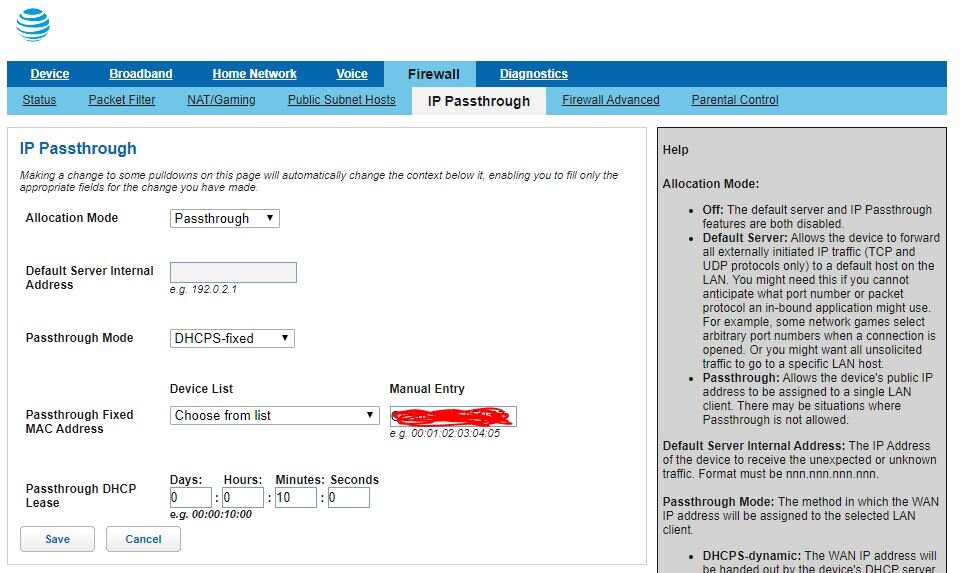

.png)