

.gif.09c9795f713c10c309d68122b089d26c.gif)
DARKNESS
-
Posts
2446 -
Joined
-
Days Won
29
Everything posted by DARKNESS
-
.thumb.gif.4a8d59f41391d88092e62269cfe1e7ec.gif)
XR1000 Unable To Access Web Portal
DARKNESS replied to fletcherjames1's topic in NETGEAR Nighthawk Support (XR range)
@fletcherjames1What your setup like exactly? -
@jmoorect1979Rocket league will most likely not be added back because the data is encrypted so it'll just be causing false DPI in addition if your having packet loss that is not related to the DPI but your networks QOS you have to adjust it by saturating your network and seeing if there are any ping spikes/loss if packets.
-
@BrunoYou can ignore ping optimizer as it not 100% accurate if you want to configure it professionally I'd use ping plotter but alternatively you can use https://www.waveform.com/tools/bufferbloat or lastly use your own system to configure the best setting by using command prompts and constantly ping a site will saturating the network.
-
@UK_Wildcats_FansShould be 168 hours so turn that into minutes and it 10080
-
@SaminQuality of service (QoS) is the use of mechanisms or technologies that work on a network to control traffic and ensure the performance of critical applications with limited network capacity. It enables organizations to adjust their overall network traffic by prioritizing specific high-performance applications. If your asking whether the router will help them on there network no since they don't have the router however if your referring to the geofilter capabilities and they live around then yes it will help everyone since they'll have lower ping servers.
-
@SaminRealistically speaking your primary feature should be QOS if you don't have that then that is certainly a problem as when other users go in to the network and saturate it will cause ping spikes which affect VOIP/Gaming. My best recommendation is getting a used XR500 as there extremely common and can get them for cheap and there reliable and have game focused features. If you go with another router like asus then I would go for the higher end models just for future proofing but other than that there be no further purpose to kill your budget as software is king. To note if you want to get the latest gaming features and further down the line then you can just go with R3 though realistically right now it on beta so if you want to wait 3-6 months for it be stable that is up to you...
-
@PharmDawggWell web based applications aren't optimized for the device your using there just optimized to work with most devices and it never going to be perfect that why native apps are typically better as they take advantage of the hardware though this is always dependent on the company since some just make potato apps.
-
@DeeKay_FPSI would capture a log and attach it on the forum as there could be a possibility that it a drivers issue with your device. Do so when connecting and you should be able to see a response on the logs. To add did you try renewing dhcp on the PC?
-
What type of app are you using? If your using the ISP one they typically suck just a fun a fact 😂
-
XR1000 Unable To Access Web Portal
DARKNESS replied to fletcherjames1's topic in NETGEAR Nighthawk Support (XR range)
@Netduma FraserCheck the XR forum I re-posted on original topic about another issue I found should be two comments just putting it out there before the patch comes etc -
XR1000 Unable To Access Web Portal
DARKNESS replied to fletcherjames1's topic in NETGEAR Nighthawk Support (XR range)
@fletcherjames1Go to Settings>LAN Setup>IP Address>Apply -
XR1000 Unable To Access Web Portal
DARKNESS replied to fletcherjames1's topic in NETGEAR Nighthawk Support (XR range)
@fletcherjames1It could be the fact that there a conflict with the IP with the modem so in this case you'll need to change the IP of the router rather than it having 192.168.1.1 change it to 1.1.1.1 or something preferable... -
XR1000 ANTICIPATED FIXES & ADDITIONS
DARKNESS replied to DARKNESS's topic in NETGEAR Nighthawk Support (XR range)
@Netduma FraserLastly it seems that games console or the DPI is not detecting the console at all. I already request the DPI to be updated a long time ago and am still waiting...though I believe I figured out the cause for this it could be the fact that it getting confused as it using the same IP address for certain devices as shown on the clip and the cause is device manager. I checked the IP's and there misclassified as there not using that exact IP address that it shows on device manager so am certain device manager is conflicting with the DPI to an extent. Just to clarify if you reboot and it shows the correct IP's then the DPI works as it should though clearly this is a bug. 0301.mov log-1709338760205.txt -
XR1000 ANTICIPATED FIXES & ADDITIONS
DARKNESS replied to DARKNESS's topic in NETGEAR Nighthawk Support (XR range)
@Netduma FraserAnother thing I'd like to add is that the PlayStation is miscategorized as a games console and as for reserving an IP the devices named under device manager won't appear named when looking at the list of devices on LAN Setup some do but most do not as shown on image below.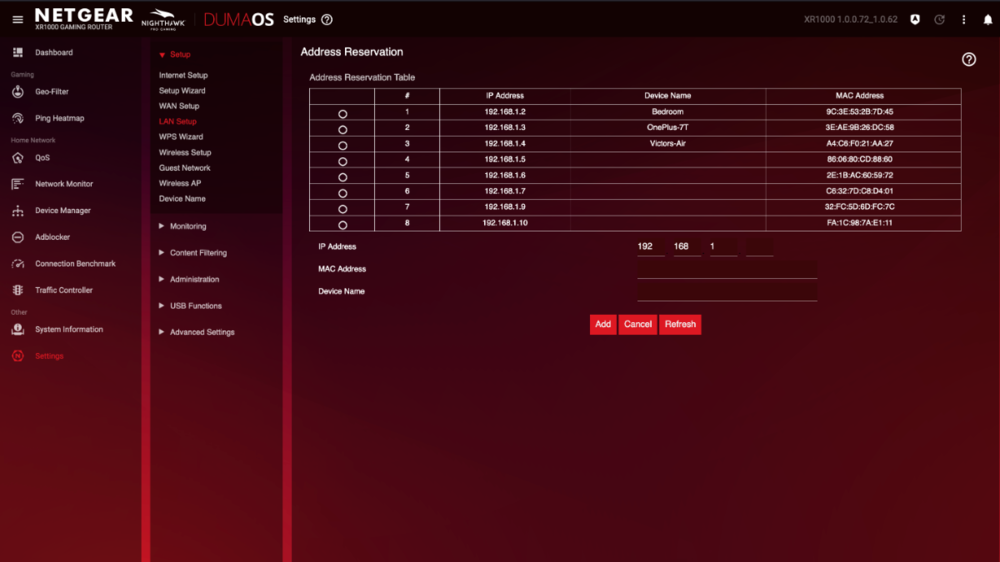
-
XR1000 Unable To Access Web Portal
DARKNESS replied to fletcherjames1's topic in NETGEAR Nighthawk Support (XR range)
Perform a factory reset by doing either of the options below: Locate the Reset button on the back of your router. With the router powered on, use the pointed end of a paperclip or similar object to press and hold the Reset button for 30 seconds. Wait for the router to fully reset and power back on. Go to Settings>Administration>Backup Settings>Erase -
GEOFILTER, R3 connecting to outside servers
DARKNESS replied to Gskillz's topic in Netduma R3 Support
@ChrisG82You can’t necessarily block the game from joining the sever the only thing you can do is block the server once you join. Geo- Latency is a must be disabled feature unless your using Steady Ping etc. -
@WESTC0ASTYeah I had the same issue trying to figure it out it took me two weeks to figure it out I was so mad and it because of dumb procedures you have to follow in order for it to function. Also I did forget to mention TFTP doesn’t work on the XR1000 or if it does there just a low chance of it working etc
-
Have you tried using the another router as an AP? Pretty sure you can use the XR700 for Wi-Fi
-
@PharmDawggPersonally I don't use it often but when I do I use it to just change the routing and it just for gaming(console) specifically as there no need for it outside of that since you can just use native apps which are faster when it comes to speeds while being anonymous. Not only that if your playing a specific game and you have sore losers who ddos the server/you your basically forced to use one as they some times get your IP.
-
@WESTC0ASTGo with .250 as max
-
@WESTC0ASTHave you tried making an IP reservation for each of the devices that are having issues?
-
@uunf8z3dTry enabling Spanning Tree protocol could be a loop issue going on from the switches
-
@WESTC0AST I would go with nmrpflash if you want to refresh the whole OS to add the app won't work because there's a bug at the moment were users are unable to login. What are you specifically having no connection to all devices or is it specific devices?
-
It most likely that there was some sort of loop within the network which is rare but it seems that it is in your case an issue am not sure how NG does the STP but it can be just the fact it enabled by default rather than it being disabled.
-
Did you reboot the modem box? It can just be the fact that it hasn't received the WAN IP/modem box hasn't refreshed it therefore needs a reboot. If that doesn't work update to the latest version https://drive.google.com/file/d/1LVrVjhOSJCl2eTj0wh8_Erw9ti986vzD/view and check if that works. After updating Go to Settings>Troubleshooting>Factory Reset
.png)

