Bert
-
Posts
1048 -
Joined
-
Days Won
15
Everything posted by Bert
-
You need a rig that can produce 540 FPS to be able to take advantage of that, even with a 4090 or 7900XTX you will not see those framerates. Also the difference is getting smaller every time you up the Hz rating: 60 Hz = 16,6ms between frames 120 Hz = 8,3ms between frames 240 Hz = 4,2ms between frames 360 Hz = 2,7ms between frames 540 Hz = 1,9ms between frames For the amount of manipulation happening from the game, ie active latency balancing and skill based matchmaking I would not invest in anything over average hardware as it's simply pointless. Even stuff like routers. Average home net has 1ms between device and router and for a fiber connection you have 1ms between device and ISP node. Do you really think QoS and all this BS matters if the game simply matches your latency in lobby to the other players? You can't even tell if you are playing on a 10ms, 30 ms or 50ms server in game due to the lag compensation systems.
-
NEW XR500 BETA FIRMWARE: 3.3.535
Bert replied to Netduma Lew's topic in NETGEAR Nighthawk Support (XR range)
I tried updating from .134 and that seems to do the trick. I was at a DumaOS 3 beta previously. going intermediate firmware -> RC10 -> RC14 gave issues. Maybe updating needs to be done from .134 and not from a previous beta. -
NEW XR500 BETA FIRMWARE: 3.3.535
Bert replied to Netduma Lew's topic in NETGEAR Nighthawk Support (XR range)
Sorry Fraser not going to try again. It doesn't even let me play a game, I get disconnected all the time. The pingplotter result is simply visualizing what happens. Both are also on the same interval so .134 should be similar if interval was the issue. -
NEW XR500 BETA FIRMWARE: 3.3.535
Bert replied to Netduma Lew's topic in NETGEAR Nighthawk Support (XR range)
This RC14 firmware performs really bad. Base latency is lower over the 134 version but I get a huge amount of latency variation playing on PC. This and it randomly disconnects me, I can barely finish 1 DMZ or WZ game without being thrown out of the game. Flashed back 134 and everything is good again. This is with QoS disabled. See screenshot, after the last packetloss I am switching back to .134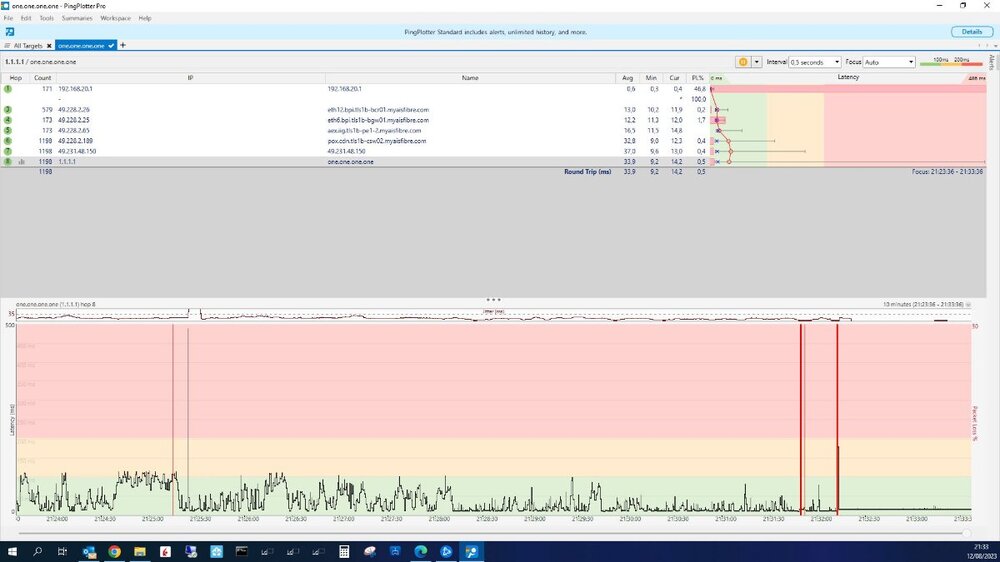
-
Traffic Prioritization Settings: Modern Warefare (BO4)
Bert replied to East's topic in Call of Duty Support
RSS queues depends on the CPU you are using. Ideally you should keep the maximum amount of queues equal to the amount of physical cores you have available. For modern day PC's it's a non issue though as a single core would be able to handle the datastream for a 1Gbit NIC. -
If we are talking milliseconds I doubt you are going to see much of a difference. Consoles are not optimized for very low latency networking. There is lots of people here tinkering with QoS / router settings thinking that it will make a difference while in reality this is all per hop basis. They forget that their own switches add latency and your packets travel to the server over 10 hops which don't care about your QoS, and have a variable load depending on the time of day. Plus processing power of DSL and Cable modems generally poses a bigger bottleneck over the current gen dual core and quad core routers. On my PS4's I typically can't tell much of a difference between the XR routers. Also with gaming consoles you are limited in other area's such as a lower screen refresh rate and input lag from your controllers. That makes all this a moot point. As for the last bit. People just want a "turn-key" solution. And generally the market this caters for is on a limited butget, you can see that on sales figures for the previous flagship, the XR700. Super advanced but the $500 price put people off. If power and speed is required it's much simpler to build your own router on a x86-64 box than to use a consumer grade system. The more tech savy crowd could easily manage geo blocking themselves with the right tools, just a matter of scanning the IPs / domains the games connect to and blocking those in the firewall. What makes it time consuming is fishing out the server IP's etc, so if you buy a DumaOS device this is all taken care of. Well that is the quick version, in some games it will break your matchmaking so geofiltering does not always work well. I would say 98% of the DumaOS users are CoD players, where it actually works ok.
-
It has more to do with use cases than actual speed IMHO. Between my R1, XR500 and XR700 I don't feel that the OS scales well with CPU's and RAM, ie the XR700 does not respond that much faster over the others. As for WAN speed at 400mbit none of these are breaking a sweat. It's like a windows PC, if you have a 10 year old i7 and put it next to a current gen i7 you barely feel the difference if you're just surfing the web. XR500 is probably the best all round router. Simply because the code/firmware has recieved the most updates. It's actually a R7800 with different software. R2 has most features but seems to be lacking a bit in it's wifi strength. Currently not offering WAN side VLAN tagging which can be a nuissance for fiber users that want to do away with their ISP hub. If you need AX wifi then the XR1000 fits the bill. Personally would not upgrade from AC Wave 2 over it unless you specifically have clients that can use this. Otherwise Wifi 6E seems to be more interesting. XR700 provides the lowest amount of latency possible provided you have the other equipment, PC's with 10Gbit networking cards and a SFP+ connection to the router. That's on paper though since in games you won't notice this. The CPU used is one that is normally found in lower end NAS systems. That's also the key feature to this router, it's extra features are more suited to media streaming than gaming. You can connect a dual port NAS to the link aggregation ports and feed your wired + wifi clients or use it as a NAS by feeding it with USB drives and connecting over SFP+. If you just use this as a standalone router it has no advantages over the XR500 since it has the same wifi specs, outside of AD wifi which no clients use, and the more stable and extra features in XR500 3.0 make it more attractive. Misunderstood product, people think you can run 10Gbit WAN but the CPU is too weak to route this (even with professional equipment with X86-64 CPU's routing + firewall 10Gbit is a challenge never mind running advanced QoS) Key point however is that these are all routers meant to be used as a 'all in one device' in a home setting with a mix of maybe 10-20 wired and wifi clients. And in that area they all have their niche. What always confuses me is the different feature sets. Like my XR700 has VPN but no adblocker, I believe my XR500 does have both. Some better consistency in this would help a lot tbh. Saying that, on my 600/600 fiber connection I was still using the R1 + DumaOS 3 because I don't use wifi on that particular connection and QoS is also not needed. It leaves a nice little footprint and can be put under your desk or tucked away in other places. Just it doesn't work well with PPPoE so you always need a ISP router in front of it, something that wasn't necessary with the XR500.
-
Actually wondering why you switched a XR700 for a XR1000. The XR700 wifi is quite solid and in terms of raw power and connectivity is actually ahead of the XR1000. XR1000 is more the follow up to the XR500 rather than the XR700.
-
Traffic Prioritization Settings: Modern Warefare (BO4)
Bert replied to East's topic in Call of Duty Support
The one that is active is the only one you need -
Found mislocated servers? Let us know here!
Bert replied to Netduma Alex's topic in Call of Duty Support
If I turn off crossplay in WZ you can sometimes find a match but usually the lobby is only half full and it takes ages. There is another factor to it, the other console players that have crossplay turned on will connect to the crossplay lobbies and not you. The game pushes crossplay really hard, like when you search it gives you about 3 seconds and then it pops a notification that you should turn on crossplay. -
Found mislocated servers? Let us know here!
Bert replied to Netduma Alex's topic in Call of Duty Support
That is your issue probably. Most WZ players in the area is on PC. I turn crossplay on for WZ but off for MP. -
Found mislocated servers? Let us know here!
Bert replied to Netduma Alex's topic in Call of Duty Support
Yes. I stay in Thailand and have about the same radius as you, strict mode on and PA 63. But since base ping for you is lower in Malaysia you could do with 50 I would think. -
Found mislocated servers? Let us know here!
Bert replied to Netduma Alex's topic in Call of Duty Support
They changed their hosting in Singapore from AWS to Choopa. Best setting you can use at the moment is about the radius you set now and a ping assist of about 50. That ensures you never get into Jap or Aus servers. -
One more thing with delete all offline devices, if you do this it deletes them just fine, but it won't update the bandwidth distribution graph. You have to do this yourself.
-
It works really well, I tried it on Infinite Warfare and detected the ports no problem. Only thing I would add, if that is even possible that it deletes the QoS rule when you press stop. But that is not a big deal Delete Offline works like a charm. The Allow and Deny lists I am not a 100% sure about how that works but I haven't spend much time on it.
-
Great work! I'll give it a try
-
Traffic Prioritization Settings: Modern Warefare (BO4)
Bert replied to East's topic in Call of Duty Support
Which part do you want me to clarify? Because it's all there -
Traffic Prioritization Settings: Modern Warefare (BO4)
Bert replied to East's topic in Call of Duty Support
It's not the same. Bridge mode passes through your ISP router and that's why you need to enter your PPPoE details. A bridge essentially bypasses the routing completely. DMZ is used when you can't bridge, so you set the XR500 in DMZ and that automaticly forwards all ports to the XR500. In this case you don't need PPPoE details as this is handled by your ISP router. -
Traffic Prioritization Settings: Modern Warefare (BO4)
Bert replied to East's topic in Call of Duty Support
A lot of people fool around with their connection on purpose. Trying to throttle bandwith, saturate the connection on purpose or other gimmicks. Could be that he's doing one of those, or just plays on shitty wifi. -
Traffic Prioritization Settings: Modern Warefare (BO4)
Bert replied to East's topic in Call of Duty Support
Could be that he's throttling his connection. There is some form of latency balancing in the game. When I see Chinese/Japanese names or Arab names in the lobby I am almost guaranteed to have a more laggy game then usual. -
Traffic Prioritization Settings: Modern Warefare (BO4)
Bert replied to East's topic in Call of Duty Support
You don't need to use that. You can set bridging mode under windows as well. Just select 2 connections and add to bridge. But I have found that the packets bypass the system, so I can't look at them with wireshark or use that tool. That's why I use Internet Connection Sharing in windows, that way it does work. -
Traffic Prioritization Settings: Modern Warefare (BO4)
Bert replied to East's topic in Call of Duty Support
If anything, if you're duplicating packets I would think that this is only necessary on the upload side. -
Traffic Prioritization Settings: Modern Warefare (BO4)
Bert replied to East's topic in Call of Duty Support
No problem here, I did just get some kind of update though. -
Traffic Prioritization Settings: Modern Warefare (BO4)
Bert replied to East's topic in Call of Duty Support
It's quite easy actually. Set your PC as games console in DumaOS and the geofilter just works as it should. That is if you use the internet sharing feature. If you use bridge mode the XR500 will see the PS4 as if it's connected to the router. But I had issues to get that software to work with bridge mode and also wireshark didn't work right. I believe that it is because I have a wrong NPCAP driver but I have never tried to solve it. So: 1. Use a second network card in your PC, or use wifi as hotspot, or use wifi to connect to your router. I just bought a 1Gbit USB network card to experiment with this for 10 bucks. 2. Go in windows, right click your connection that you have connected to the router and enable sharing, with the other connection set up. Under advanced you can also add ports to forward 3. Set up your PS4 connection as you normally would. 4. In DumaOS, forward the CoD ports to the PC andon the PC forward them to the PS4. I typically just leave it on Moderate NAT though. 5. Run that software and what I did was set a filter so it only affects UDP traffic coming from my PS4 by entering the MAC adress of my PS4 6. In my case I need different traffic prioritization rules, I use UDP 60000:65536 - 30000:45000 because this setup changes the source port somehow. -
Traffic Prioritization Settings: Modern Warefare (BO4)
Bert replied to East's topic in Call of Duty Support
Yeah I have seen that, it's probably anticheat measure. I have a copy of BO3 multiplayer edition on my PC and it crashes as well when you launch it. Because it can potentially be used for lagswitching.
.png)