


Krush
-
Posts
5610 -
Joined
-
Last visited
-
Days Won
64
Everything posted by Krush
-
Hi! Usually, a limitation to 100Mbps is linked to a problem with the RJ45 cable. (if you are wired) Have you tried with another cable or checked if it was properly inserted?
-
Salut ! Tu as laissé ping assist, tu dois le mettre sur 0;0 pour que les serveurs soient filtrés sur la zone 😉
-
https://pt.wikipedia.org/wiki/Rede_privada_virtual😉
-
The hardest part is running the cables through the existing ducts. But an electrician will do it without any problem. This is without a doubt the best solution if you want to avoid Wifi!
-
Just to be sure... You understand that reducing your bandwidth to 50% is already huge. The bandwidth for online games is insignificant. (Smartboost prioritizes game packets) Reducing it below that will prevent you from having the necessary speeds for your other devices....
-
This has been asked, but between you and me what is the point for you in reducing your bandwidth below 50%?
-
You can use this site. Just search for your game! https://portforward.com/
-
Hi ! yes a big security problem! In this way your PC is totally open and accessible from the outside by malicious people.
-

XR500 can't login to interface
Krush replied to khelgor's topic in NETGEAR Nighthawk Support (XR range)
Salut ! Ne touches à rien sur la Freebox dans un premier temps ! Un fois la configuration du XR500 terminée, il te suffit d'aller voir sur ton PC quelle passerelle utilisée pour accèder à l'interface web dumaOS via le statut de ta carte réseau. (Ton PC doit être connecté soit en wifi soit en ethernet au XR500) Soit 192.168.1.1, soit 10.0.0.1. (via le naviguateur) Ensuite : Pour DMZ le XR500 via ta Freebox c'est simple : (exemple avec un R3) Enregistrement 2024-09-29 034511.mp4 -
Hi! You also have to take into account the time zone the server is on. In ranked players will rather play between 10pm and 2am I think!
-
Ping Optimizer stays at 100% Doesn't test lower %
Krush replied to PUBzZz's topic in Netduma R3 Support
😉 Enregistrement 2024-09-27 143612.mp4 -
I admit that the cable between the mezzanine and the xbox would be too mutch! I have the same problem as you! I may have found a solution while waiting for this to be studied and resolved. I set an IP directly on the XBOX configuration page and it seems to work after several restarts of the xbox in wifi. It recovers WIFI access after 30 seconds maximum. "Auto R3 WIFI setting and broadcasting of the SSID between the 2 frequencies" (The xbox is in energy saving mode) IPv6 LAN/WAN off PS: Restart the R3 after the modifications
-
Hi! I don't have a Series X but I did the test on a Series S. (I think the wifi cards are the same) Try as in the screenshot.
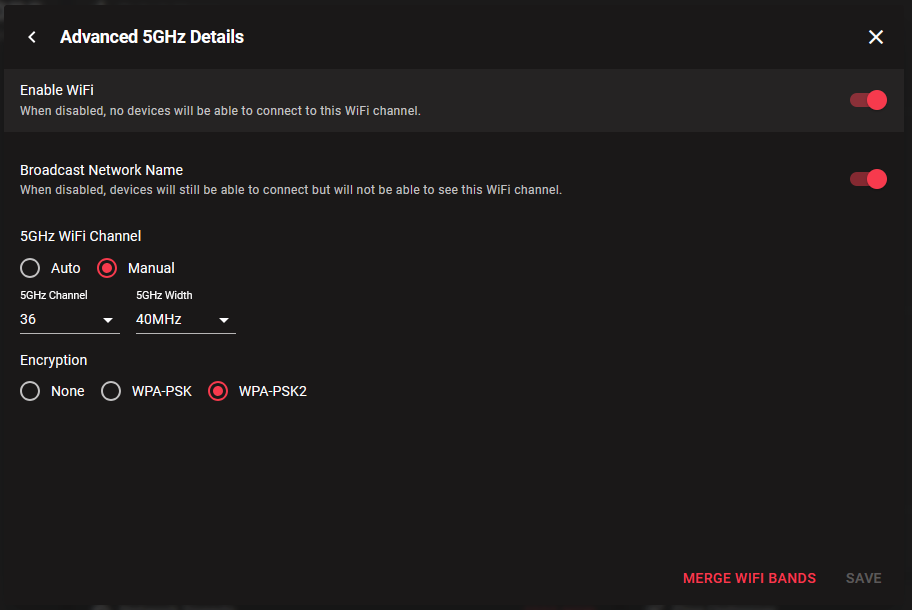
-
Hi! No need to make multiple topics Frazer will put you on the list when he gets back 😉
-
Les FW sont accessibles sur la page de support NETGEAR !
-
Essayes de mettre un FW antérieur pour voir si ça marche !
-
T’es grave ! Fraser est off le mercredi, il reviendra vers toi comme toujours pour t’aider…
-
Netduma R3 : Internet interruption every 5 minutes
Krush replied to Noxduma's topic in Netduma R3 Support
Non car la carte perd le lien au R3, donc c'est forcément le cable ou la carte ! -
Netduma R3 : Internet interruption every 5 minutes
Krush replied to Noxduma's topic in Netduma R3 Support
J'ai peut être une autre solution/idée ... Vérifies que le cable rj45 est bien connecté au R3, sinon va dans les paramétres de la carte et force le 1Gbps ! -
XR500 dropping internet often.
Krush replied to rjaaayyy's topic in NETGEAR Nighthawk Support (XR range)
Hi! You have hidden the ethernet information, it will be hard to help you ´This is not sensitive information... it is local DHCP´ -
Very high speed is made to download games faster! But the bandwidth in online games between server and players remains the same between a 5/1 line and 1000/1000 Mbps. That is to say of the order of a few kilobytes...
-
Salut ! Pourrais-tu supprimer le cache de ton naviguateur et réessayer STP ! Et re-ouvrir la page sur le naviguateur avec http://192.168.1.1 ou 10.0.0.1 ... "De base l'IP pour l'accès à la page web est 192.168.1.1"---- Mais si tu es derrière ton routeur principal, il peut automatiquement te proposer une autre IP d'accès 10.0.0.1 en cas de conflit !
-
Netduma R3 : Internet interruption every 5 minutes
Krush replied to Noxduma's topic in Netduma R3 Support
Salut ! Donc ton PC via son port ethernet pert la connexion au R3 aléatoirement ! As tu essayé de mettre à jour le driver de la carte ou changer le cable RJ45 ? Si ça saute comme ça, c'est souvent lié ! -
Start by disabling Geolatency! It will force servers outside your circle. If your goal is obviously to play on Spanish servers mainly... Some servers are poorly optimized for these games and can give you the feeling of a problem. It is also possible that your ISP suffers from congestion at peak times, generally the speeds are shared between 64 users at the "FTTH" mutualization point. (Unless you have a dedicated FTTO line)
-
Netduma R3 : Internet interruption every 5 minutes
Krush replied to Noxduma's topic in Netduma R3 Support
Salut ! T'as essayé de reserver une IP à ton périphérique ? C'est seulement ton PC qui perd la connexion ou l'ensemble des périphériques derrière le R3 ?

.png)
