


Netduma Fraser
-
Posts
86509 -
Joined
-
Days Won
1867
Everything posted by Netduma Fraser
-

ANNOUNCEMENT: Introducing the Netduma R3
Netduma Fraser replied to Netduma Lew's topic in News & Announcements
Não há jogos que precisem de opções específicas, mas você poderá selecionar o jogo para filtrar/priorizar Yes it will work with PPPoE though the speeds may be limited to around 300Mbps. We think we can improve on this but it won't be in time for the launch. If you use a VPN you'll be limited to whatever can be done through it, theoretically should be the max speed that the encryption protocol can do (we don't have a figure for that at the moment). Without all that and with QoS you should see near gigabit. Yes Wireguard can be used -
Nunca damos fechas ya que siempre está sujeto a cambios. Lo esperaría este año o principios del próximo si pasa nuestras pruebas.
-
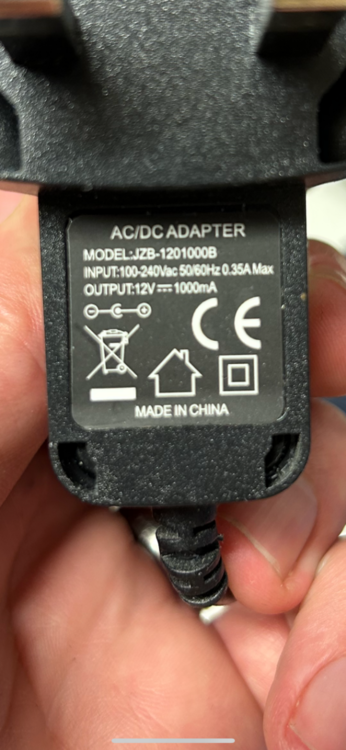
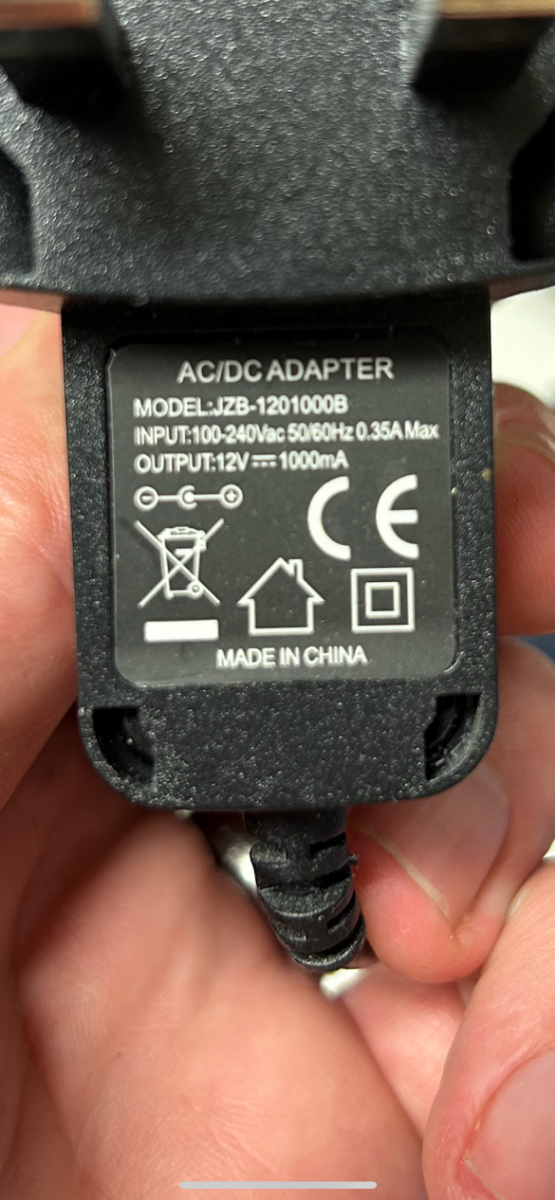
It has more input/output power than the R2 adapter below. I would assume it's fine in that the R2 wouldn't take more power than it needs but I'm not versed in the nuances of electricity so hopefully someone else could comment, otherwise might be best for your peace of mind to get one closer to the spec.
-
netduma r3 Netduma R3
Netduma Fraser replied to HANDSOME KING's topic in Feature Ideas & Improvements for DumaOS
It's an internal reset button on this one as with the R2 The ports are limited to 1Gbps so you wouldn't get 1.6 but you'll get very close to gigabit speeds -
You can sign up here: https://forms.gle/Jg6BnARJKoEPKeU28 Once ready you'll be added to the beta section
-
ANNOUNCEMENT: Introducing the Netduma R3
Netduma Fraser replied to Netduma Lew's topic in News & Announcements
We're NGs software partners, we don't create the routers just the software. I understand it's not what you're hoping for but in terms of our own router hardware it is a big improvement. You don't have to get the R3 but if you wanted to then the above is what you could do while still using the 700 for your SFP requirement. As much as we would like to be able to create huge spec routers it is very expensive to manufacture and for the customer to purchase, we're barely seeing 1Gbps speeds in the UK so it's not something we'd be able to test reliably either. -
Netduma R2 Packet loss and Ping spikes Wired and WiFi
Netduma Fraser replied to morph1kx's topic in Netduma R2 Support
It gives us an indication of whether there is some instability with your line to countries close to you which there doesn't appear to be. If you just put the device you're playing on in the DMZ as a test and then play does it improve? (Remove it after testing) -
Haga clic en la parte de la consola, actualice la página y tome una captura de pantalla, por favor.
-
ANNOUNCEMENT: Introducing the Netduma R3
Netduma Fraser replied to Netduma Lew's topic in News & Announcements
I would say so. That will be the main version for the moment and we'll do some more fixes as well but no ETA In the coming days/weeks before we start shipping. Keep an eye out on our YT channel as we'll post videos there, we've done two already on SmartBoost and a tour -
Netduma R2 Packet loss and Ping spikes Wired and WiFi
Netduma Fraser replied to morph1kx's topic in Netduma R2 Support
What is Ping Heatmap showing your ping to the servers as? Also if you do this test: https://www.meter.net/tools/world-ping-test/ could you provide a screenshot of the results please. If you think your ping differs when the R2 isn't connected, please do another test without it and also provide the results -
COD MWIII GeoFILTER NOT FUNCTIONING ON XR1000v2
Netduma Fraser replied to hammonje's topic in Call of Duty Support
I would suggest connecting direct to your modem to see if the search is starting at that as well. However, if the Geo is setup correctly it wouldn't allow anything outside your radius, could you provide a screenshot of the page please? -
Viene sempre visualizzato senza ping o solo con alcuni giochi?
-
Netduma R2 Packet loss and Ping spikes Wired and WiFi
Netduma Fraser replied to morph1kx's topic in Netduma R2 Support
Where is it you're located approximately? If you use the Geo-Filter without filtering enabled but so you can see servers where are the games putting you? -
Necesita la pestaña de la consola en esa ventana en la parte inferior, por favor
-
XR1000 rapp issues
Netduma Fraser replied to Bussiness Goose's topic in NETGEAR Nighthawk Support (XR range)
Make sure you're not accessing using HTTPS or that the browser isn't forcing HTTPS, if you're using Armor I would suggest disabling that also. Go to the System Information page and then in the Rapp panel menu ≡ change the retries to 5, reboot from the interface, close the interface tab, wait 4 minutes before accessing and see the pages load. Could you provide a screenshot of your QoS page please? -
No there isn't, we could do that but that would be a lot of queries as it'll be everything not blocked, I'll add it to the request list
-
Hybrid VPN stuck on connecting
Netduma Fraser replied to loki's topic in NETGEAR Nighthawk Support (XR range)
Great to hear you got it sorted, thanks for the update! -
ANNOUNCEMENT: Introducing the Netduma R3
Netduma Fraser replied to Netduma Lew's topic in News & Announcements
Netgear have many routers of varying specs and so they can do things like that no problem as they're a big company, for us, we've had the R1, R2 & now the R3 with it being a step up each time. You could do the above or have the 700 upstream. -
Netduma R2 Packet loss and Ping spikes Wired and WiFi
Netduma Fraser replied to morph1kx's topic in Netduma R2 Support
Have you tried the Early Access firmware yet to see if that is more stable for you? -
Hybrid VPN stuck on connecting
Netduma Fraser replied to loki's topic in NETGEAR Nighthawk Support (XR range)
Good advice above, it's quite possible you'll need to use the Advanced Setup for HybridVPN to connect, in which case you would need to get the OpenVPN configuration files from pure and enter them in the config box on HVPN -
ANNOUNCEMENT: Introducing the Netduma R3
Netduma Fraser replied to Netduma Lew's topic in News & Announcements
I'm actually not sure on that one, in theory it should be better than the R2, I'll check with the team and get back to you. -
COD MWIII GeoFILTER NOT FUNCTIONING ON XR1000v2
Netduma Fraser replied to hammonje's topic in Call of Duty Support
Great to hear that, thank you for the update! -
NEW XR700 BETA FIRMWARE: 3.3.363
Netduma Fraser replied to Netduma Lew's topic in NETGEAR Nighthawk Support (XR range)
It's just in relation to the XR700 bug where WiFi is completely gone and unable to be restored -
Netduma R2 Packet loss and Ping spikes Wired and WiFi
Netduma Fraser replied to morph1kx's topic in Netduma R2 Support
If you disable QoS fully from the Congestion Control menu and also disable the Geo-Filter do you still experience it? -
Netduma R2 Packet loss and Ping spikes Wired and WiFi
Netduma Fraser replied to morph1kx's topic in Netduma R2 Support
Is that how you usually have it, the TP upstream of the R2 or another router upstream?

.png)