.gif.09c9795f713c10c309d68122b089d26c.gif)
DARKNESS
-
Posts
2446 -
Joined
-
Days Won
29
Everything posted by DARKNESS
-
@The_Optimizer

-
.thumb.gif.4a8d59f41391d88092e62269cfe1e7ec.gif)
Fixed CPU usage spike issue coming next week.
DARKNESS replied to Netduma Cameron's topic in News & Announcements
@Netduma CameronSo as you work on the CPU section is there particular reason why CPU3 is mostly IDLE? -
@iOrcusDid you check test bypass was disabled and set to always on cc also you might need to double check as it doesn't save on incognito most of the time you basically have to keep reapplying till it applied something am sure there trying to solve at the moment.
-
@Kevomeister011If speed test Bypass doesn't appear try using incognito and check whether it appears...So when you switched ports did you get any different results? Also am referring to the ports on the R3 not your switch.
-
@Kevomeister011Did you try switching lan ports and checking whether speeds changed since I had a bug were it was slow on one specific port...
-
Are connected by LAN or WIFI?
-
I have had about 7+days or so though personally that because I am tweaking stuff and testing things out..it pretty stable for me though there are users that can't access the UI so they typically reboot so there's that so it going to per users case etc...I'll probably run a benchmark as well to see how long it can stay up though I'd wait till the firmware is more polished as it currently does have bugs.
-
@Netduma FraserSo I retested it with older firmware and I guess this only happens when you reinstall the same firmware as you don't get the following prompts if your using a different firmware. I did original have some sort of CGI error when updating so that may need to be looked upon or that might been the cause etc...
-
@Netduma FraserHey so I tested whether you could update through the dumaos app since someone else told me they couldn't and I guess it is indeed a bug since I couldn't do it either. Logs provided when the crash happened it does show the processes being killed there also the footage to add the interference becomes inaccessible till 2-3 minutes after. R3 DUMAOS APP UPDATE CGI.txt R3 2ND TEST.txt lv_0_20240108190105.mp4
-
If I were you and you wanted the software features updated quicker and new additions you should definitely stay with the netduma series and just use an access point for wireless connectivity as the wireless connectivity isn't so good when it comes to range but if you live in a small apartment then it doesn't matter it just in households were you'll need an access point for range.
-
@iOrcusI would just recommend setting the speeds manually as we can't adjust the slider the way we want currently...if you remember your settings then put it on the R3 should work the same way your just forced to input the speeds.
-
@Netduma FraserDo you know when’s the DPI getting updated?
-
@KinomoriI would advise updating to the latest version even though it just minor security updates I believe netgear is lazy and can't even push the update through the router so there that...so you have to do it manually. https://kb.netgear.com/000065541/XR1000-Firmware-Version-1-0-0-68
-
@Proud R3 OwnerIsn't it just a basic website about finance if there no VOIP then there isn't much of a point as it just like searching for an URL
-
You can't force change regions using geofilter on fortnite unless you change the regions manually in settings in the game...regardless I wouldn't leave it on auto as I have seen the game sometimes connect you to further away servers based on some algorithm bug so it best just to set the region and then use geofilter to force lock on the specific area etc.
-
@carmine19It not on the list so it not going to be detected under Smart Boost if your on PC do the capture with wireshark and add it to the following forum for it to get priority whenever they update the DPI...
-
Exit Lag wasn't advertised with netduma though it has been requested by others as well to add this is a better explanation to your situation https://www.youtube.com/watch?v=n7MVdUBjTv8 https://www.youtube.com/watch?v=JMicgp1nmHA
-
@CHEATZThey all mostly use the exact same ports also there no need to port forward on console just use upnp but if you really want to there it is https://support.activision.com/articles/ports-used-for-call-of-duty-games
-
Look up port forwarding for your specific game and platform as they can all be different
-
XR1000 update dumaos !!!!
DARKNESS replied to Dominik Grabowski's topic in NETGEAR Nighthawk Support (XR range)
@Dominik GrabowskiThat because you are not disabling the auto update feature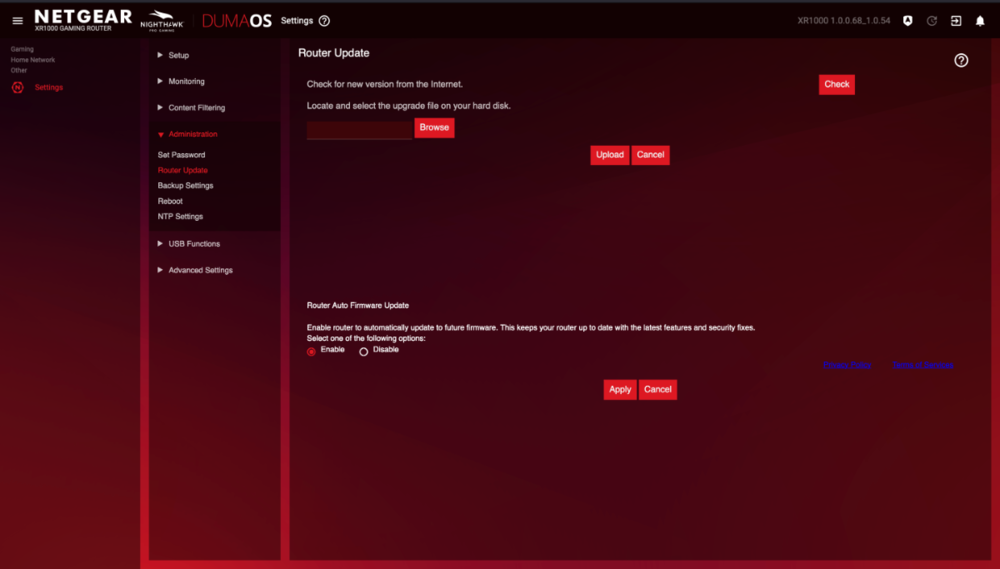
-
@Netduma FraserSeems to be a bug with lan Ports since after hard resetting it fixed another thing to note when checking LAN it still said 1G Speeds on Settings
-
XR1000 update dumaos !!!!
DARKNESS replied to Dominik Grabowski's topic in NETGEAR Nighthawk Support (XR range)
@Dominik GrabowskiYou can downgrade versions you can do so by going into settings>administration>router update and upload your preferred firmware version -
XR1000 update dumaos !!!!
DARKNESS replied to Dominik Grabowski's topic in NETGEAR Nighthawk Support (XR range)
I don't think that has anything to do with you being able to access the UI buddy.....the update is coming this month that am aware unless there a delay -
@Rbk23To add are you running the latest firmware?
-
@Rbk23Well there always the possibility that it a defective unit....

.png)