


DanologyUK
-
Posts
562 -
Joined
-
Last visited
-
Days Won
2
Everything posted by DanologyUK
-
Can you connect to the IP on your PC and log into the router?
-
Are you trying to connect to WiFi with the Username and Password found on the sticker under the router? Can you see the WiFi SSID when searching for WiFi on your phone?
-
Can you load any other website from your PC? Also, did you buy this brand new from a website or did you buy it used from someone? I would suggest holding the reset button on the back of the router and then retry accessing using that same IP address
-
Have you had a look through the instruction manual for the R2? https://support.netduma.com/docs/user-manuals/netduma-r2/
-
You are testing a WIFI connection. What does your speeds show on a wired ethernet connection?
-
un prioritized packets
DanologyUK replied to L7NALMARI's topic in NETGEAR Nighthawk Support (XR range)
Isnt that just telling you all of your traffic has been prioritised as per the priority you have set? Not sure why you think this is causing you issues? -
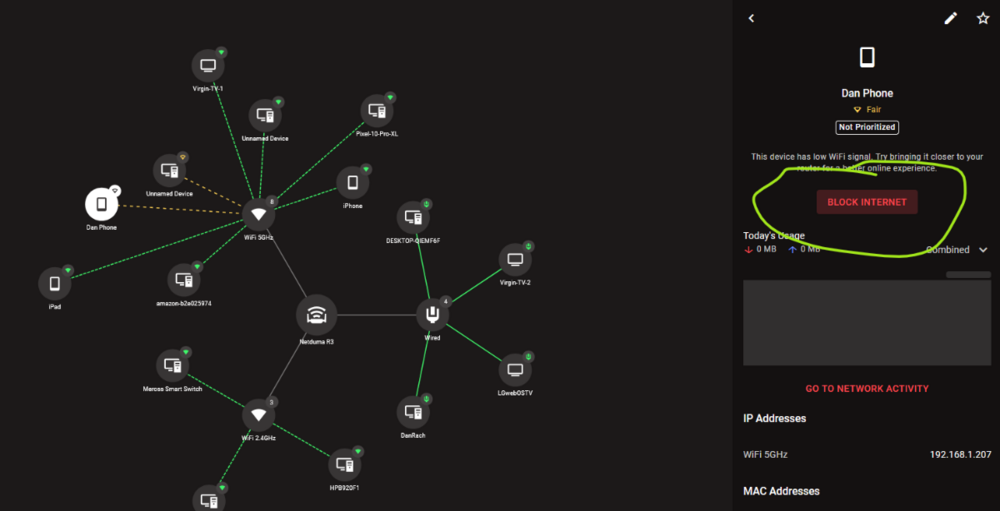
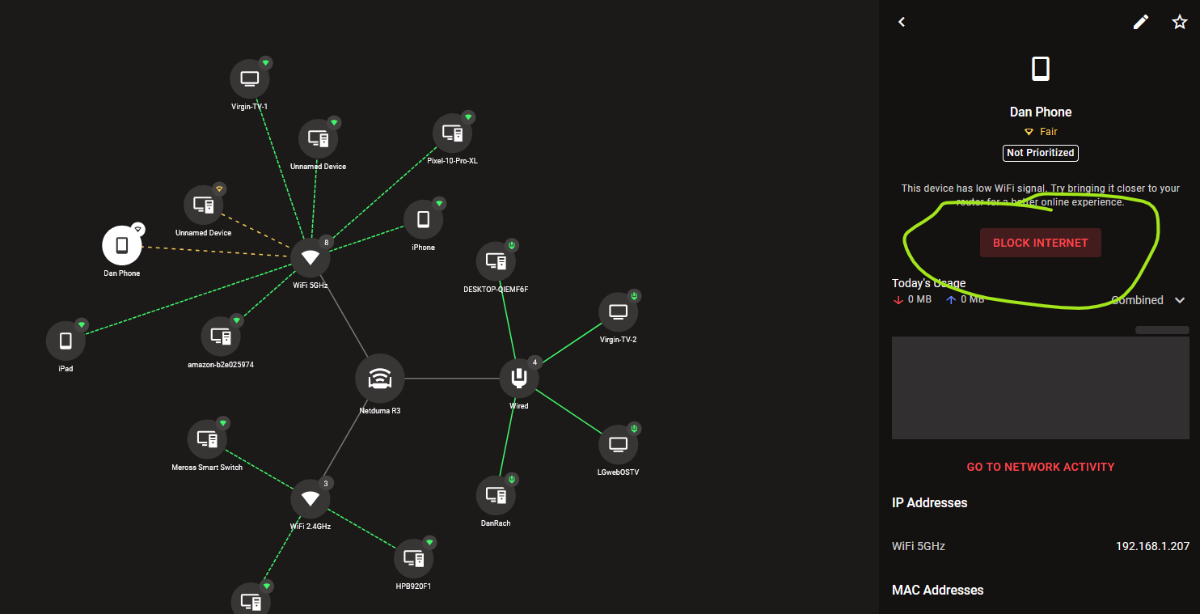
Click the device you want to block then click block internet as I mentioned above already
-
Open Device Manager, select the device you wish to block and then click Block Internet.
-
As your title indicates, it has been new year and Christmas holidays very recently so Netduma staff would have been having a break with their families, just like you did I guess? Most companies return back to work tomorrow so I imagine the staff will continue working on the update from tomorrow.
-
All devices will consume bandwidth unless you block them in Devices. When you prioritise a device, it just means the router will action that device's packets before any that are not prioritised/lower priority.
-
So what I dont understand.... When using Exit Lag, youve said your pings haven't changed but when using Exit Lag you now also get lag spikes for 2 - 5 seconds (that is crazy long!). So tell me, what benefit is Exit Lag giving you as from what youve said already, it's giving you MORE issues?
-
It's QDisc with Netduma’s own QoS logic controlling how/when shaping and prioritisation is applied.
-
You just admitted it lag spikes when using it though??
-
Using ExitLag is making your ping/latency higher as its basically a VPN so nothing to brag about. Having a ping of 22 - 24ms is not great.
-
Google the game and the console/PC to find the ports to open.
-
The speedtest and ping optimiser is a known issue. They are working on it. Just manually set it.
-
What is your setup? What is the device your ISP provide?
-
There is nothing to install on the PC. Simply open your web browser and type 192.168.77.1 into where you would normally type any website and it'll load your router interface.
-
What a strange comment. The servers used for the beta would have been reduced due to the demand compared to the launch. Basically common sense really, not difficult.
-
How do you expect them to guess where the servers will be BEFORE it's even released?! Surely that is just common sense. You might be lucky and Cod 6 servers will be used for most of them but who knows until the game is physically out and can be tested??
-
Why CAT8? CAT8 are made for data centers and not homes. Most of the "CAT8" cables you can buy are not certified as CAT8 so just because it's a higher number and you think you have the best cable, you may wish to review the cable as its probably a fake. As you have already told us you are an "IT technician" i thought you might have already known this?!
-
Well I can see your problem! Your monitor is upside down so the internet is falling out of the monitor. Turn it around the correct way and you wont have any internet leakage.
-
Yes that is correct you need to put the LAN IP of the R3 into the DMZ of your eero pro 7 router. You would be better speaking / posting your support issue to eero as i doubt you will get support for a non netduma router on here.
-
The WAN port is limited to 1GB
-
That's not possible. R3 is a router, not a modem. You need some sort of ISP modem before your R3.


.png)