


DanologyUK
-
Posts
567 -
Joined
-
Last visited
-
Days Won
2
Everything posted by DanologyUK
-
It is loading a lot quicker than it was but still seeing the frames loading in
-
That has worked for me! The ServiceNow website has loaded instantly, since switching that. Please don't tell me, I need to start switching stuff off to be able to load websites. I purposely moved from the Xr500 to the R3 due to the amount of functions I had to disable on the Xr500 just to be able to get a stable connection for my devices. EDIT - I spoke too soon. It is better but still not right.
-
I use ServiceNow as part of my work and im finding that this website, regardless of browser (tried 3 with 1 having no extensions) is taking an age to load but if I load ServiceNow in Citrix, it loads instantly so i know its not a site issue. Its having trouble loading the full site by the looks of it, its loading the background colour and eventually itll load the form outlines and eventually itll load fully. Even closing and reopening I have to go through this long load times. Where do i begin in triaging this? I have disabled AdBlocker and also SmartBoost and neither have made any difference. I've tried changing the DNS to 1.1.1.1 and 1.0.0.1 and also setting it back to default but neither made any difference. My PC is wired to the router as well
-
ANNOUNCEMENT: Introducing the Netduma R3
DanologyUK replied to Netduma Lew's topic in News & Announcements
Did you need all customers to do this or will the shipping address give you a clue on what plug we will need? I will be having mine delivered and to be used in the UK. -
ANNOUNCEMENT: Introducing the Netduma R3
DanologyUK replied to Netduma Lew's topic in News & Announcements
Before I place my order for the R3 (see this is maybe the only way out of my numerous issues on my XR500) please can you confirm: - DHCP bug is no longer present so I can let the router allocate IPs correctly just like any router should (I would hope so as I assume netgear are no longer involved in this) - QOS isn't causing websites to no load (such as Twitch) so I don't have to no longer keep having to toggle it on and off to load a simple website? -
NEW XR500 BETA FIRMWARE: 3.3.535
DanologyUK replied to Netduma Lew's topic in NETGEAR Nighthawk Support (XR range)
Any updates on Twitch and Discord not loading when QOS is enabled please? -
Disabling QOS doesnt disable AdBlocker
DanologyUK replied to DanologyUK's topic in NETGEAR Nighthawk Support (XR range)
Just checked with DPI off as well as QOS and even though the AdBlocker button is able to be toggled, it does actually seem the AdBlocker is disabled regardless of if it says Enabled or Disabled. -
Disabling QOS doesnt disable AdBlocker
DanologyUK replied to DanologyUK's topic in NETGEAR Nighthawk Support (XR range)
What is happening here? As you can see QOS is disabled and AdBlocker is enabled and i have nothing in my whitelists. I cant load https://www.awin1.com/awclick.php?mid=2041&id=73243 I then disable AdBlocker, click the link again and it loads but yet QOS is still disabled?! brave_MJFwzRwJvo.mp4 -
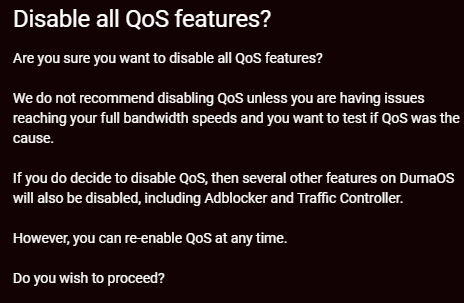
When i have to disable QOS, due to sites not loading, I have spotted that, even though the message warns the AdBlocker will be disabled, it doesn't actually disable it. Is this a typo? I tested it whilst having QOS disabled and i can still disable/Enable AdBlocker. I have also tested to check if AdBlocker was actually disabled (but was reporting wrong on the button), by going to https://www.awin1.com/awclick.php?mid=2041&id=73243 and it was blocked even though QOS was disabled and AdBlocker is enabled.
-
NEW XR500 BETA FIRMWARE: 3.3.535
DanologyUK replied to Netduma Lew's topic in NETGEAR Nighthawk Support (XR range)
Add Steam Downloads to the broken list as well please. With QOE on, Steam wont download any games. The second I turn off QOE, it starts the downloads. EDIT - After restarting the router, its now downloading with QOE on. -
NEW XR500 BETA FIRMWARE: 3.3.535
DanologyUK replied to Netduma Lew's topic in NETGEAR Nighthawk Support (XR range)
Discord seems to be also affected. Please see logs. Twitch eventually loaded but didnt load all the page and also Discord was stuck spinning "Checking for updates". Disabled QOE and Discord loaded in straight away. Logs attached. Hope they help log-1699900650885.txt i suspect you are after this? [DoS Attack: ACK Scan] from source: 104.17.107.108, port 443, Monday, November 13, 2023 19:11:52 [DoS Attack: ACK Scan] from source: 104.17.107.108, port 443, Monday, November 13, 2023 19:11:29 [DoS Attack: ACK Scan] from source: 40.99.202.114, port 443, Monday, November 13, 2023 19:10:36 [DoS Attack: ACK Scan] from source: 40.99.202.114, port 443, Monday, November 13, 2023 19:10:35 -
NEW XR500 BETA FIRMWARE: 3.3.535
DanologyUK replied to Netduma Lew's topic in NETGEAR Nighthawk Support (XR range)
To add to the broken list, Twitch is again not connecting with QOS on. Loads of posts have talked about this in the past and i cant believe we are still in the position of faulty software/hardware that cant provide basic services as advertised. -
NEW XR500 BETA FIRMWARE: 3.3.535
DanologyUK replied to Netduma Lew's topic in NETGEAR Nighthawk Support (XR range)
I still strongly believe there are gremlins in the QOS (of the associated functions from this). Trying to load iPlayer on my Virgin Tivo box, but it fails to load. . I then try loading it on my LG TV and again it gets to the splash screen but doesn't get any further. I disable adBlocker for the whole network thinking it might need something whitelisting later but it's still not loading on either device after a restart of the Tivo box and the TV. I check my IP reservations to check if something has come online that I haven't set a static IP between .2 and .99 (DHCP set to start at .100) and find everything has a IP of <= .99 Tried loading iPlayer once again on both devices after restarting them and still both fail to load. I disable QOE and by magic, they both now load without any issues. Why? -
When i used to run a Pi-Hole, i had 2 buttons mapped on my Streamdeck so i could easily disable/enable AdBlock if i come across a page block (such as referral via QuidCo etc). I have just asked Bard (Google AI) how I can do it and its come back with the below but it doesnt work. Is what im trying to do, achieveable? If so, would someone be able to advise of the correct URL. I have tried "enable" and "enabled" but neither work. Yes, there is a URL or .bat file that you can map to your Streamdeck buttons to be able to quickly disable/enable the AdBlock function on your NetDuma Xr500 router. URL: http://192.168.1.1/cgi-bin/luci/admin/netduma/adblock/set?enable=0/1 Replace 192.168.1.1 with the IP address of your NetDuma Xr500 router. Replace 0/1 with the following: 0 to disable AdBlock 1 to enable AdBlock Example: http://192.168.1.1/cgi-bin/luci/admin/netduma/adblock/set?enable=0 This URL will disable AdBlock on your NetDuma Xr500 router.
.png)