


Krush
-
Posts
5524 -
Joined
-
Last visited
-
Days Won
60
Everything posted by Krush
-

Alguma notícia boa para nós usuários do R3?
Krush replied to Rodolfo Lima's topic in Netduma R3 Support
"Ton but" = Ton objectif ! -
Alguma notícia boa para nós usuários do R3?
Krush replied to Rodolfo Lima's topic in Netduma R3 Support
Ok, ton but est de contourner le script "COD". Y a 10K vidéos sur internet d'influenceur sur le sujet avec des théories plus saugrenues les unes que les autres ... ---Je ne peux pas t'aider sur le sujet !--- -
Alguma notícia boa para nós usuários do R3?
Krush replied to Rodolfo Lima's topic in Netduma R3 Support
Cela semble correct pour éviter la congestion sur ton réseau local ! J'ai 8G symétriques en France et pourtant je ne suis pas le meilleur quand je joue ! -
Alguma notícia boa para nós usuários do R3?
Krush replied to Rodolfo Lima's topic in Netduma R3 Support
Il faut comprendre également que l'optimisation du routeur est faite sur votre réseau local, il n'agit pas en amont de votre domicile. Si vous avez des problème de congestion FAI ou un mauvais internet en règle générale dans votre pays, vous ne pourrez pas faire grand chose à part demander une optimisation/contrôle à votre FAI ! -
Oui ! En effet avant de te lancer dans la désactivation du DHCP, il faut que tu gardes à l'esprit que sans certaine base, tu te lances dans une aventure périlleuse ! 😉
-
Il est tout à fait possible de désactiver le DHCP ! Il te faut comme tu l'as mentionné entrer des adresses IP statiques pour tous tes périphériques en amont ! Enregistrement 2025-07-26 154428.mp4 Tu peux également définir une IP statique prédéfinie pour ton périphérique sans désactiver DHCP ! Si ton périphérique est allumé, il te suffit de le rallumer pour qu'il obtienne la bonne IP. Enregistrement 2025-07-26 154428.mp4 ---- L'utilité de mettre une IP statique derrière un périphérique est essentiellement lié à un transfert/ouverture de port spécifique ----
-
Essayes 10.0.0.1 !
-
Tu n'es pas sur le même matos ... surtout qu'en France la chasse aux vitesses "test de débits" est maintenant liée au "WIFI" sur les routeurs FAI ! 😉
-
C'est un pion dans l'océan ! Cela te permet de savoir quel serveur/pays/géolocalisation ton jeu "via ton périphérique de jeu se connecte" mais sans lui imposer des contraintes ! Tu gardes la possibilité de contrôler visuellement le serveur de jeux mais sans le forcer vers une destination/ un ping mini/max! Cela peut être très utile pour définir la zone/le serveur cible pour ton jeu... en fonction de l'emplacement "géolocalisation" de ta ligne physique FAI !
-
😉 Enregistrement 2025-07-25 132217.mp4
-
Salut ! C'est quoi ton routeur Wifi principal FAI ? Le R2 est capable de router 1G en WAN/LAN cablé. Donc si ta ligne est proche de ces débits, rentres les manuellement car le test peut être limité au serveur de test ! Son WLAN est limité au Wifi5. Ce qu'il faut comprendre, c'est que pour tes périphériques ayant besoin de beaucoup de bande passante (console/PC--- pour le téléchargement de jeux--), il faut privilégier un câble. Le Wifi restant pour les périphériques secondaires.
-
Everything connected but still no internet or ethernet
Krush replied to Finkler's topic in Netduma R3 Support
I agree with Fraser, if everything is wired correctly, it makes no sense. -
Everything connected but still no internet or ethernet
Krush replied to Finkler's topic in Netduma R3 Support
I don't know! 😉 But maybe a video of your cabling from your internet source to the R3 could help! -
Everything connected but still no internet or ethernet
Krush replied to Finkler's topic in Netduma R3 Support
Do your devices get a local IP (DHCP) behind your Sagemcom router/modem? -
Everything connected but still no internet or ethernet
Krush replied to Finkler's topic in Netduma R3 Support
Have you made any changes to your Sagemcom ISP router upstream? -
Everything connected but still no internet or ethernet
Krush replied to Finkler's topic in Netduma R3 Support
Test: Yellow RJ45 port of your ISP router to the Blue RJ45 port of the R3! (LAN FAI TO WAN R3) -
Everything connected but still no internet or ethernet
Krush replied to Finkler's topic in Netduma R3 Support
----------------- From the pictures I see, you just made a mistake in your wiring! You need to connect the R3 to your ISP modem/router... Modem/router - LAN Modem/router to WAN R3 - LAN R3 to your other devices! -
------------------------------------------- Without taking him to task... it's easier to close the debate this way... I understand him so much!
-
I just read his post on reddit... he seems to have the same feedback/response that I gave him! 😁
-
I have no problem personally, as you wish!
-
WLAN is subject to many constraints compared to LAN! Why compare them?! The differences in speed are related to the network card of your device...And especially on the server on which you performed the test ---WIFI6 is limited to the 5GHz band / WIFI6E can access the 6GHz band----
-
Smartboost optimizes the speeds needed for a smooth connection on your switched-on devices. You cannot get the maximum speed without disabling it; this is the principle of QoS! Your phone just doesn't need to hog any more bandwidth at the time of testing!
-
The R3 speed test is performed directly from the WAN... It doesn't take into account the R3's QoS settings, which are linked to the LAN/WLAN! Is the Ookla speed test LAN or WLAN behind the R3?
-
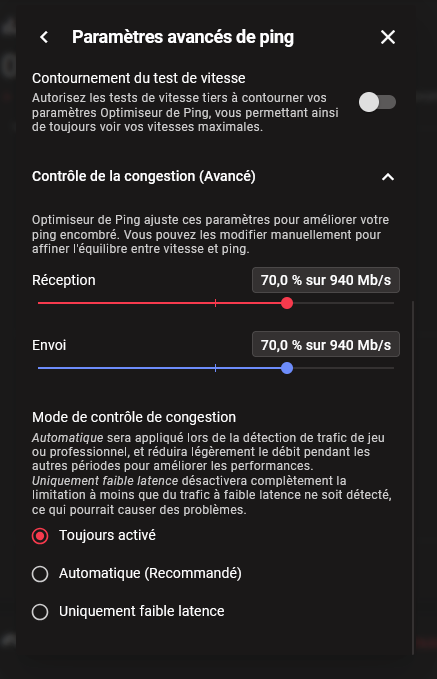
The R3's internal speed test is live from the WAN, which means you've managed the ping optimizer with very low percentages and always enabled! Can you take a screenshot of your ping optimizer?
-
Hi! @Netduma Fraser His first video shows R3 network activity going up to 5 Gbps, which isn't possible! ----Is there a loop in his local network?!---

.png)