

Krush
-
Posts
5610 -
Joined
-
Last visited
-
Days Won
64
Everything posted by Krush
-
C’est pas ça ! Il devrait être dans les fonctions wan et te proposer soit mode routeur, soit mode bridge…
-
C’est bien de la fibre avec le modem intégré à la box. Faudrais que tu ailles dans la page d’administration du routeur pour voir si il te propose un mode bridge. De cette façon le routeur se comportera comme un simple modem et tu n’auras plus qu’à brancher le R3 derrière !
-
Ok inconnu en effet ! C’est modem routeur HFC où tu as un ont en amont fibre ? Il a peut être un mode bridge proposé sinon en effet le plus simple dans un premier tant serait d’attribuer un ip fixe pour le R3 et l’attribuer au dmz dans le routeur fai !
-
Salut ! c’est quel FAI ?
-
Hi ! You must « always » set it when you want to carry out the congestion test!
-
Pourrais-tu essayer en désactivant : ( c'est ok pour moi comme ça ) 😉

-
Salut ! J'ai pas de livebox 5, mais pour que tout marche parfaitement derrière, tu dois désactiver également UPnP/wifi etc... sur la livebox (l'ensemble des options de routage). Il faut que la livebox fonctionne comme une passerelle pure (modem) ip statique sur le R3 et DMZ... Tu éteins l'ensemble et tu les redémarrer un part un en commençant par la livebox/R3/PC !
-
@artful40 Please ignore !
-
it sends to the Paris region... Thanks for the feedback... 😉
-
This is something known but will be resolved! Try separating your WiFi bands and putting one device on band 2.4 and the other on band 5. And they will communicate together!
-
... @WWWWWWWWW It seems to me that you are familiar with the forum, if you want to cause trouble or anything else please use your account (nice guy).
-
Hi ! Could you do the test by setting the ABB to always! (Congestion control) This is the basis for carrying out this test!
-
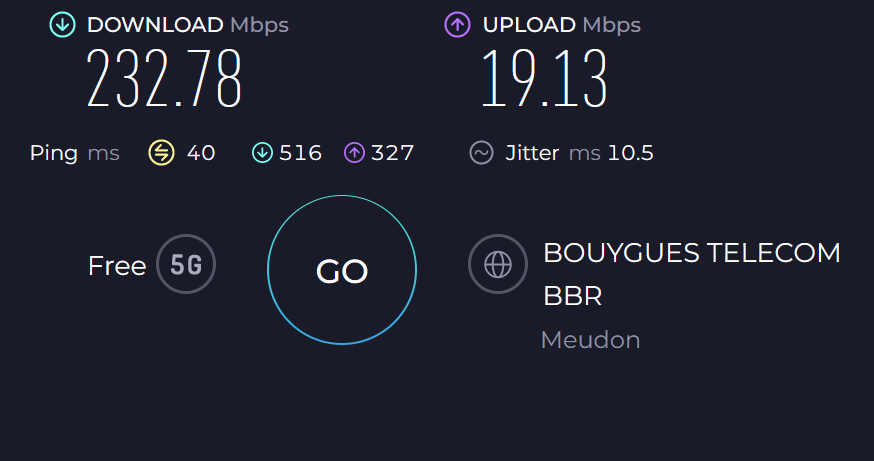
I have a 5G plan in the city center... I would be interested to know your maximum speed with this type of connection! ?
-
hihi ! I understand your questions guys, but stop me right away... Otherwise I'll give you a history lesson starting from the Roman Empire going back to the 12th century with a little theology and no one wants that! 😁
-
This must be due to UPnP not automatically opening the port for NAT quickly enough after starting the Xbox. You just have to test it for it to be operational... (power saving mode maybe)
-
Hi ! You may not be able to get IPv6 behind the R3. But this is not a problem in itself because IPv6 is not necessary, your xbox will work very well with IPv4 only! 😉
-
Hi ! have you done a factory reset that might also help in addition to clearing the browser cache or reopening the admin page
-
Hi! Online gaming doesn't need a lot of bandwidth so this is normal behavior 😉
-
In fact yes, Sunday is historically the first day of the week! 😀
-

My settings for Good Hit detection MW3 <R3 Router
Krush replied to Spritekid242's topic in Call of Duty Support
Hi ! In the first case you risk having congestion (streaming/downloading at the same time as you play) and in the second no. -
Hi ! Have you set the ABB to always?
-
Hi ! To my knowledge, the OpenVPN and Wireguard Protocol, but the request has already been mentioned for the others...so in the list!
-
I was just going to ask you @Mobel, I could see that you lived in the same country! 😉
-
Salut ! @Netduma Fraser reviendra vers toi dès qu’il aura pris connaissance de ton message et fera le nécessaire pour te renvoyer le mail de confirmation ! 😉
-
Hi ! These are 2 separate network cards with their own Mac address so normally you should be able to connect both at the same time. Check your yellow port ethernet cable on the R3. Have you modified any parameters on your PC on the ethernet card?

.png)