


DanologyUK
-
Posts
562 -
Joined
-
Last visited
-
Days Won
2
Everything posted by DanologyUK
-
I use Firefox as my daily browser. If i leave the website for idle too long, the page changes to the screen below. Is this some kind of issue with the forum as the URL does change in my browser because if I refresh, this page stays loaded. https://forum.netduma.com/?app=core&module=system&controller=ajax&do=instantNotifications&csrfKey=7738584cb0f56afa861cdb32ebc7aee3¬ifications=0&messages=0

- 1 reply
-
- 2
-

-
.png)
-
Black Ops 6 is currently being identified as Video & Streaming and not Gaming. I'm playing on Xbox. It only seems to be in some games and not others.
-
Google it so you can understand how to do it in your application. It's UTP not Upnp.
-
Can’t watch anything on Netflix, Crunchyroll etc
DanologyUK replied to Munz01's topic in Netduma R3 Support
Give us a clue on what happens when you try and what you have tried to fix it..... -
Errr you do realise you can screenshot just the Duma screen? You are sharing your p()rn bookmarks 😂
-
In your ISP router, you will need to give the R3 a static IP. You might find this in DHCP page. Once you set this static IP, you then need to put that IP into the DMZ page and enable it.
-
That doesnt look like the page you want. You need to find a page that has DMZ on it.
-
I'm not asking when it is coming. I dont have any problem with mine, it was just for the sake of the other users who are all having issues
-
Instead of using another router in your office, use a network switch instead. Regarding the speed test / ping not working, this fault has been posted many times already and Netduma have said it's a known issue. I find it will usually work, after a reboot
-
.
-
Internal Server Error - Netduma R3
DanologyUK replied to justinzepeda13's topic in Netduma R3 Support
Remove the power cable out the back of the router and then reinsert and wait 4 minutes and retest -
Where does it tell you? VPN is not available yet.
-
So you are literally ignoring every response youve had and just rely on a youtube video that is falsely telling viewers how it works. oook.. You carry on. If MTU worked like that, dont you think you would be able to get the MTU server information for all games easily?
-
Have you followed the guide on the 1st or 2nd link to calculate what your maximum MTU is?
-
Here is another video that will explain how MTU works. Have a watch to help educate yourself on this topic -
-
Ive just clicked the image link for the download of the firmware and it has downloaded it fine for me. This is the link to the download from the pinned post - https://forum.netduma.com/applications/core/interface/file/attachment.php?id=38559&key=fff23e6dc6d803627f67a54baf2710f0
-
Fraser has already said in a reply above he wouldnt know what they are.
-
I'm sorry but that guy is waffling a lot of rubbish. You do realise that MTU = MAXIMUM Transmission Unit. By setting your MTU to the max MTU as offered by your ISP and as referenced on that link I posted, doesnt mean every packet you receive on your PC is going to be 1500 bytes as package size will differ from server to server and will normally be a lot less. If you try to exceed the MTU of your ISP, that is when you start getting packet loss due to fragmentation occuring Here is another link about MTU to help you to understand it - https://homenetworkgeek.com/mtu-size/
-
MTU is to do with your ISP and nothing to do with the servers. This site will explain everything - https://homenetworkgeek.com/mtu-size/
-
You have been saying "Shouldnt be long" since mid February, almost 2 months! That is long
-
Almost 5 months since released. That is too long to have "patience" on issues which should have been resolved before it was even released. They shouldnt need to be fixing so many issues after release!
-
Your R3 wont lock into anything the other side of the VM router, only your VM router will handle this as your VM Router is performing the modem part of this job (those frequencies etc are from Virgin's network). You need to speak to Virgin Media if there is a fault, your R3 wont influence any of this and will only use the WAN sent to it from your VMRouter/Modem (depending on what mode you have it in).
-
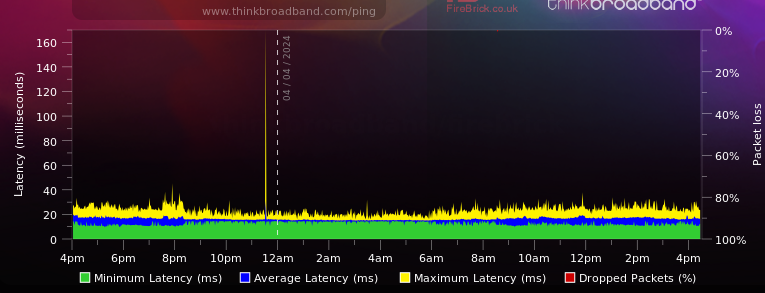
Remember your ISP could be to blame for the packetloss as well. Set up a free "Broadband Quality Meter" - https://www.thinkbroadband.com/ping once set up, let it run for a few hours (it runs a ping from their server to your router) and it'll plot out your connection in a heatmap. See mine below. If you were to have true packetloss caused by your ISP then you will see a red spike/spikes from the top of the graph.
-
You can see on Twitter / X, they are clearly talking about resyncing the cloud and nothing to do with the update! Of course they will see an update as they are currently dragging their heels in releasing an update so will be testing.
-
4.0.41 Is the latest. Would suggest you update and retest. Link to the download is pinned to the top of the forum.
