

.gif.09c9795f713c10c309d68122b089d26c.gif)
DARKNESS
-
Posts
2446 -
Joined
-
Days Won
29
Everything posted by DARKNESS
-
.thumb.gif.4a8d59f41391d88092e62269cfe1e7ec.gif) @Rbk23I'll be honest I am not an expert on ONT so this articles summarizes something I found a bit particular is that you need a special fiber router whatever that means therefore your probably going to have to use your system like this ONT>ISP ROUTER>R3 If that works you can just disable the wireless signal for the ISP router and have the R3 handle everything in a way it just using the other routers connection as the throughput. Aritcle https://us.hitrontech.com/learn/what-is-an-ont/ How an ONT fits into your home network An ONT device is necessary for your home network only if you have fiber installed. This is because, with fiber-optic Internet, you cannot use any modem or router. You must have an ONT or OLT and a fiber router.
@Rbk23I'll be honest I am not an expert on ONT so this articles summarizes something I found a bit particular is that you need a special fiber router whatever that means therefore your probably going to have to use your system like this ONT>ISP ROUTER>R3 If that works you can just disable the wireless signal for the ISP router and have the R3 handle everything in a way it just using the other routers connection as the throughput. Aritcle https://us.hitrontech.com/learn/what-is-an-ont/ How an ONT fits into your home network An ONT device is necessary for your home network only if you have fiber installed. This is because, with fiber-optic Internet, you cannot use any modem or router. You must have an ONT or OLT and a fiber router. -
@Rbk23You have access to the ONT correct? If so did you reboot it when you connected to the other router? If not do so and see if same occurs
-
@Rbk23Try dmz option I would do the following: Copy the WAN IP from the R3 in Settings > WAN then access the ISP modem/router and enter it in the DMZ function
-
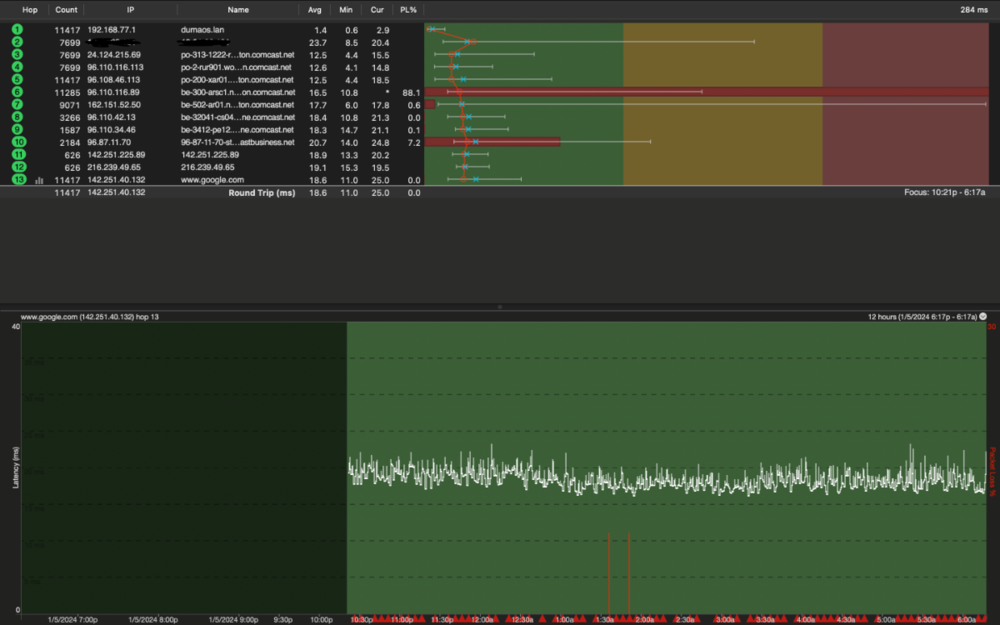
@Rbk23All you need to care about are the first 3 hops and the last hop basically
-
@Rbk23This is an example as to how it should be you can ignore the ISP section as they typically block Ping to there servers depending on your ISP that is etc..
-
@Rbk23Yup that definitely an issue first hop should be clean as the others are you using dhcp or ppoe? Since as you said your using your ISP box it shows no affect then there must be something on the settings or the way you set it up that causing latency issues on the first hop.
-
Application name: Genshin Impact Device type used for capture: MAC OS/PS5 Any other comments: New Game for DPI Engine https://www.playstation.com/en-us/games/genshin-impact/ Genshin Impact #1.pcapng Genshin Impact #2.pcapng Genshin Impact #3.pcapng
-
@Netduma Alex Application name: Tom Clancy's Rainbow Six Siege Device type used for capture: MAC OS/PS5 Any other comments: Not detected on the PS5 https://www.playstation.com/en-us/games/tom-clancys-rainbow-six-siege/ Rainbow.pcapng Rainbow 1 .pcapng
-
@Netduma FraserMajor bug found so I tested all lan ports trying to figure out why I was getting 100mbs when I have GIG internet speeds and figured out that port 3 specifically is the slowest locked to 100mbs and 20 upload the rest work fine this has also been tested with other devices to see if it was a just once occurrence and Ethernet cables. R3 Ethernet Port Test.txt
-
Loosing LAN connection since upgrading to v4.0.20
DARKNESS replied to appleround's topic in Netduma R3 Support
@appleround I would just run the latest firmware and see if that solves your issue...also do a hard reset after upgrading -
Loosing LAN connection since upgrading to v4.0.20
DARKNESS replied to appleround's topic in Netduma R3 Support
Hmmm I remember having this issue with my older R2 the way it was caused was by having more than 1 lan connection though I couldn't replicate it all the time. I am certain it an OS issue as the router worked fine when there was no lan connection from more than 1 device and you can see similar warnings. Though when I got the newer unit the issue stopped occurring...I still have the unit so I can probably replicate the similar log. -
@JayC7Update yes it not detected I'll upload a capture when I get the time though it should've been working looking at the past I did upload a log I guess alex missed it since looking at the forum he didn't seem to have updated it...I don't play rainbow six siege generally so that the reason to add I am basically the only guy who's gotten all the PS5 versions tested and am not affiliated by netduma so I by no means am required to follow up.
-
@Rbk23Google should be fine as it the most common
-
@Rbk23Actually just do 10 minute one that should be fine to add you can try using steady ping on expert and set your ms that is mostly suitable to stabilize the connection as it forces it
-
@Rbk23Can I see an Image set to 6 hours or less if possible
-
@Rbk23That could possibly be a server issue or a steady ping bug though alternativly it could be your network spiking up on latency so I would advise to test your network to make sure that not the cause you can use following software for simplicity to test the network https://www.pingplotter.com/
-
@Rbk23H.264 should work or an MP4
-
@Rbk23It the format HEVC isn't supported it going to look fine on the phone or computer but when uploaded to the forum it not going to be seen file formats are a pain if you have no knowledge 😂
-
@Rbk23Use different format file is not viewable
-
@TrayDayIns't that already detected my guy? Also servers don't matter it more about the data that within them that gives the info as there all identical except servers and that would be something that's already accounted for though that lot of captures 😂
-
@JayC7I'll check tomorrow and see if the same occurs though geofilter should be working fine if not try the following steps also check your inbox The suggestions below should help if you are continuing to connect to servers outside of your radius. * Disable GeoLatency * Disable PingAssist (set it to 0,0) * Enable Strict Mode * Disable Fast Search Then restart the game if that doesn't work, reboot PC/Console and check again.
-
@JayC7I'll check for myself though did you look on the Stat for nerds while active in match and didn't see it active there either?
-
@JayC7What platform are you using to play Rainbow Six Siege?
-
Steady Ping causing unintended lag to Whatsapp
DARKNESS replied to AsNCo's topic in Netduma R3 Support
@AsNCoWhen your in the application what is it classified as on the DPI? Realistically it shouldn't have any effect though in theory if it was being classified as a game then steady ping could be doing something which is causing it to lag like trying to optimize the ping and it thinks it a 100ms is optimal etc... -
@NuyorricanI am not the one who designed the OS but I guess it a flaw design I noticed it long ago though I believe it do to it being able to be designated or classified as different things for certain individuals such as at job etc so you can see most of them at work from home or chat and messaging for VOIP as there basically mostly classified VOIP.

.png)