


CRarsenxL
-
Posts
771 -
Joined
-
Last visited
Everything posted by CRarsenxL
-
Would it be worth it to ask them if they can put the R2 IP 192.168.77.1 into their DMZ ?
-
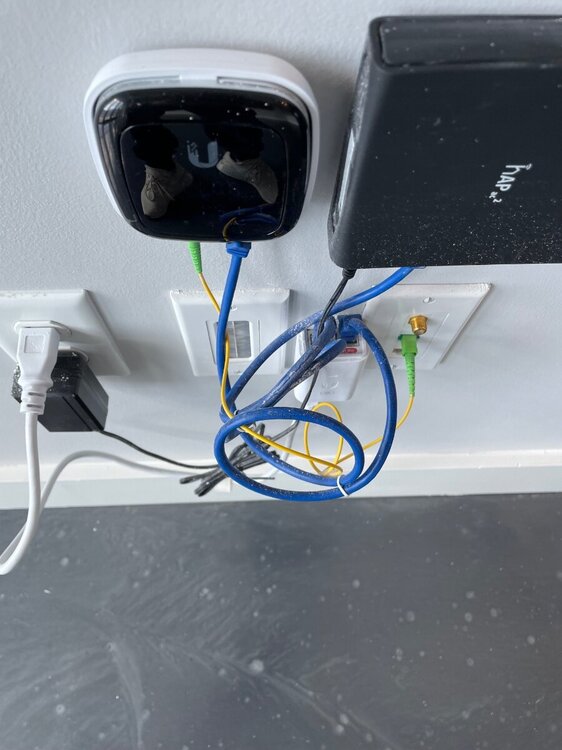
Hi all, My apartment complex has a ubiquiti PON it looks like. it also looks like there is a POE connection. that microtik router in the picture is no longer in use as my R2 is in its place. I get packet loss.. not sure why. It does have dynamic IP and the R2 retrieves it as 10.xx.xx.xx it also retrieves the preset dns they have 8.8.8.8 and 1.1.1.1 perfectly fine. ( I have also replaced all cables) anyone have tips?
-
Question — which ports does this cover? this the same as games console? also the smart qos on the r2 I know it prioritizing packets. but does it do the auto congestion control and auto bandwidth management for the lowest latency?
-
ANNOUNCEMENT: Introducing the Netduma R3
CRarsenxL replied to Netduma Lew's topic in News & Announcements
I just ordered the R3! however, the the R2 have the qos “smartboost” now? Is that the smart qos I see on the forums? -
I’m also on the latest stable fw
-
Noticing the internet drops after a day or so. the WAN IP just randomly stops pulling. It’s definently the r2 as this used to happen awhile ago as well. is there any fix for this? Wasn’t this a dhcp lease issue?
-
Duma os classified games (DPI) OR Games console (ports)
CRarsenxL replied to Ameryjr's topic in Community Discussion
Vanguard, cold war- 13 replies
-
- 1
-

-
- dpi
- traffic prioritisation
- (and 1 more)
-
Duma os classified games (DPI) OR Games console (ports)
CRarsenxL replied to Ameryjr's topic in Community Discussion
DPI or Duma OS Classified DOES NOT work for cod FYI on pc at least -
Traffic Prioritization Settings: Modern Warefare (BO4)
CRarsenxL replied to East's topic in Call of Duty Support
Leave offloads enabled. Newer nics are faster . But I’ll hear you out on the RSS and queues. -
Yes
-
DPI doesn’t do the glitch w the DMZ I found… it’s not using packet inspection for console?
-
After all the testing I have done. I have concluded Duma OS classified is the BEST option. Duma OS classified uses DPI to detect UDP traffic. I believe this is the lowest latency detection wise for that gaming traffic. Delete any other rules you may have, and use the Duma OS classified. TRUST ME. The reason I say this is because the port based services and even manually entry add more latency IMO. I have the xr1000 and I promise you, this is the best option. I will test the R2 later this weekend and report back.
-
Fraser confirmed normal default was Ethernet and wireless type gaming voice / video was for wifi
-
You need to do Src 3074 and dst any
-
Def doesn’t affect gameplay
-
The gaming/voice is only for wifi. Normal (default) is what should be used
-
Doesn’t matteR if UPNP or pf. I found DMZ feels super off however
-
Try it. That’s the best one I found. Idk y ppl say Src should be 1-65535, to me it’s the opposite. Ive made money playing this game and linked my profile above. See for yourself if you think I’m kidding
-
Not true. If you do that rule, it will not capture game traffic. (It turns on and off) if you do Src 3074-3480 DST 1-65545 tcpudp the game feels significantly better and it turns off when u quit app and when u start a game, it stays on
-
Who said I was losing? https://www.checkmategaming.com/profile/69117/xrsenai TCP data is definitely as important as UDP. Prioing 1 over the other makes the game feel horrible.
-
Maybe I’m just better at cod and can notice differences. Not your fault
-
It’s not that simple. Go ahead and use games console or duma classified as those only prio udp. Those prios make the game worse. I found SRC 3074-3074 DST 1- 65535 TCPUDP Guarantee ur reg is better in my prio
-
What about PS5? Im using TCPUDP SRC 3074-3479 DST 1-65535 Is this good?
-
Tried that. It turns off throughout the game
-
I’ve got 20+ devices on a 500/900 Fios connection. I play on mostly peer hosts cus of custom games. What would recommend. I found QoS disabled works ok. 1024-65534 Src and DST work ok and 1-65535. Src dst works ok as well. but never the magic bullet that’s consistent can you assist?
.png)
