


KinGzzy
-
Posts
417 -
Joined
-
Last visited
-
Days Won
3
Posts posted by KinGzzy
-
-
51 minutes ago, DARKNESS said:
@18RayFYour case is uncommon but not unheard of. What stands out is that you're using DHCP, which typically operates with an MTU of 1500. However, your ISP is clearly providing an MTU of 1492, commonly seen with PPPoE, and when the MTU exceeds the limit set by the router, fragmentation occurs, which can lead to issues like the one you experienced. In other cases, this might manifest more noticeably, such as through packet loss. It is not an issue on the router side as the router uses the most common configuration.
@KinGzzyMost of what you said isn’t even an issue; the time going backwards is literally just the DPI reading the packets, and as you are using the AI, which you are, it doesn’t tell you the most obvious thing, which is that IPv6 is disabled.
Okay, so for you, "problem" rhymes with "breakdowns" in the IT world, which you clearly don't know much about, especially here, since it's supposed to be a gaming router, so latency and other factors should be optimized as much as possible. Well, in these logs, that's not the case. The router, especially the processor, is working unnecessarily and haphazardly, which affects the stability of the system and therefore the router... Basically, just because your car starts and runs doesn't mean it doesn't have a problem... But since it's you, I can understand.
-
-
15 hours ago, 18RayF said:
Cant connect direct to ONT as PC is in different room and no cable long enough unfortunately , i realised there was a MTU mismatch from PC and Router could it cause this as i changed router to 1492 as PC already had that and its working fine now ?
These logs were yesterday after it happened and today after I changed the MTU on Router while attempting to load up also .
R3_2026-01-27T18_49_20.363Z_logs.txt 99.9 kB · 2 downloads R3_2026-01-26T22_39_49.174Z_logs.txt 99.64 kB · 1 download
Hi
According to the logs, your router is suffering from major software instability.1. IPv6 configuration problem (odhcp6c)
2. Script and TLS errors (cli.lua)
3. Time instability (Time went backwards)
4. Very frequent DHCP renewal (udhcpc: lease obtained, lease time 600)
5. Memory cleanup (drop_caches) USER root cmd echo 3 > /proc/sys/vm/drop_caches
6. Processor instability (Time went backwards)
7. The conflict with "DPI" (Deep Packet Inspection)
In your logs, I also see: user.info dpiclass-daemon: Daemon shutdown user.warn overwatch: Changing category of appid=161... to VPNYour router is suffering from major software instability. This isn't just a minor connection error; it's the DumaOS system crashing because it's trying to handle too many things at once.
-
just with a Windows machine and a shell script
-
2 hours ago, Netduma Fraser said:
They did implement a ping limit to prevent people using VPNs to connect to far away servers which would also impact you trying with the Geo-Filter to force servers far away. Given where you're forcing it's reasonable you might hit that limit. However, you should also disable Geo-Latency & Ping Assist when trying to force servers.
Where did you get that information?
there is always an alternative -
16 minutes ago, Netduma Fraser said:
Appreciate it but we do kind of need the IDs/IP addresses for the cloud
Ah, okay, you can have your cake and eat it too.
How much?? -
For the Netduma team.
Here is the list of Battlefield 6 servers known to date before the update.
Tested and approved by myself.define hostgroup {
hostgroup_name North-America
}define host {
host_name DC-California
address NA-CA
check_latency 143
lat 36.7783
lon -119.4179
}define host {
host_name DC-Virginia
address NA-VA
check_latency 86
lat 37.4316
lon -78.6569
}define host {
host_name DC-Ohio
address NA-OH
check_latency 97
lat 40.4173
lon -82.9071
}define host {
host_name DC-Oregon
address NA-OR
check_latency 155
lat 43.8041
lon -120.5542
}------------------------------------------------------------
define hostgroup {
hostgroup_name Europe
}define host {
host_name DC-Germany
check_latency 20
lat 51.1657
lon 10.4515
}define host {
host_name DC-UnitedKingdom
check_latency 20
lat 55.3781
lon -3.4360
}define host {
host_name DC-Ireland
check_latency 29
lat 53.4129
lon -8.2439
}------------------------------------------------------------
define hostgroup {
hostgroup_name Asia
}define host {
host_name DC-HongKong
check_latency 187
lat 22.3193
lon 114.1694
}define host {
host_name DC-Japan
check_latency 225
lat 36.2048
lon 138.2529
}define host {
host_name DC-Singapore
check_latency 155
lat 1.3521
lon 103.8198
}
-
The NA servers are located in:
California, Virginia, Ohio, Oregon, "no more, no less"No Georgia.
-
For EU servers, they are mainly located in Germany and England.
-
9 minutes ago, Netduma Fraser said:
That's interesting, kind of acting like a relay then allowing servers outside potentially
quite
-
If it helps,
the game points to the old EA servers before the migration to AWS servers, which leads to false leads. It will take longer than expected to geolocate all the servers. And that's assuming it even manages to connect to regions other than the client's (NA, APAC, EU, etc.).
-
-
15 hours ago, L7NALMARI said:
What the best vpn for call of duty
any advice guys ?
Nolag Vpn
-
1 hour ago, Netduma Fraser said:
It's very unlikely that it will drastically change the way the matchmaking works and the Geo-Filter should still work without us doing anything but it may mean we have to do more whitelisting initially to get it 100%. We'll do what we can during out limited time with the beta and if we can't sort it fully by then, then when it launches we'll get it sorted.
There are three possibilities, in my opinion.
1: Microsoft is using these servers, so they have a new public IP address and a new IP address range.
(Everything needs to be redone on the geofilter side.)2: Microsoft is still using AWS as a "hybrid backend" for some servers. In this case, some AWS IP addresses would remain valid
(no total change).3: If Microsoft uses "BYOIP" (Bring Your Own IP), this is a feature where a company brings its own IP addresses to the cloud (AWS, Azure, or other). In this case:
The IP addresses belong to Activision/Microsoft, not the cloud provider.
They can be used on both AWS and Azure.
(Result: the player would see "the same IP addresses," even if technically the infrastructure has changed providers).PS: I'm not an expert but I think that Microsoft will use its ecosystem which in the long term is much more profitable but from memory I don't think that Azure is better established than AWS (e.g. South America) for Gaming. So we'll see.
-
4 hours ago, cedric108 said:
I saw the reliable leak that bo7 will migrate from AWS to Azure.
Do you know if Geo-Filter will be available right away on day one?
Not sure if they host this weekend's beta also on Azure, if they do, will the current Geo-Filter work?
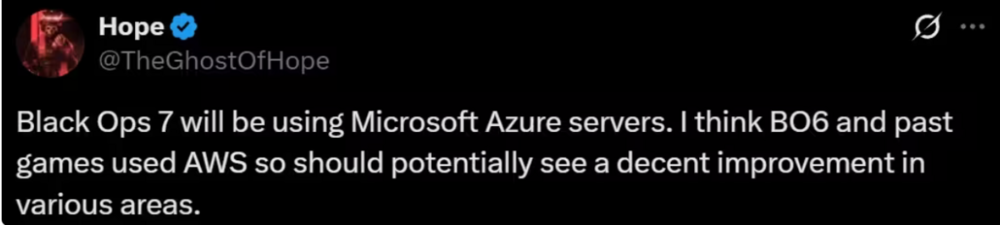
No need to leak, it seemed obvious.
Call of Duty = Microsoft
Azure = Microsoft -
On 9/24/2025 at 11:32 PM, Iced Soul said:
1. What Windows and router tools can I use to prioritize traffic, other than QoS?
On Windows, there isn't much you can do about the network.
You can tag your applications with DSCP tags if your router supports packet prioritization using DSCP.
Some people optimize their Windows using the registry.
Google is your friend, but if you want, you can test software.Windows:
Resource Monitor (resmon.exe) allows you to see which processes are consuming bandwidth.
Third-party tools like NetLimiter or cFosSpeed allow you to limit or prioritize certain applications.Router:
All routers these days, or 99% of them, have QOS.On 9/24/2025 at 11:32 PM, Iced Soul said:2. Isn't bandwidth distribution also handled by QoS?
QoS → its main role is packet classification and prioritization (e.g., gaming > voice > download).
Bandwidth control → is achieved through mechanisms such as HTB (Hierarchical Token Bucket), HFSC, or FQ_Codel/SQM, which manage efficient throughput distribution.
To be more technically precise:
QoS ≠ direct throughput management → it's a "who comes before whom" logic in the queue.
HTB or equivalents → allow hierarchical classes to be defined with minimum and maximum bandwidth allocations (per user, per IP, per protocol).
In modern routers (e.g., OpenWrt), the two are often combined:
Classification (QoS) → to identify sensitive flows. Scheduling/Shaping (HTB, FQ_Codel, CAKE) → to efficiently allocate and limit bandwidth.
So, to put it simply:
QoS = packet priority.
HTB/HFSC = bandwidth control = actual bandwidth allocation.On 9/24/2025 at 11:32 PM, Iced Soul said:3. Ensure network or game performance levels? How do I guarantee network performance? The game's performance is excellent. I play at 240 fps with plenty of hardware.
For gaming, both are very important, especially if you're playing on a PC. Having a 240 Hz monitor isn't enough.
Optimizing Windows is important to avoid input lag in games.
And when it comes to networking, there's no magic formula: a very good ISP connection and a good router to prioritize game packets and other...On 9/24/2025 at 11:32 PM, Iced Soul said:4. Could you be more specific about ensuring the reliability of critical services, please? I have no idea what it is.
In your case, that's gaming, especially Call of Duty.
This means you need to make sure your game takes priority over other tasks.
No packet loss, no buffering, and no excessive ping; your game remains the top priority, even when downloads are overloading your bandwidth. -
On these beautiful words, take care of yourself and have a good evening.
-
About the network card improving sound: we’re not talking about audio frequency or equalizers. None of that! Honestly, it shouldn’t even need explaining; anyone familiar with networking should know this.
2- I understood, don't worry, and I am very familiar with the network because I am currently a sysadmin.
What I’m talking about is data packets transmitted from the server to your client. A network card that handles these packets and queues better ensures that the data arrives without delay. These packets carry critical info, like enemy footsteps and shot registration. With an efficient NIC, they don’t get delayed or ignored.
3 - In short, packet and delay management is actually shared at several levels:The Network Interface Card (NIC)
-
It handles the reception and transmission of packets at the hardware level.
-
It manages the queues of incoming/outgoing packets and applies certain optimizations (such as offloading, interrupt moderation, or buffering).
-
A high-end network card can process packets faster, reduce latency, and prevent losses if the bandwidth is high.
The Operating System (kernel network stack)
-
The kernel (Windows, Linux, etc.) manages scheduling, buffering, and the transmission of packets at the software level.
-
It’s the one that delivers packets to applications (your game, for example).
The Network Protocol (TCP/UDP, etc.)
-
UDP (often used for games) sends packets without delivery verification → faster but with a risk of packet loss.
-
TCP guarantees delivery (retransmission, ordering), but adds latency.
The Quality of the Network (routers, ISP, the Internet in general)
-
Even with a good network card, if your connection is unstable, saturated, or poorly routed, you will experience latency or packet loss.
-
If necessary, I can give you a course on how the network works from layer 1 to 7.
-
@Krush parce que quelqu'un a dit.
Non pour être plus sérieux mon but est de dire aux personnes d'arrêter de vendre du rêve et bien souvent sans fondement.
Ces matériel pour la plus part coûte cher et difficile a configuré et pas adapter a toutes les personnes donc sans le vouloir influencer l'achat de ces matos qui pour 90% des gens ne servent a rien et certainement pas pour du gaming.
-
At home I changed the color of my LED to red and I went from 2 to 4 K/D.
-
53 minutes ago, Greg_lino said:
Bullpoopy ? Mon K/D est passé de 1,3 à 3 après avoir réparé ma connexion. Le R3 n’est pas parfait, mais QoS + géofiltre fonctionnent. J’ai également mentionné d’autres choses pertinentes dans le processus. Ce n’est pas une perte d’argent pour moi. Ne faites pas ce que j’ai fait et n’utilisez pas le Netduma dans le PPPoE – c’est un non-sens et en fait un gaspillage d’argent !
Okay, let's admit that what you say is "true." Explain to us why it's better.
Why an Intel card and not Marvel, for example?
Why SFP? SFP+ RJ45/FIBER.
Which L2/L3 switch should you choose and why does it improve your network?
Why do you get better sound when you change your network card?
What is bridge mode and why should you enable it? And if you don't have one, what should you do? -
On 9/20/2025 at 7:12 AM, Greg_lino said:
E ai cara, vou mandar a msg inglês. Tmj
Hey man! I read your posts and I’ll try to help. I also play COD (Warzone) and had a lot of issues with my internet, but I managed to improve it a lot. Went from a 1.3 K/D to 3 in WZ. Hopefully this helps you decide which setup to go for.
The Netduma R3 is really good at what it’s made for. The QoS works well and the geofilter is by far the best feature for COD/WZ. But it does have some issues, especially with PPPoE. If your ISP uses PPPoE, keep in mind that the R3 doesn’t handle it well. Here’s what I did to fix my connection:
Step 1: Call your ISP and ask for a static or public IP. This takes you out of CGNAT, which usually gets overloaded during peak hours. Just this change alone gave me about 50% improvement.
Step 2: Put your ISP’s ONU in bridge mode and let the Netduma handle the whole network (QoS, packets, IPs). This gave me another 20% improvement.
Step 3: Swap your onboard NIC for a PCIe card with the Intel i226-V chip. Highly recommend it! Even footstep audio got cleaner. This chip avoids micro-delays and improves reg hit. I’d say around 15% improvement here.
Step 4: Replace the ISP’s ONU with a switch that has an SFP port. This improves the network infrastructure and also solves the PPPoE problem with the Netduma, since the PPPoE dial-up is handled by the switch, leaving the R3 only with QoS and traffic management.
👉 But keep in mind: depending on your ISP, this swap is pretty technical, so I only recommend it if you already have some networking knowledge. For me, it added another 10% improvement.
The rest is just using quality cables and optimizing your PC.
Overall, I do recommend the Netduma R3. It still has things to improve, but it offers some great features.
Bullpoopy don't listen to this advice, you'll waste money for nothing... Do you even know what QOS is?
1: Prioritize traffic
2: Distribute bandwidth fairly
3: Guarantee performance levels
4: Ensure reliability for critical services
You only have one PC with an internet connection, a QOS won't do you much good. -
To answer the DM, I don't use cake, but fq_codel for my own reasons, being on a local network with four servers and various network devices. A well-configured fq_codel handles all of this for me perfectly. For prioritization, I switched to hfsc, which isn't the best, but it gives me flexibility when I decide to play my FPS games, even if my network is overloaded.
It's not the best QoS I've set up, but since I don't play much anymore, or even at all, this is a good alternative.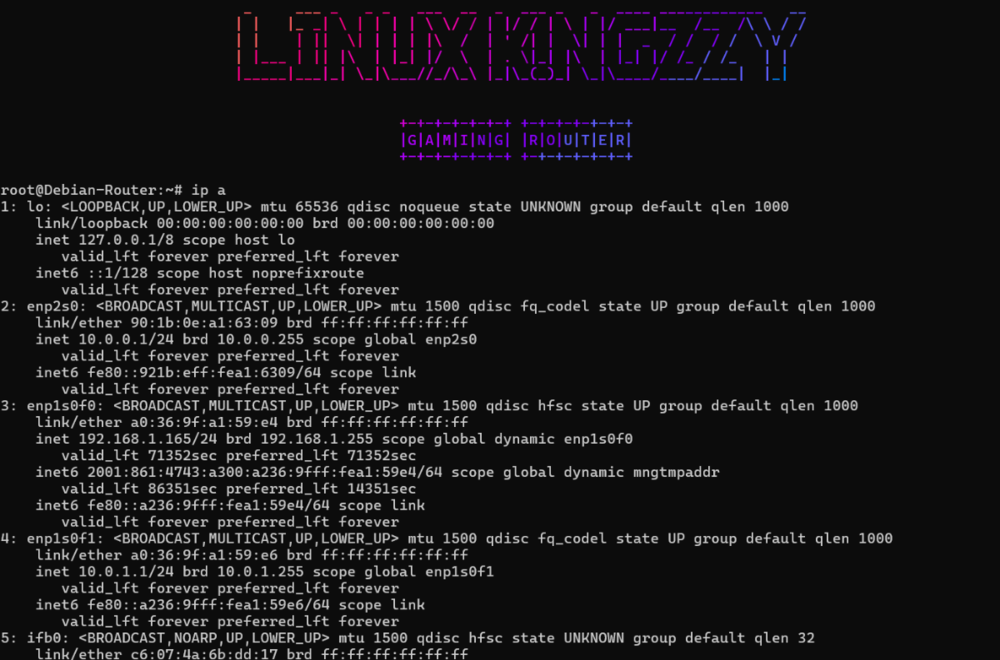
-



.png)
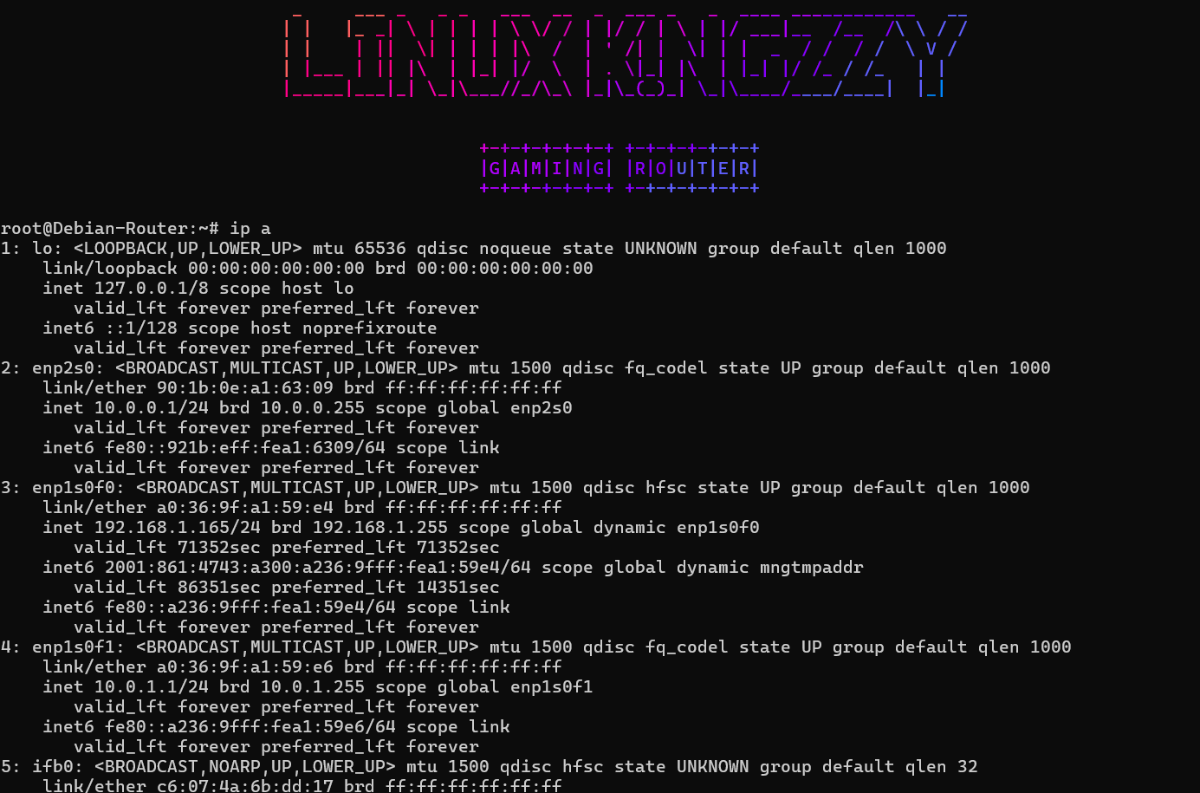

Call Of Duty Battlenet Issue again
in Netduma R3 Support
Posted
Anyway
just this error in its log:
`cli.lua: goto outils hook failed`
PS:
I didn't read it properly, and yes, I use AI to help me with my tasks to save time, both professionally and personally, like many admins and sysadmins.
But as you know better than anyone, if you don't understand it, unfortunately, AI isn't very useful, especially in the world of IT.
If you still have doubts, I can send you a screenshot of my qualifications.