

Newfoundland
-
Posts
2122 -
Joined
-
Days Won
8
Everything posted by Newfoundland
-
Not seeing a big difference in Wifi strength
Newfoundland replied to VeeDot's topic in Netduma R3 Support
Where is your router situated? do you have any other kind of electrical equipment near it? Did you test to insure there is no leakage and that the antennas are acting as normal. It’s why I asked to remove them and test to insure the radiation pattern is working as designed. If the signal remains the same without you have an issue that would indicate hardware. -
this extender supports 160Mhz so therefor uses DFS. WiFi Band : Band 1: 1.2Gbps @2.4GHz - 1024QAM; Band 2: 4.8Gbps @5GHz - 1024QAM
-
That would be an issue with Duma firmware as it’s not picking up IP allocation from the extender for clients. That’s an issue Fraser will need to look into. if you run a wire to it via a lan connection does it show clients then?
-
How are you setting this up, WPS or simply connecting to extender UI? Set it up next to the router to insure the signal from 5Ghz is seen then see if it detects it. If it does move it to location. If it fails then it’s signal strength issue. My old EX8000 use to have to be setup this way under the instructions. With WPS I had to repeat the setup twice to gain full throughput which was in the instructions. Off course that may not be applicable to the new extenders you have but also worth a try but important to set it up close to main router.
-
For home users with just the router, no switches or mesh points it’s not required. Yes it’s an old protocol but still in use but not as applicable as it was.
-
any good settings for 3000mbs internet
Newfoundland replied to artful40's topic in Netduma R3 Support
It’s only capable of 1Gb. Leave QoS off unless your network is congested with clients using up the available 1Gb. To use 3Gb you can use your old router if it can do the 3Gb and simple put the R3 into its DMZ and connect your gaming equipment to that. it’s up to you if the gaming equipment uses WiFi, if not disable R3 WiFi, disable QoS and simple use the geofilter and its options for best service. -
It should be fine, DLM would only really change for a short period if you reset multiple times in a short period. does this control the free WiFi that the hub transmit?
-
No, it’s pretty standard on many routers and is the old standard where RSTP is a more upto date version with level 3 layers the new version RSTP helps with OSPF and EIGRP for faster path selection. STP is 802.1D RSTP is 802.1W
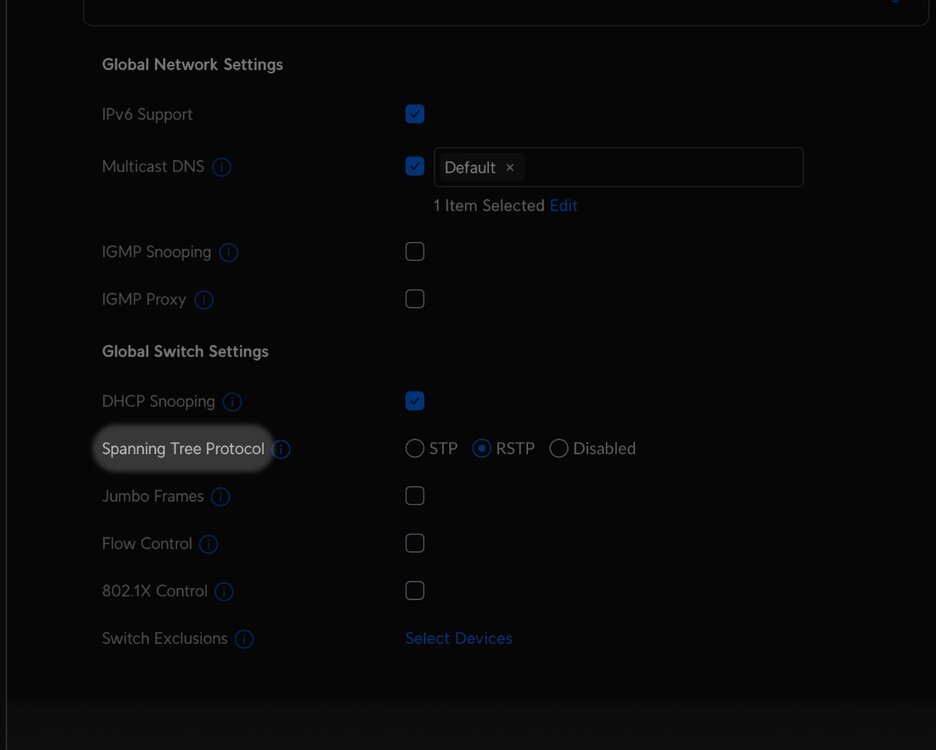
-
This is an extender yes? Is it showing up under Duma as an access point?
-
I’m off to the Philippines for 3 weeks to see my other half then back to sell up and move out of the U.K. to be with her. I hope they like my passport hahaha
-
DUMAOS 4.0 on the NETGEAR XR1000 router?
Newfoundland replied to met foxit's topic in NETGEAR Nighthawk Support (XR range)
Hope all goes well and you make a speedy recovery -
I’m fairly sure custom duty would be required. We do here in U.K. from say US for a router or power amp as example. We can look up duty fees on the government site. Now some companies offer and it’s shown others don’t and it would be common knowledge that your country would slap a duty on top. I’ve purchased gear from allover the world and it’s not the company who you are purchasing from that will or have to tell you a custom duty is required. It’s your responsibility to check when importing goods. https://www.amazon.co.uk/gp/help/customer/display.html?nodeId=G26L6NHEDGERVR8W even Amazon have guides to help where they ask you as the buyer to check for any additional custom duties.
-
Not seeing a big difference in Wifi strength
Newfoundland replied to VeeDot's topic in Netduma R3 Support
Hi, I’m going to ask a strange request. Take the antennas off and see if it remains the same. You can use on a mobile device an app called WiFi Sweetspots which is free. First test it with app with antennas attached then remove them and test again. -
What percentage or amount are they asking. Custom charges for importing varies across the board.
-
need help EA FC 24 ping improuve with R3
Newfoundland replied to Authentik06's topic in Netduma R3 Support
Wait for Fraser to pop along. bit of advice, don’t allow anyone to take control of your pc or into your network. Be safe online. -
A lot depends on your peering contracts from your isp. Most big isp companies here say in the U.K. have great peering contracts. Would this service help others, yes if they don’t have great services. I believe Asus use one as their gaming service already. I see no harm offering these services as a choice. I would post a thread under the suggestions forum.
-
Any chance you could screen capture this or even give a small video to help with your issue
-
What phone or mobile device do you have? Are you able to install WiFi Sweetspots. It’s free and is a nice easy way of showing your connection in a basic way. With it running you can walk around and see what is going on. if you can take a screen shot when you are around 6ft from the router then walk about and see what happens.
-
I guess you are asking if this secure connection can be added to the DPI list. I suppose they could try to accommodate it but the way it’s designed ie your connection with the cloud it should prevent the DPI from recognising your secure connection after all it’s suppose to insure a secure connection for security reasons. some DPI based routers simply ignore such traffic so it never shows up and is classed as uncategorised. Perhaps showing as a SSL/TLS connection might be one way too. it’s something the devs would know more about so hopefully Fraser will pop in and perhaps add it to the work load.
-
With regards to bufferbloat this seems to be an issue many don’t understand. You have a 1000 up and down service and the only time you will get congestion on that throughput is if you have a service or multiple clients eating up that amount. You should never need to cap it by 50%. Most end users don’t require a QoS that caps that amount unless you have the above. it use to be a case where that much throughput would grind routers but nowadays we see 10gig ports as processors and the sheer power of todays routers can handle such connections with ease. I know many like to use these online tests but they don’t always represent a true reading and it’s easy to get caught up in their figures where in reality you are simply capping your throughput to levels that are simply not required.
-
It’s encrypted and the DPI engine is simply not recognising the traffic. It’s a site to site encrypted connection to make sure your information is secure via the cloud. DPI engines are known not to be 100% accurate. It’s a library that needs to know as much info as possible and with the endless list of online applications they all do the best they can. these cloud services try to secure you through their own services to protect your information, it prevents your router from knowing what info is being sent. Not quite like DoH where all traffic is encrypted so the DPI engine is simply guessing and in your case it thinks it’s a game. might be hard to characterise that service as the purpose of the service is to protect your information. By rights your laptop for work should also be on an isolated network where it’s protected too so any compromised client can’t access your laptop. That way you keep work and home use separate and more secure.
-
I think only you can decide on the next step. There’s always a risk on newly released devices, even the giants like Apple suffer this. is the router useable, if so it’s really down to you which way you go. You can return then repurchase taking into account it’s on a discount or hang in and wait. Fraser does his best but he is only human and can’t solve issues that require a deeper look at. Give him some slack at the moment.
-
You need to wait till the devs are back from holiday. There is no magic wand to fix issues. in the mean time just swap routers over and wait for some update from Fraser. Go online and have fun gaming while you wait for the next update.
-
Hi and welcome. Might not work as you are on the wrong forum thread
-
MS increased once the router was installed
Newfoundland replied to pyroass's topic in Netduma R3 Support
Ok that’s great. Let’s ignore the packet loss at the moment, it’s not carried through and you would notice that to be honest. yes it shows jitter and an increase in latency at times. As long as there was no internal clients sending out it shows a slight jump here and there. It’s not huge but it’s there. Hopefully the devs can resolve this once back from the holiday period
.png)