


K0NSPIRACY
-
Posts
475 -
Joined
-
Last visited
-
Days Won
1
Everything posted by K0NSPIRACY
-
Is there any point to throttling connection then? It doesn’t sound like it would improve hit detection in game.
-
The only TP rule I have set up is Gaming/Voice (WAN) so should that be disabled if I start using Bandwidth Allocation? From my testing, the QoS sliders do limit the download/upload speeds when I do speed tests so is using both making my connection worse? Also what are the best settings to use for Bandwidth Allocation when gaming? I don’t need any other devices in my house to have much speed at all when gaming as I’m the only one in the house.
-
Is Bandwidth Allocation the best way to throttle download/upload then rather than using QoS sliders? I’ve always used the QoS sliders to try this but never really notice any difference.
-
Where do you live? The same method should still apply, so just try servers that are 30-60ms from your location on ping heatmap.
-
@Bul If you’re based in the UK, leave your home location there and “allow” the Italy and Spain servers when you start the game up (turn off auto ping and manually select them). Please note this may take a couple of start ups of the game to add both servers to the allow list. Once you’ve done that, use polygon method in geo filter to draw around Italy and Spain, then search for games. I only tried this late last night and only played a couple of games, so will need further testing but this is what worked for me so give it a try.
-
I was able to join Italy or Spain servers last night as a test, but I couldn’t tell which I was connected to as both were highlighted in geo filter during the game and pings are approx the same. Is there anyway to identify whether I’m connected to Italy or Spain…such as certain info in the Auto Ping data?
-
Found mislocated servers? Let us know here!
K0NSPIRACY replied to Netduma Alex's topic in Call of Duty Support
Would that cause UK WZ servers not to show up at all on DumasOS ping heatmap though? -
Found mislocated servers? Let us know here!
K0NSPIRACY replied to Netduma Alex's topic in Call of Duty Support
Have the UK Warzone servers been turned off? When I have just the geo filter covering the UK, I can’t find a game (usually after midnight) so have to expand the region, and the ping heat map is no longer showing UK servers since I first checked at approx 7pm. I’ve resynced the cloud but no change. Have Activision actually starting turning off UK servers? -
Found mislocated servers? Let us know here!
K0NSPIRACY replied to Netduma Alex's topic in Call of Duty Support
Yeah that’s what I figured. May be the player population is dropping off as they never used to offline the UK servers at all. -
Found mislocated servers? Let us know here!
K0NSPIRACY replied to Netduma Alex's topic in Call of Duty Support
I don’t play much at weekends but I can confirm that I’m unable to find games on UK servers after approx 2am GMT during the week. I usually have Geo Filter set to 200 miles just to cover the UK but I have to increase to 500 miles after 2am and it usually finds games on French servers. -
Found mislocated servers? Let us know here!
K0NSPIRACY replied to Netduma Alex's topic in Call of Duty Support
I don’t know if this is the right place to post it, but I couldn’t connect at all to UK servers after 2:30am last night searching for duos games. Geo Filter was set to 200 miles and had to increase to 500 miles where it found servers in France. -
How to force connection to a server in another location/country?
K0NSPIRACY replied to Vinman's topic in Call of Duty Support
Thanks Fraser. I just checked that server with an IPlocation and it shows that it’s either New Jersey or Singapore...I’m not sure which result is correct tbh?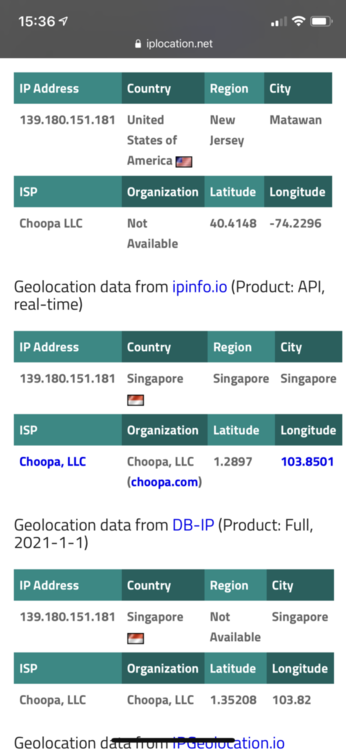
-
How to force connection to a server in another location/country?
K0NSPIRACY replied to Vinman's topic in Call of Duty Support
Yeah France, Germany, Netherlands and UK are the only EU servers that show on Ping Heatmap for Warzone. Further afield, the only other WZ serves shown are Russia (Moscow), South Africa (Cape Town), India, Malaysia, China, Japan, Australia and then 11 locations in America. -
How to force connection to a server in another location/country?
K0NSPIRACY replied to Vinman's topic in Call of Duty Support
I’m based near Birmingham (UK) and have only tried connecting to India, Malaysia and Hawaii (which don’t actually exist). I’ve also read that Italy or Spain could be worth trying but they don’t show on Ping Heatmap. Where would you recommend trying to connect to? I’l try the cloud flush before I play next. 👍 -
How to force connection to a server in another location/country?
K0NSPIRACY replied to Vinman's topic in Call of Duty Support
Ok I’ll give that a test but it’s not a priority at the moment tbh. Just switched over to BT from Vodafone today...had a bit of a minor job to getting back devices back online via the R2 but got it sorted, so just going to go back to basic testing and monitoring for a few days first. The only tests I did with locations were last week when I did change whilst on the game, but after you told me to do with game closed, I was still unable to connect to other server locations. What does “flush the cloud” mean? -
How to force connection to a server in another location/country?
K0NSPIRACY replied to Vinman's topic in Call of Duty Support
All I get when trying to test forcing connection to a server in another location is a never ending loop of searching for a game and failing to connect. The only times it looks as though I may connect, I get a message saying unable to connect to data centre.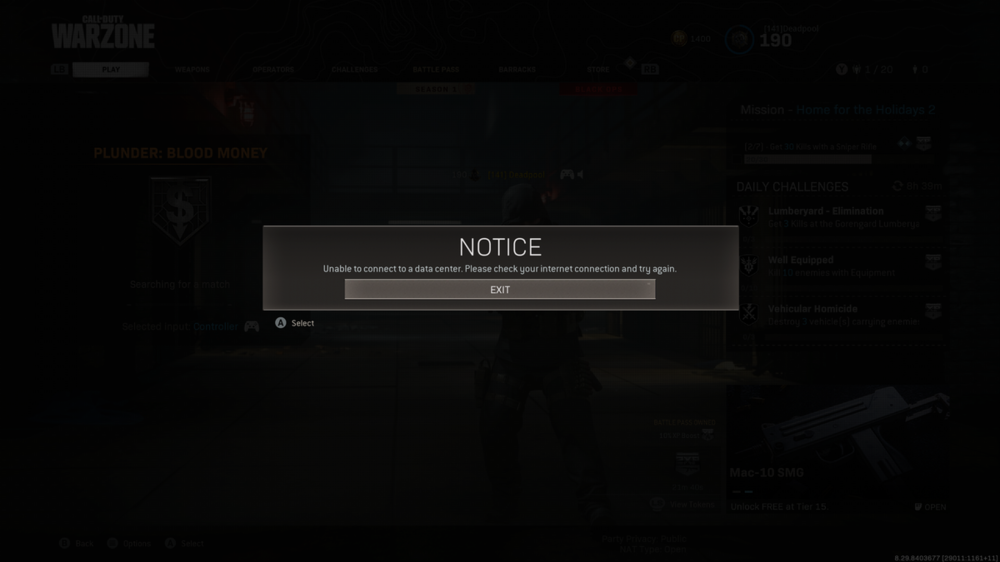
-
How to force connection to a server in another location/country?
K0NSPIRACY replied to Vinman's topic in Call of Duty Support
That makes sense. The only way I could find a game after this happened was to close the game, change my Geo back to actual home location and relaunch. -
How to force connection to a server in another location/country?
K0NSPIRACY replied to Vinman's topic in Call of Duty Support
I've also tried testing this but was unable to find a game after it searches for 5-10 minutes then times out. I did a ping heatmap test then in Geo, I set tried setting location to India and Hawaii with a good radius and no ping assist, however I could see that the game was still trying to put me in European servers so DumasOS would block those servers and the search would repeat on loop. -
A few questions before I buy Netduma R2...
K0NSPIRACY replied to K0NSPIRACY's topic in Community Discussion
Makes sense. Thanks Fraser...and happy New Year! 😊 -
A few questions before I buy Netduma R2...
K0NSPIRACY replied to K0NSPIRACY's topic in Community Discussion
Hi Fraser. I did some tests last night with QoS and brought the sliders down to about 50%. It was only when I was doing some speed tests on my iPhone (not whilst gaming) and getting slow results that I realised that the QoS restrictions was actually why I was getting the slow results (approx 50% of download and upload speed as per the 50% on the sliders). This brings me on to my question... My other non-gaming devices (Sky tv, Apple tv, Nest, iPhone, MacBook) are usually just powered on and not using up bandwidth, so do I really need to use QoS if no other devices are being used whilst gaming? I can understand the benefits in a home with multiple people using multiple devices using up bandwidth, but in my situation I'm not sure what benefit QoS would provide if no other devices are being used? -
A few questions before I buy Netduma R2...
K0NSPIRACY replied to K0NSPIRACY's topic in Community Discussion
Ok thanks. I did a few checks and I noticed the second one (053f965c.setaptr.net) is in California or Utah...I have no idea how I would connect to that with Geo-Filter set to 175 mile radius of my UK location? -
A few questions before I buy Netduma R2...
K0NSPIRACY replied to K0NSPIRACY's topic in Community Discussion
Thanks Fraser. I'll continue to test with the QoS to find out what works best, but I'm not sure if its hit and miss with my connection at the moment so will just play around with it. I think you were right about the Geo-Filter causing the high XBL latency test result...I tested with a ping assist of 30-50ms and the latency dropped back down straight away to what I usually see at 22ms so that's reassuring. I'm a bit confused with the servers I'm connecting to whilst playing Warzone...apparently I'm connecting to both "dedicated" and "peer" servers, but surely they wouldn't have P2P servers for Warzone? Are these just named or flagged incorrectly, and does it matter? How do I find out where these are located? A few examples... Host type: Dedicated ID: c72d844fca663a3f Domain name: 45.63.102.79.vultr.com Host type: Peer ID: f705915ca2963a3f Domain name: 053f965c.setaptr.net Host type: Peer ID: b4d4cb967153494e Domain name: vi-ads-1339.ads.vi.net Host type: Peer ID: 2d5fdea9fcccaeb3 Domain name: 95-179-204-169.choopa.net Host type: Dedicated ID: 0a689b6605a9e9ee Domain name: 104-238-169-102.choopa.net Host type: Peer ID: 01d4531e71a04f54 Domain name: Unnamed Host type: Peer ID: 464e6631ebe57c81 Domain name: Unnamed Host type: Dedicated ID: 9718f5c0b5366469 Domain name: Unnamed Host type: Peer ID: 2e5f5d28fccdaeb3 Domain name: 95-179-205-40.choopa.net Host type: Peer ID: b4d4f8c37153494e Domain name: Unnamed -
A few questions before I buy Netduma R2...
K0NSPIRACY replied to K0NSPIRACY's topic in Community Discussion
Just did the "test network speed and statistics" on Xbox One X, and I'm getting 154ms latency which is usually around 22ms. Is this something to be concerned about now? Before I had the R2, I would usually reboot the Vodafone router to try to resolve this...is this likely to be anything to do with the QoS? -
A few questions before I buy Netduma R2...
K0NSPIRACY replied to K0NSPIRACY's topic in Community Discussion
I've just had a quick look at the QoS and unfortunately this doesn't make sense to me as the variables are different so not entirely sure what I'm supposed to be mirroring or what I need to do to mirror the values? The variables per test are as follows: Speed test: download/upload/netflix speed Ping test: average ping/jitter/packet loss Ping test (under load): download/upload/idle Could you please confirm what values should be mirrored in which tests and how this is achieved. Also, do I need to then further change the bandwidth allocation for gaming? As per my question above, why would anyone recommend dropping that to 1.08...would that be to try to get lag compensation working in their favour or something? -
A few questions before I buy Netduma R2...
K0NSPIRACY replied to K0NSPIRACY's topic in Community Discussion
Thanks Fraser. I think that makes sense so will look into the settings. My speeds have remained relatively high and stable so far today so presume it was just network issues with Vodafone yesterday.
.png)