


Netduma Greg
-
Posts
79 -
Joined
-
Last visited
Posts posted by Netduma Greg
-
-
On 1/10/2025 at 4:38 PM, Dlon said:
Hello Greg,
Sorry for my late response.
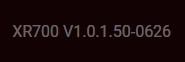
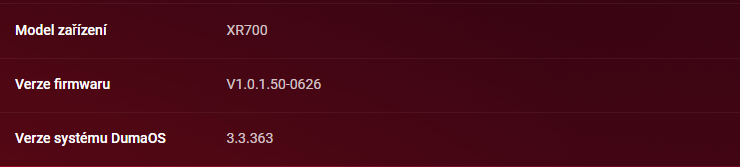
Model: XR700
Firmware version: V1.0.1.50-0626
DumaOS system version: 3.3.363
If there are some more details you need, let me know.
ThanksThank you,
I'll see if I can replicate the issue with that version in the mobile app.
-
With the current release you can log in with an R1, although there are a few compatibility issues that I'm going to fix.
-
As long as your R1 is above DumaOS version 3, it should work. I'll test the app with an R1 tomorrow.
-
Hi, could you tell me the router you are using and it's version, if possible?
-
-
Tested on XR500 and XR1000, will be fixed in the next app release, it just need to pass testing.
- Caution and Netduma Fraser
-
.png) 2
2
-
Hi, could you tell me your exact model of your unit?
There is a chance we hide Traffic Controller (Settings->Internet Rules) in the app on NETGEAR units below DumaOS version 4.
Previously this might've not been a problem because we couldn't identify some units (like the XR1000 and the XR500), but now we do.
-
On 6/22/2024 at 11:04 AM, Movement said:
Hello why on geo filter search for location not working
-
user.info lua: Sent request to https://api.netduma.com/api/v1/geocode/autocomplete?text=London%2c United Kingdom with headers {"content-length":"0","content-type":"application/json","Connection":"keep-alive","Authorization":"Bearer eyJhbGciOiJIUzI1NiIsInR5cCI6IkpXVCJ9.eyJzdWIiOiJyMl91c2VyIiwiZXhwIjoxNzIwMjA1NDQzfQ.XOzFQv3J8QVrMUMLChuqxBeim3HM4bpsyEMY68T4KE0"}
user.info lua: Error: Received http code 500 with body Internal Server Error
user.info lua: Error: the server replied with an invalid message: Internal Server Error - Sat Jun 22 2024 08:24:27
-
user.info lua: Sent request to https://api.netduma.com/api/v1/geocode/autocomplete?text=London%2c United Kingdom with headers {"content-length":"0","content-type":"application/json","Connection":"keep-alive","Authorization":"Bearer eyJhbGciOiJIUzI1NiIsInR5cCI6IkpXVCJ9.eyJzdWIiOiJyMl91c2VyIiwiZXhwIjoxNzIwMjA1NDQzfQ.XOzFQv3J8QVrMUMLChuqxBeim3HM4bpsyEMY68T4KE0"}
user.info lua: Error: Received http code 500 with body Internal Server Error
user.info lua: Error: the server replied with an invalid message: Internal Server Error
It seems the API we used went down without notice. I'm going to add an integration to another one asap so it starts working again. No firmware update is needed.
-
user.info lua: Sent request to https://api.netduma.com/api/v1/geocode/autocomplete?text=London%2c United Kingdom with headers {"content-length":"0","content-type":"application/json","Connection":"keep-alive","Authorization":"Bearer eyJhbGciOiJIUzI1NiIsInR5cCI6IkpXVCJ9.eyJzdWIiOiJyMl91c2VyIiwiZXhwIjoxNzIwMjA1NDQzfQ.XOzFQv3J8QVrMUMLChuqxBeim3HM4bpsyEMY68T4KE0"}
-
Hi,
One option is what @Netduma Fraser said, the other is a known issue before DumaOS versions 4.0.23 where the UI fails to load the data from the router.
If you are before that version you can always check if that happened by opening the browser console with F12 and see if there are any "Could not validate payload" errors showing up.
- PharmDawgg and Krush
-
2
-
Quote
COD feels as if it is playing better when the router can ping the host, this may just be the placebo effect; though I do feel that not as many people are flying round the screen, like Billy Whizz.
By default none of the COD servers allow pinging directly, when pinging happens on the UI for them we are doing additional work to do that. It should not influence gameplay in any way (sorry @Netduma Fraser I have to correct you there).
The Stabilised state for Steady Ping is the only thing that directly influences the gameplay.
Some details on what Steady Ping does exactly and why is it working even when we can't ping:
Ping is always a request->response and we measure the time for this roundtrip. Steady Ping on the other hand just sitting on your router and processing the response part. Your game server sends these in perfectly uniform intervals (this interval is the tickrate), but when they reach you the intervals are not so uniform because of the internet. So what Steady Ping does that it applies an additional delay (this is what you see in the graph) so it has a window of time where it can make these responses arrive in order and in uniform intervals to your PC/Console, so in the game everything appears as smooth as the server intended. (Disclaimer: Ping and game traffic are different types of traffic in reality, but the mechanism is the same to process them)
This is the reason why even if we can't ping (we don't have the request side) everything still works, or even if the ping graph might have a spike you will not see this in game because it might've happened on the request side.
Also this is the reason in-game ping (graphs) are always more accurate.
- PharmDawgg, Zennon, YT_LowPingKing and 2 others
-
1
-
 3
3
-
 1
1
-
I looked into it and it has the same 2 issues that I've seen today already, both bugs and they need to be fixed.
-
The UI fails to parse Steady Ping data and it gets stuck in "Stabilizing" state for a long time, even if the game is stabilized
-
When we start pinging it gets stuck establishing a ping for a long time instead of getting a ping (or not) between 1-5 seconds. That's why the UI is in the loading (Waiting for host) state for a long time
-
-
Ok, I found these issues, I'll indicate which ones are bugs and which ones I need to follow up on.
- We fail parsing Steady Ping data in the UI in some cases so game hosts are forever stuck in the "Stabilizing" state or the state they were. - Obvious bug
- Steady Ping not working Destiny 2, it is forever stuck in the Stabilizing state - this looks like it's a bug, if Steady Ping attempts to stabilize that means it would benefit from it but we fail to do so. I'll talk to QA and other devs if they know this already. If they don't, they will. - this is most likely a bug, but tbh we were in the lobby for almost the whole duration while I was looking at this. If it is the same during the game it is definitely a bug.
- Steady Ping failed (desynchronised) in Finals. We could not replicate this in the remote session, but I'll pass this on see if we can replicate it internally instead. - this can be a bug, or just the connection was that bad during that time that it broke Steady Ping temporarily, then it retried and succeeded. Maybe we can do it better in cases like that I don't know, I pass this on as well.
Again, thanks for the help @FallenGhoul
-
Quote
If there are no servers in your filter radius GeoLatency just adds more latency to the nearest server (like Apex) - expected, but confusing because the game has literally no choice but to connect to that server so you end up with higher pings.
How GeoLatency works is if the server is outside your radius it elevates the ping to it's target value, so all servers end up with the same ping. In your case you ended up connecting to France instead of the closer Saudi Arabia server for Apex because to the game they appeared the same. This will be reviewed so this exact scenario does not happen (maybe it will add a fixed percentage to the existing ping instead, but it needs an internal discussion)
-
Had a look, here is the list of issues. Some may end up being working as expected, but I mark the ones that are definitely bugs.
-
Siege not compatible with Steady Ping - this may be because Steady Ping doesn't provide any benefit to the game or we just don't support it yet, have to confirm this one.
-
Blocked servers can be hosts because of GeoLatency, but we ignore them for Host detection (to show ping) - I rewritten host detection since then but it has the same issue, this is a bug.
-
Geo-Filter Map stops working after a while (15 minues?) not showing any changes in connections - this is a bug (ofc) for front-end
-
Pinging can end up in trying to establishing a ping for a very long time showing the pulsating skeleton element - bug for back-end
-
Geo-Filter can't ping servers that Ping Heatmap can, especially Console devices in Geo-Filter - bug for back-end
-
Some servers block ping for periods of times, then allow it again - nothing we can do about this one but it probably looks confusing. Steady Ping status still displays in this case which is correct.
-
If there are no servers in your filter radius GeoLatency just adds more latency to the nearest server (like Apex) - expected, but confusing because the game has literally no choice but to connect to that server so you end up with higher pings.
Edit: Confirmed, Steady Ping is supposed to work with Siege as well. Now they know it isn't working.
-
-
Hi, from all of you that has the WebGL issue I need all of these details:
- your OS (and it's version)
- your Chrome Version
- your GPU name
- In Chrome in chrome://settings/system "Use hardware acceleration when available" is enabled
The first issue here is that we don't handle it better if WebGL is not available on the UI.

App hasn’t work in months
in DumaOS Mobile App
Posted
Because I can't replicate this for the life of me, the crash log says it crashes on restoring app state and it started happening for you after an app update my first guess is there is some data left over for the old version of the app.
I assume you uninstalled and installed the app multiple times already (based on your video). Can you check there is no data stored for the app in your phone and on your iCloud after you uninstalled it?