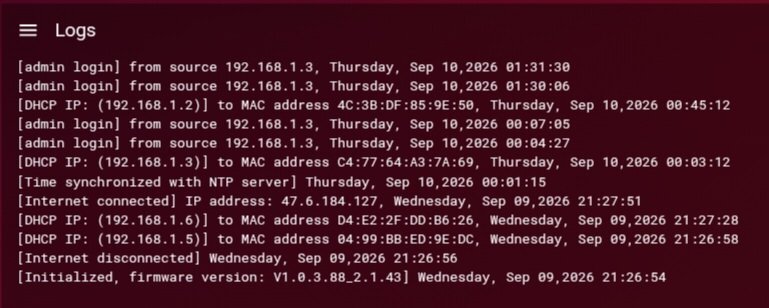
My XR1000v1 router has been updated to firmware version 1.0.3.88_2.1.43 from firmware version 1.0.0.74.
Since this update, the first major issue I have expirenced is all devices both randomly and predictably dropping connections over ethernet and wifi at the same time before regaining internet connection. My Galaxy A15 will specifically say "connected without internet." All LED light indicators on the router show solid white with no error lights on the EU2251 Modem. I'm not on fiber or pppoe as my ISP is Spectrum. I have power cycled the modem before the router. All devices have been address reserved with no randomized mac addresses. All IPs and MACs appear to match in the Address Reservation page and Device Manager page with no ghost devices present.
The second major issue, is that once QoS has been enabled (unchecking "Disable QoS" in the three line menu) all connections immediately drop briefly. Setting Congestion Control to 'Always' also causes it to behave erratically with speeds falling far below set slider percentages also with potential connection drops. Packet loss, abnornally high ping values flollow. The Connection Benchmark, Xbox speed test, Ookla speed test all show similar results tested with an ethernet connection to an Xbox Series X. When this issue is present, it has been confirmed to me by multiple others in an Xbox live party that my voice becomes broken/laggy. I don't believe this issue is a visual bug.
Setting Congestion Control to 'Never' does not fix the issue. Disabling QoS entirely does sometimes fix the issue, but once re-enabled by unchecking the "Disable QoS" box, the issue immdiately returns with all symptoms including an immediate brief connection drop to all devices. Line speed is 1gb download, 40mbps upload. Input speed is 940mbps download, 40mbps upload. This speed input was used without issue on the previous firmware version. Sliders are set to 80% download and upload. These sliders worked fine on the previous firmware version.
When updating the XR1000, I did so over a wired connection using the browser UI on Edge. When the first attempt to update was initiated through the update page, it initially failed. I was able to re-access the page, and attempt a second time. This attempt succeeded. Four factory resets (three pinhole and one erase) after the update has not cleared these persistent issues, along with multiple power cycles and UI reboots. I would like to know if this first failed attempt might have caused an issue despite a successful second attempt, or if there is something else wrong.