


Redflame
-
Posts
36 -
Joined
-
Last visited
Posts posted by Redflame
-
-
19 hours ago, Netduma Fraser said:
No fix specifically yet, there is a recent topic on the matter which may have some useful info for you https://forum.netduma.com/topic/60877-pppoe-session-not-automatically-reconnecting-every-24h-–-netduma-r3-firmware-40540
Hi Fraser
Thanks for information. So from what I read, you have to go back to older firmware and do a certain approach to get it to not disconnect, but you also noted you may not have an issue if you have a static ip?
I have order a static one with my isp due to having nat issues with my current isp.
-
I am moving from my current ISP to a newer ISP.
There may be a chance that my service could go live without the new router arriving yet therefore I may need to plug my R3 directly into ONT until I get new router for DMZ.I was told not so long back, that there was a disconnect bug with direct PPPoe.
-
On 1/16/2026 at 3:07 PM, Netduma Fraser said:
You shouldn't have a double NAT if the R3 is in the EE hub DMZ so I'd suggest checking the WAN IP on the R3 is the same as the IP entered in the DMZ.
In that scenario if you need PPPoE for example then yes you can just put those details in and leave everything else the same. You may need to fine tune your Congestion Control settings a little more to get the same results you're used to but otherwise it would be fine. I would look into the DMZ thing though first as you can see reduced speeds and there is also a disconnect issue with PPPoE we're looking into. The R3 won't change any settings unless you change them so no need to screenshot.
If you have a double NAT even after connecting to the ONT then you have a CG-NAT in which case you only have these options to resolve it:
- Get a static public IP from the ISP (usually a charged extra)
- Use a VPN (using a VPN generally gives you a moderate/strict NAT anyway, also an extra charge)
- Change ISP to one that doesn't use CG-NAT
Hi Fraser
Before getting back you I wanted to check lots of stuff.
I can’t do the windows/pc test. We have a laptop but bizarrely my mom’s laptop doesn’t have an Ethernet port.
R3 and EE hub = the R3 wan ip address is same as DMZ.
So I did port forwarding for cod. And the game still reported moderate Nat type with port forwarding.
My Ps5 connection test says I have the type 2 Nat type.
I asked EE myself for clarification on this and I know you can get conflicting info from isp based on agent, but the agent was adamant they use CG-Nat on all products fibre and mobile (some customers on forums argue they don’t use it for fibre).
Although when I was with BT before my migration opening up a port to cod services give me open Nat.
So I’m guessing it’s highly plausible that I’m sitting behind CG-Nat. My contract is over in May so I’m going to PlusNet (as BT backbone does give me a good below 1ms jitter connection to most game servers if my local network is kept in check with QOS)
Or I’m going to try Sky but option 61 hurdle worries me lol.
Thanks for all your support, I am very grateful.
-
43 minutes ago, Netduma Fraser said:
You shouldn't have a double NAT if the R3 is in the EE hub DMZ so I'd suggest checking the WAN IP on the R3 is the same as the IP entered in the DMZ.
In that scenario if you need PPPoE for example then yes you can just put those details in and leave everything else the same. You may need to fine tune your Congestion Control settings a little more to get the same results you're used to but otherwise it would be fine. I would look into the DMZ thing though first as you can see reduced speeds and there is also a disconnect issue with PPPoE we're looking into. The R3 won't change any settings unless you change them so no need to screenshot.
If you have a double NAT even after connecting to the ONT then you have a CG-NAT in which case you only have these options to resolve it:
- Get a static public IP from the ISP (usually a charged extra)
- Use a VPN (using a VPN generally gives you a moderate/strict NAT anyway, also an extra charge)
- Change ISP to one that doesn't use CG-NAT
Hi
So I double checked.
Wan IP > 192.xx.xx.xx is the same as the static ip that is set on ee hub - the one I used since day one.
public ip > is the same one that call of duty, whatismyipaddress dot com and ip info see.
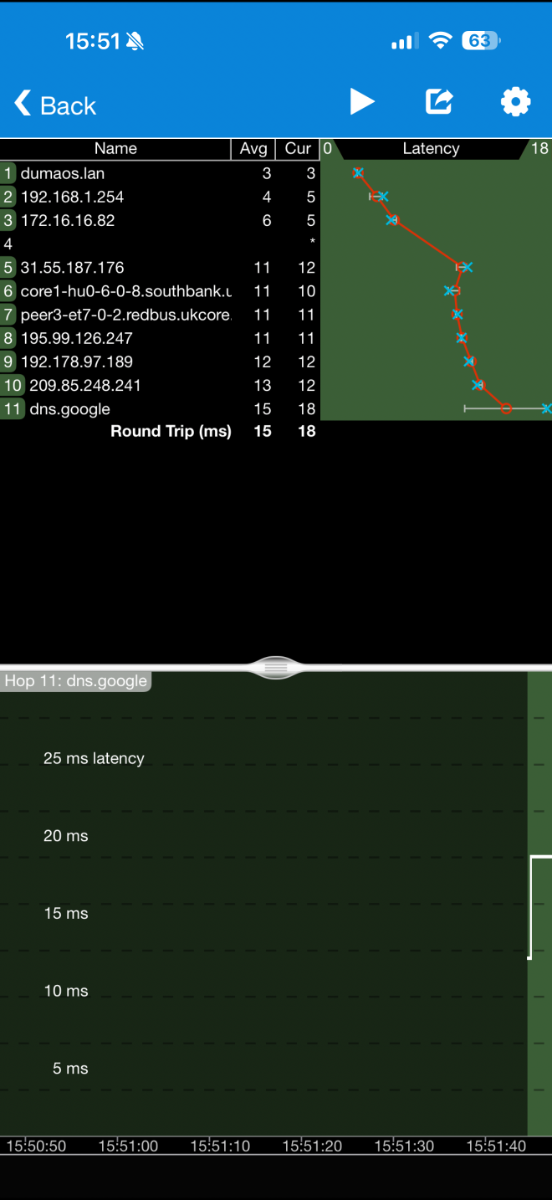
I don’t know if this is a sign of double Nat or just the way things work in DMZ. But I noticed in trace routes that after dumaos.lan I hit ee router default gateway.
I’ll show a screenshot,

-
On 12/9/2025 at 8:41 PM, Netduma Fraser said:
Good to hear, thanks for the update, glad you're having a good time!
Hi Fraser I hope you and your team had a good Christmas and 2026 is treating you all well so far.
I was wondering if i could ask your advice. Due to my setup (Using EE hub with the R3 inside its DMZ).
I have double Nat. My ps5 doesn’t seem to care, but my Xbox is not happy about it.
So if I were to plug my R3 into my EE’s FTTP ONT, would I need to setup R3 again or can I just go to wan settings on Duma os app and put sign in details?
Also, if this approach doesn’t go well and go back to ee DMZ. Should I screenshot my current wan settings or will the router automatically revert to previous settings once reconnect to EE hub?
Just to reinform you of my current setup.
EE Hub WiFi is off, UPnP is off on ee hub and R3 is assigned a static ip and in the EE DMZ.
R3 has UPnp on.
-
On 11/28/2025 at 3:40 PM, Netduma Fraser said:
Ping Optimiser can be a bit hit or miss as the servers are not always available and they don't have a huge abundance of servers available. Great to see the results you're getting there with it!
It's adding about 10ms to your ping which is the round trip time to absorb any jitter you might get. I would assume the tick rate isn't reading correctly as it's quite low otherwise, it's the rate at which the server updates information, higher the better. Steady Ping isn't for everyone, some people love it, others not so its just about finding what works best for you really.
Yeah 632 is absolutely plenty - 25Mbps is a 4k stream roughly so you have more than enough.
Usually we say to prioritize your device as well as gaming to act as a backup for prioritizing but if you're regularly downloading on the console itself while playing then probably best just to prioritize gaming.
Thanks for information.
Yes I found the sweet spot now on cc now.
My pings are usually rather low but there’s a lot jitter on my path so that can cause negative feedback from game especially in PvP. So Steady Ping helps me. It makes hit markers and incoming landing with good frame by frame accuracy rather than massive bursts traffic like the famous one hit/10 bullets all in one.
I will prioritise it as it’s very I download during gameplay. It was on off. I feel having backup it’s better than not

BTW I can fully BF6 without having filter turned off in geo filter. Plus all servers I get seems to be on their rightful location e.g London or Frankfurt.
So thanks to you and your team for your hard working locking that down

-
Server ID - IKUGH4
Geo filter map location - Oklahoma City, USA
Real location - EU
I was playing BO7 co op end game mode and this popped up in USA. But ping was nowhere near USA, so I strongly believe it was misplaced.
My ping to server from uk was 30-35ms.
Usually those are pings I get to Cod Madrid, Milan and Warsaw servers.
-
Thanks very much, Fraser. It wasn’t as hard as I thought it would, yay. I’m familiar with interface a bit due to EE WiFi Enhancer, But I’ve been trying to get most out of my R3 so a few things:
1. BufferBloat and Ping Optimiser
So I ran Ping Optimiser and it kept reporting n/a on new ping. I thought it might be glitching out as I know there had been issues with it before. But I don’t think it couldn’t do any meaningful change to my connection, not a glitch.
When I first step up R3 it gave me an 95 cap up and down.
So I decided to do a waveform bufferbloat test to ensure R3 is doing its job. We have a laptop but no Ethernet port, ps5 browser is inaccessible you can get around it to open but it doesn’t function properly. So I got my series x and plug it into Ethernet to R3 to do the test.
95% cap down/up on internet speed of 915/111
Grade A+
Idle Latency 9msDownload Latency 5+ms > total 14ms
Upload Latency 0ms > total 9ms
Jitter - Idle 0.5ms, download 2.4ms, upload 0.7ms
I tried to get rid of that 5ms by lowing down to 90.5 percent of 915, and 87.5 percent of 111
Test 1:
Grade A+
Idle Latency 9msdownload latency 4ms > total 13ms
upload latency 0ms > total 9ms
Jitter - Idle 0.8ms, download 4ms, upload 3.5ms
Test 2:
Grade A+
idle Latency 9ms
Download Latency +3ms > Total 12ms
Upload latency 0ms > 9ms
Jitter - Idle 0.9ms, download 2.5ms, upload 0.7ms
I think it’s great R3 is able to completely kill off upload latency, before it I was getting 22-45ms when uploading. As a ps5 user I use the auto upload feature on PSN when I get a good sniper shot. So this doesn’t affect gameplay anymore!
2. Steady Ping
I like the concept of steady ping. It does seem to help in call of duty multiplayer a lot. I understand it adds a buffer and it’s slightly delaying communication. Is that both upstream my input to the server, or the downstream snapshots to my ps5 or both?
Also what does the tick rate synchronisation o 1.2 actually mean itself? In Battlefield it’s like 1.9-2.5 but in cod multiplayer it’s jumping all over the shop, 8 > 12 > 17.
My Steady ping usage This is a mixed bag. If I use it when setting my CC to 95 or 70 it feels good, but if I use it with my current 90.5/87.5 it feels not good. Without steady ping using 90.5/87.5 it feels okayish, but I feel the slowdown/speedup/normalish pacing - I guess due to irregular packets arrival. At 95 without steady ping, again I can feel different pacing more intensely At 70 percent I don’t feel the irregularities.
So I would say it works well at 95 or 70 I’m debating what should I hit. I have a streaming household, usually either 3 tv streams or 2 and one game - so at my current speed I’ll be dropping down to 632mpbs download and 77.7 upload, which is still plenty I feel? But 95, which ping optimiser set, seems to work well.
Smart boostWhen it comes to smart boost, should I prioritise my ps5 on device list or is gaming as no1 priority enough? I have noticed when playing cod if another game is updating from patch/dlc ping can spike with ps5 as a favourite.
Double Nat
Nothing on PS5 has screamed double Nat. Like all gameplay is superior to before. I can play gta online, which uses peer to peer just fine and play server hosted games like cod/bf fine no issues.
Series x though is complaining about double Nat. I’m not going to use much as family/friends mainly play on PS5 and PS games now not Xbox anymore, so I use my ps5 more for that reason. Is it normal with my setup with ee and DMZ to have double Nat or did I do something wrong?
-
19 hours ago, Netduma Fraser said:
It's your topic so we can continue here if you like!
With Sky you're correct it does require DHCP Identifiers/PPPoE details to be entered so if you want to keep tinkering to a minimum you'd probably want to avoid it - it'd be fine once setup but more of an initial headache. For TalkTalk I *think* it would be easier but I don't know if they have specific requirements or not. If EE allow third party routers to be used then you could connect it direct to the ONT, if you require PPPoE then you'd need to enter that in the router which may reduce your speeds yes.
Hey Fraser, I’m grateful for all the advice.
I’ve set up the R3 and got it working. I managed to do it via EE HUB. So ONT > EE Hub > R3. I’m a novice at this so not sure if I done it right. I use the netduma YouTuber channel on setting up R3, research using Google on EE hub and then went from there.
So have I done this right? R3 is plugged into EE Hub lan and the cable is going into R3 wan, just like in your video > The private ip EE Hub Gave my R3 is reserved for R3, so it always uses it > on EE turn on DMZ for the R3. Turn uPnP off on EE hub > Disabled all wireless signals (2.4/5Ghz) on EE Hub > all devices that used EE WiFi, now are connected to R3. This is the best approach right? I have a moderate Nat type on cod on ps5, but no double Nat. I had moderate on EE as well btw.
I plan to set up WiFi extender that I used with EE with R3, as downstairs has one large room with a blackout zone for internet no router can sent it signals. So hoping my TP link WiFi extender and R3 play nice.
The hardest part of setting up R3 was convincing the household to have a WiFi time out while I did the set up, lmao.
Im mainly using Duma Os app on iOS. When firmware updates arrive, will they arrive at the app and I just confirm & app+router does its thang? Similar to the update it does when setting it up?
My experience with R3 so far
So after using WiFi enhancer BO6 was more playable but still felt like I was losing fights I should win.
With R3 I don’t feel at disadvantage, my brain was literally saying ‘you’re going to die in this fight’ so everyone I won, I was surprised. This was with smart boost only and with steady ping plus ping on, trying to figure out which is best to use.
And my god BF6 is a night and day difference. I was actually rage quitting previously even with EE qos. Fights are fair now. Before I could empty an entire clip into a player and they would look at me and bang I’m death. Now we trade shots and if I die, and it feels good coz I knew I wasn’t quick enough and I should have lost that fight. BF6 last night was so enjoyable.
My family members would sometimes get buffering here and there, even with streamer mode on the EE hub, but they had none so and are happy.
-
5 hours ago, Netduma Fraser said:
We're still working it out at the moment as it's a recurring issue, we're having a dev look into it in more detail before we release a new cloud so we can hopefully get it sorted once and for all
No worries, just wanted to update you an EE update had come but issues still linger, but glad you and your team are on the case.
Fraser, if you don’t mind indulging me. Please say if you want me to move this another discussion, I’ll it edit out and start a new general discussion.
But I’ve had a few issues with WiFi enhancer with EE. It’s not the router or your feature set, as geo work but game mode just gives up working. This isn’t the only issue, it’s mainly down to their buggy customer app. The feature set is limited, you can only toggle boost on or off, and you can’t set congestion control limits, just run ping optimiser and hope the values are good, although you can’t see what values it sets. There’s no router admin settings, you got to access DUMA os via going deep into ee WiFi controls things.
My warzone squad mate, told me to just get an R3 because you can be more in control plus you know what settings are set, etc.
I got an R3 before, we did talk about it back then. My BT hub didn’t allow or have a bridge mode, and messing with DMZ wasn’t something I was qualified on. So I was using R3 directly into Bt Ont but couldn’t get it connected, you did offer to help but as I was going away, and my streaming made family don’t go to bed until 12:30 -1am troubleshooting was challenging coz of this. I sent it back because I was weary what if it didn’t work and migrated from BT to EE for simplicity.
Im leaving EE as my issues with the service, some of advisors were rude and blame the issues on my set up lol. Sadly they don’t have your kind, pleasant mannered willingness to help.
Ive just order an R3
So the two isp I’m eyeing up is sky or talk talk, they use DHCP/IPOE. I heard sky uses something 61 or 62 which R3 may struggle with. I heard there shouldn’t be an issue with talktalk. So could you confirm if the R3 as a pure router would work with these? And am I right to assume that I can plug it into my ee Ont (modem) and it’ll able to work, but just at reduced speeds?
-
On 11/13/2025 at 3:10 PM, Netduma Fraser said:
Appreciate the understanding! That's a good point, I'm not sure if they keep to that plan for us as the cloud would effect every router but it's quite possible, will let you know if I hear anything also.
Yesterday November 17th EE app had an update, and that night app underwent maintenance I thought maybe is this. It was unplayable without having the filter off.
it was USA again. I didn’t write them down, but they were VG something possibly VGA? So either update isn’t done, or there’s either some ip your team haven’t got or these are new servers.
Also game mode doesn’t boost BF6 packets still.
-
On 11/10/2025 at 7:32 PM, Netduma Fraser said:
Great thank you very much, that's really helpful, I'll check in with the team to see if the cloud was updated (sounds like maybe it hasn't been) and see if we can get this corrected asap
No worries. I appreciate no software is perfect and there will occasionally be bugs popping up, and can’t phantom the complexity that DUMA OS is doing under the hood to boost game packets or know which server is the game one, and filter out the bad apples (laggy ones).
I appreciate all the effort you and your team is doing, and how speedy you are. I think EE usually push updates to their app at the end of the month (what a rep told me before) so I’ll update you in the last week of November if the issue is still there.
-
20 hours ago, Netduma Fraser said:
No worries! Is the ping to that US server actually lower so it should be an EU server? If so, if you could provide the ID for it we can correct it. Both really should be sorted, I'm just not sure when EE will allow for the update to go through
Hi Fraser,
I’ve pop down the servers ID that come up today. Based on ping they all seem to be possible be Germany (my ping to Frankfurt is 19-22ms) and that’s what I was seeing here.
I’ve also posted matchmaking flow, so on my 7 matches which servers I got and in what order. I don’t know if this helps.
Please note: Battlefield 6 still wasn’t boosting. I played Call of duty: MW3 (2023 version) and battlefront 2 (a frostbite dice game) before checking out Battlefield 6 and they were both boosted. This was on ps5 pro btw.
The 1G servers blocks on my geo map are pointing towards USA, Oklahoma City.
1GAUNE
1GAUAI
1GAUVC
1GAUTQThe 53 are showing up as Frankfurt, Germany on my geo map.
53JUL9
53JT8V
53JULT
Note: when 53 server ID’s pop up, the below id that pops up and shows in London. The geo behaviour is the following - gamepad icon is in Germany and there’s a white dot in London light up solid no flashing or flicking as if a constant connection. White dot in London is (56) and the gamepad in Germany is (53) if that makes sense? The USA server appearing - the white dot in London didn’t appear.
56NFLM < London white dot.
Matchmaking flow
Match 1) 1GAUNE
Match 2) 1GAUAI
Match 3) 53JUL9
Match 4) 53JT8V
March 5) 53JULT
Match 6) 1GAUVC
Match 7) 1GAUTQ
-
On 11/2/2025 at 10:23 AM, Netduma Fraser said:
I'll have to check with the team to see if the cloud has been updated (of course we need to get the approval of EE first). We're aware of the Oklahoma servers and they will be resolved in that cloud update
I did have a look around the forum just to see if it was EE or if it was affecting the whole of Netduma. I noticed that others were having issues, and you + your team are doing a lot and dealing with a lot of BF issues & are very busy coz of this. so appreciate you taking the time to reply to me.
Lately it has shown the right servers. But every so often it shows up USA servers erroneously. I’ve blocked all non eu servers due to cod. And when I play bf6 I have to use non filtering because it won’t connect to London or Germany as router thinks it’s a USA server.
Also just to clarify, are you fixing the game mode/game boost issue - where battlefield 6 isn’t being prioritise or just the geo filter issue?
-
Hey Fraser
I hope you are well.
So battlefield 6 has released and I still noticed the game mode isn’t boosting battlefield 6, whereas it boosts the other games such as (Rogue company, call of duty mw3/bo6/warzone, gta online, Fortnite, Battlefront 2)Out of curiosity I downloaded BF 2042 ( the previous one that released in 2021) and that is actively being boosted.
I noticed on geo-filter that when I’m playing on a London or Frankfurt server. The server is a white dot. Then there’s a server in Oklahoma City with the gamepad icon that pops up. In battlefield 2042 it just shows only Frankfurt or London but with the gamepad icon on them instead of just a dot. Note: my ping is either between 6-8 or 20-22, so I don’t think im connecting to the states (I’m uk btw).
-
1 hour ago, Netduma Fraser said:
We always try to test games during their beta stages where possible but due to the often limited time we have with it and that everything is subject to change we can never guarantee 100% support with it during the beta stage. While we finalised testing with it on Friday and so were able to put out a cloud update for our own platforms the same day, with EE we need to wait for their go-ahead before we can push an update that can affect so many people. So I would hope that we'd be able to get that out for the next beta event but if not we'll be ready to go at least for launch day.
Do keep in mind as well that the servers are really busy currently, I'm getting into queues waiting to launch the game and that will be part of their testing, seeing how the networking experience is for everyone so I wouldn't expect everything to be super smooth currently.
Thanks for updating me.
Do you or any of your team know what time nudge actually is? And if it show me below, above, or lock step with ping value?
Am I right to assume that this update will just arrive, I won’t need to manually resync cloud on geo filter?
My gameplay to gameplay moments most of time (the 45/45 split) is still good, good hit detection sync with server and interaction with game elements. On the packet loss servers though, I do tend to die around corners.
my main concern was as it’d not being boosted over other packets if any family member does uploading files or heavy stream I’ll get packet queuing.
Thanks for all the hardwork you guys are doing over there at NetDuma, I do hope you enjoy your time in the beta
it’s amazing from what I played so far.
-
Im trying out the BF6 Beta:
this is my first beta with this router and Duma os, so forgive me if this normal behaviour.
So when playing a game thr router detects game udp packets and then ‘boosts them’ by putting them at the front of any traffic, so local network doesn’t disrupt gameplay.
Geo filter works perfectly. But game mode/boost isn’t working.
I try to resync cloud in geo filter to see if that may help router recognise but it did nothing.
incase my router was glitching out, I tried bo6 and Fortnite and it worked.
Performance is a mixed bag. In 5-10 percent matches I have 1 percent packet loss (according to ea network stat) 45 percent of games are fine good overall connection, good hit detection etc but input lag is a bit delay in some cases. And 45 percent it’s perfect no issues at all.
I’m either hitting London 7-8ms ping. And every so often Frankfurt 20-22ms. Time nudge (not sure what this is entirely) but on the servers is 14-10ms.
Ive had the icon for latency variation popping up. Here and there.
again no jitter or packet loss issues. So I think that part is the server given at one point logging I was in a queue of 20k players waiting lol xD
-
On 7/7/2025 at 6:43 PM, Netduma Fraser said:
That's really great to hear, thanks for updating with your experience!
Hey Fraser
Everything is working as it should.
thanks for your support and patience with my issues. -
On 6/27/2025 at 6:52 PM, Netduma Fraser said:
It could still be the cloud issue, in which case when it can be updated it should help with that but yeah if it happens again do raise a ticket with them and see what they say
Hi
I restarted my router and the booster (game mode) stay on for 4 days. So two days ago I turned on streaming mode.
They’ve both stayed on and gameplay is nice and smooth again since.
As I restarted my router, EE pushed a new app update (Like to update the actual iOS EE app) so I don’t know if this was to do with the cloud update or not.
So I think your theory that the outstanding cloud update may have been causing it was true, as it’s working normally now for my console.
Either tonight or tomorrow night I’ll try my Rog Ally with WiFi enhancer, and if all goes well - you’ve saved my gaming experience.
ill report back if the Rog works with WiFi enhancer
-
19 hours ago, Netduma Fraser said:
The PS5 and the device playing Fortnite, when you turn them off are they in an instant on/standby mode at all? If so fully shut them down and see if it works the next time
No. I power off both fully. As UK Energy prices can be horrid, plus the ps5 networking can be weird if you play multiplayer from rest mode.
Ive restarted the router, see how it works tomorrow and day after. If it still glitches out I’ll raise a ticket with EE - if I’m being honest, I think it’s on them.
Because Every aspect of ping optimiser and geo filter seems to work, so it seems the router itself is maybe not tagging or recognising game traffic?
-
6 hours ago, Netduma Fraser said:
Stops working in what sense, stops prioritizing the specific game you're playing? Does it work for some games and not others?
Hard to say at the moment.
So, for example say:
I am playing call of duty on my ps5.
my family member is playing Fortnite.
When you go onto boosted part of WiFi enhancer each pre mentioned mode (game, work, streamer) each boosted modes widget has an arrow, you select the arrow it’ll expand game mode and it’ll tell you how long it has been boosted for.
If I’m playing call of duty, they play Fortnite.
On game mode boost drop down it’ll show ps5 and Xbox series x (to say they boosted) — EE told me with WiFi enhancer the net duma os automatically detects game traffic and boost it.
If I restart my router (turn it off for 2 mins and back on) it’ll boost for a day sometimes two then stops working.
It could be UI bug/glitch, but I feel an obvious inconsistency in networking performance in call of duty.
it started happening around June 16th, which was the same day EE updated their app, so not sure if there’s a link there.
-
14 hours ago, Netduma Fraser said:
You can mention it here that's fine
Thanks.
So I don’t know if it’s related but the EE App has been updated recently (the main customer one in which WiFi enhancer page lives). This has happened since 16th of June
EE has three modes, I think it’s akin to smart boost?
Just in case you don’t have EE or are fully aware with their product naming this is what the app says: (if you well informed about their product modes, skip the bold text - non bold text below explains my issue)
How boosting works
Boosting stops you experiencing drops in WiFi performance. Especially when everyone's on your WiFi at once.
It works by giving boosted apps their own traffic lane, instead of rediverting bandwidth from someone else.
You can activate Game Mode, Work Mode and Stream Mode without worrying that your're spoiling fun for someone else.
There's no trade-off, even if you activate all modes at the same time.
Game Mode
Automatically boosts your WiFi whenever you fire up online games.
Work Mode
Gives your WiFi a boost whenever your're using apps like Zoom or Teams
Stream Mode
Enjoy buffer-free bliss whenever your watch online videos and shows.
So game mode/boost stops working, sometimes it’s on and off. Most days it’s off, even though it’s on. I try running ping optimiser to see if that makes it work, it doesn’t.
I tried turning off steaming mode. This was new to me (only had it added recently) game mode work for a bit, but now doesn’t.
Do you think this is something I need to speak to EE about or is this a Net Duma issue?
-
1 hour ago, Netduma Fraser said:
That's awesome to hear, thanks for sharing your positive experience!
The cloud is ready on our end, we're waiting for the all clear from EE before it can be deployed. As you can imagine with the customer base that they have they are cautious about putting out updates which is understandable so I don't have an ETA for you unfortunately, it shouldn't be a really long time away though.
Thanks for the update.
I’ll wait 7 days from now and if I have issue with rog, I’ll get in touch with them and see where they go. As you’re done stuff on your end.
I have another issue, do I open another thread or can we speak about it here? I’m not sure if it’s an EE issue or Net Duma - so would like to mention it to you before taking it to EE?
-
8 hours ago, Netduma Fraser said:
Not bad thanks, hope you did too! They've gone home now but I'll leave them a message so they can pick it up tomorrow and let me know, then I'll let you know
Okay, I look forward to your response tomorrow. I’m excited to able to play ROG ally via net Duma feature set.
May I also say thank you to you and the team.
Before with my old router, bo6 was unplayable.
Coming to EE, their router in vanilla mode is an improvement but still bo6 desync is still heavy. Using net Duma feature set, which is mainly QOS game mode boost has helped. Instead of getting 20 bullets in one and instant death, I now get 3/4 hits then die and my shots are more consistent, it feels more in sync.
And with geo filter? When I play mw2 DMZ or mw3 zombie mode. Matchmaking likes to throw me onto a Chicago or New York server and playing with 77-100ms ping isn’t fun. But via net Duma geo filter feature, I always land on London 7ms, or Paris and Amsterdam with 12-13ms. Feels so good.
So thanks to you guys for bringing this to market, and the continuous of innovation you’re doing

.png)
Has PPPoe disconnect bug been fixed?
in Community Discussion
Posted
Thanks for clearing it up for me.
Static IP is part of the package, but thanks for clarifying what you mean about wan.
My service is going live in 4 days time and router is coming in 4 days, so I may try to plug r3 in if it doesn’t arrive when I go live. As a temp solution, if it works it works if it doesn’t, it doesn’t. Hopefully it will be less than 24 hours just in case.
I am not sure if you recall, but I did struggle with whole r3 in DMZ, just about manage to do it, haha. I’m a technical noob, so thankful for all your support.
I am getting a Fritzbox from my isp. I understand you have to do an ‘expose host’ for the R3 to use it to do pppoe. Are you aware if setting this up is hard or straightforward?