


Kfetish
-
Posts
84 -
Joined
-
Last visited
Everything posted by Kfetish
-
Ok ladies and gentlemen idk if they fixed the hit detection issue on pc, but my hit detection has been absolutely brilliant like “back in the day” when I first tried port prio. I’ve changed absolutely nothing on my end and I’ve played at least 20 games across servers from Texas to Cali, to Oklahoma with consistent results across all. I haven’t had to deny a server all evening. Kinda makes me want to remove all my denies and start over. For reference my congestion control sliders are set at 98% up and down with never selected. My bandwidth allocation flower has all values equal. Share excess is not checked for up or down. NO traffic prio. I’m forwarding the ports activision lists. Upnp is on. Weird I know but works best for my setup. 🤷🏽♂️ DumaOS classified games is on. Geo filter is set to about 500 miles around where I personally live. I think that about covers it. It’s so good right now I hope I don’t have to reboot my router and I hope there’s no update to the game. 🤣 I’m working on lmg’s right now and the M60 is making ppl quit the lobby. I hope y'all have as much luck as I’ve had because this came out of nowhere. 😳
-
Bottom section of QOS.
-
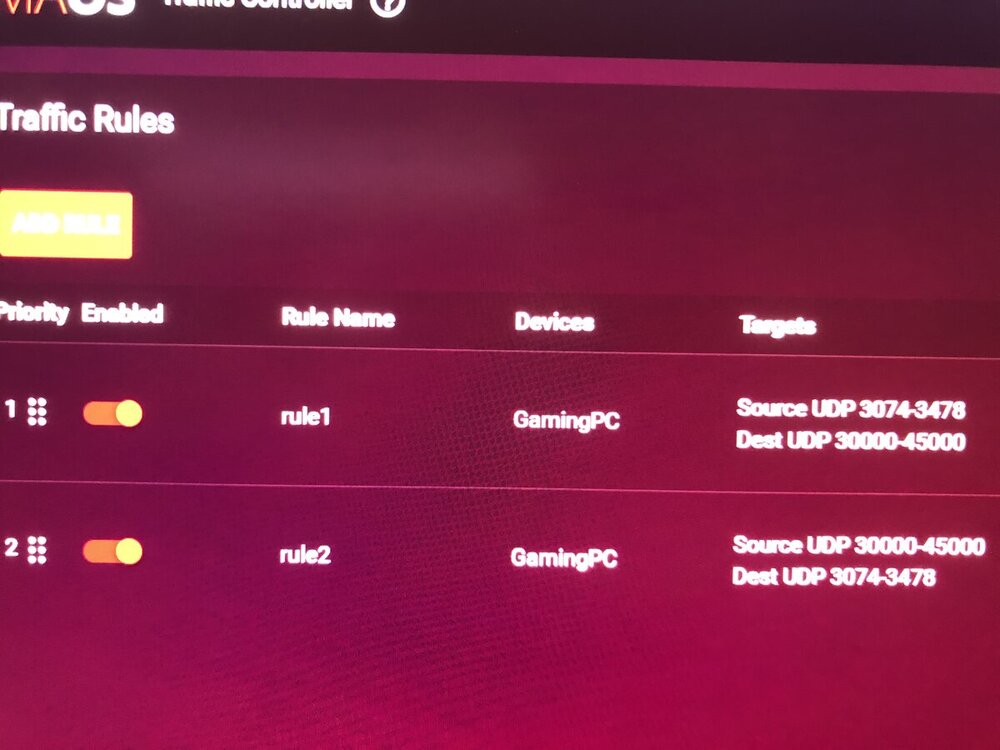
You need to put them under traffic prioritization not traffic controller.
-
Lag compensation is real. When I run my full speeds, 740 down and 40 up I am regularly the host and can kill absolutely no one. I’m behind everyone by a mile on the killcam. Playing on the exact same server with my connection gimped to the point I can almost not load the images on the blizzard app, I can tell I’m the one ahead. Several times ppl would shoot at me first and I’d kill them anyway. I’m by no means a pro player but I’ve played enough to know when I should win or lose a gun battle. So I’m happy in a sense with where I can get on the lag compensation scale, but it’s still taking me WAY too many bullets to kill someone. To be more precise, the closer I am to my target, the less my bullets register. I haven’t attempted my shotgun camo for this very reason. My type 63 is killing ppl across the map with two shots. Let me round a corner and put three into someone’s chest. I die. Watch the killcam and they took NO or very little damage. No way I missed at that range. This game is so connection based it’s unreal. I’ve started a match off with a 10 kill streak and should have had the game of my life, only for ppl to rage quit and what I can only assume is a host migration, and all of a sudden I couldn’t hit the broad side of a barn, and it’s a struggle to go positive. Granted the ppl who joined may be better players, but that shouldn’t cause me to completely forget how to aim and kill ppl. As if lag compensation isn’t enough, we have sbmm putting us into considerably higher ping lobbies for the sake of “balance” and “fairness”. I’m trying to achieve the connection I see others have who kill me in 4-6 bullets vs the 10-13 I’m having to put into them using the same gun and same attachments. I live in Louisiana and try to play exclusively on Texas servers, to which I have the lowest ping, o distance to server shouldn’t be my issue, unless of course they live in the same city as the server? Idk. All I do know is once upon a time I was happy with my connection to the game, and now I am not. Nothing changed on my end. I am getting constant total internet disconnects on 379, so I’m going to upgrade now, factory reset, and see if I can’t get an acceptable connection to Cold War.
-
Thank you for posting all your settings. Hopefully between the community we can find settings that are universally beneficial. I’m also experiencing frequent disconnects with the 379 firmware, but am wary to upgrade due to the issues ppl are reporting. I’ve went through the gamut of things I normally try to get my hit detection back on track and nothing is working. How an update to the game can change things so much I’ll never know. Currently I’m using traffic prio, bufferbloat sliders at 40% download and 20% upload, port forwarding the ports activision says use, distribution all even on the flower, share excess unticked on both, upnp off.
-
Thanks a ton. I have not upgraded to the latest firmware. I’m still on 379. I’ll give this a go and see if things improve. 🤞🏽
-
Just for some context what are your internet speeds? Under bandwidth allocation do you have share excess upload and download checked or unchecked? Are you using port forwarding? Are you using upnp? Sorry for all the questions. Just trying to get my connection back to normal. I have gigabit internet from suddenlink but my actual speeds are about 740 down and 40 up.
-
I hate others are having these issues but I’m glad it’s not isolated to only my end. I’ve tried everything I know to try and I can’t get any improvement. My ping is also considerably higher to the Cold War servers than it has been previously. I’ve forced cloud update and everything. How does the hit detection go from brilliant to utter trash? #soconfused
-
Hit detection on pc for Cold War has been absolutely horrendous as of late. Maybe because I’m working on tactical single shot rifle camo at the moment and the full auto weapons somewhat hid it, but the closer I am to an enemy the more my bullets simply don’t register. I’m bout at my wits end. 🤦🏽♂️ My shotguns are broken as well. Switch to it for an up close engagement and simply “whiff” with a point blank shot. Anyone have any updated settings to share? I’m still using traffic prio 3074:30000-45000, and the other norms. Seems every update they release puts me back to square one.
-
For me everything went to crap after the last game update. Not the one we just got today or yesterday but some previous update completely ruined my experience and I hadn’t changed a single setting. I’m spending more time tweaking to get it playable, then I am playing the actual game. Sucks.
-
Interesting and simple. I’ll give it a go. What do I have to lose? Lol. Since you’re not using a netduma router do you just play on whatever servers you’re connected to, or does the router you do use have some sort of geo filter or equivalent to filter the servers you play on?
-
My hit detection was absolutely brilliant when I first did port prio. It’s fallen off so steeply I’ve put the game down for now. I have no idea what happened as I didn’t change any settings. I’ve ran the full gamut of tweaking my settings and nothing has got my hit detection back the way it was. Fun while it lasted I guess....
-
Placing my pc in dmz does absolutely nothing for my hit detection nor does it help the lag compensation issues.
-
Interesting. Will try and report back. I’m very pleased with my settings atm but will always shoot for better lol.
-
Excellent info! Will try and report back. You rock!
-
VERY interesting. There’s been several matches where I started off unstoppable and went on say an 8 or 9 kill streak and then...BAM, all of a sudden I can’t kill anyone and get insta melted. Like I all of a sudden forgot how to aim. I always chalked it up to ppl rage quitting and it making me host mid match. Hmmm 🤔
-
For me after an update I always have to find the sweet spot on anti bufferbloat, sometimes never works best, other times always does. I also have to adjust the amount of speed both up and down. Share excess both checked sometimes is best then other times neither checked is better or only share excess ticked does the trick. It’s a shame to have to do all this in order to enjoy the game. My hit detection seems consistent, the bigger hurdle for me is getting on the right side of lag compensation. Even with great hit detection I’m usually a half second behind. The killcam proves it. I’ve tried servers far from home, close to home, I’ve tried the magic “between 40-60ms ping servers”, to no avail. Sometimes throttling my speed to absurdly low helps, but normally only for a game or two.
-
It seems to happen after an update to the game for whatever reason. When it happens I go back to the drawing board, meaning I try all the suggested tips from these posts to dial in what works again. It’s maddening but for me necessary. All I can suggest is tweak the settings until you find it playable again.
-
If I’m correct, those are ports you’d want to open for an open nat. The important ports to prioritize are the ports being used while you’re actually playing. The game will use three every time, one of which changes every match. Kinel, ghost, and blackfirehawk, and others, have done tireless work narrowing down these ports. That’s where the 30000-45000 range comes from. They used wireshark to capture these while in game. Some set up the rules individually, some in one large range. There may be ports we are unaware of. That’s the mystery. It seems to me after updates to the game I’ve got to go back to the drawing board as far as my settings go. Right now I’m trying to get on the right side of lag comp and I’ll be content lol. I’m also on pc and use the rules kinel posted the other day in response to my post. My hit detection I’d say is on point, but being a half second behind is leading to some very frustrating deaths and rage quits.
-
Just wanted to update the post by saying those settings helped overall. Thanks again. I guess my bigger issue is lag comp. I’m almost always a half second behind, and in a game where you die in milliseconds, it’s a major disadvantage. I’ve tried pc in dmz, pc not in dmz, WiFi 2.4 and 5ghz, congestion control on always from almost no bandwidth all the way up to full speed in small increments, congestion control on never also from almost no bandwidth to full speeds, share excess on, share excess off, upnp on, upnp off, only share upload ticked, close servers, far servers, in between servers, cross play enabled, cross play disabled. I’ve pretty much exhausted all options. Like everyone I’m just searching for a consistent, fair experience. 🤷🏽♂️
-
No problem. Thank you very much for taking the time to respond. I’ve read all your posts from all the threads. You’ve put in an insane amount of time testing and tweaking and I and the whole community appreciate it.
-
First of all merry Christmas to everyone. So I tried these rules with my r2 on Cold War and it has helped my hit registration tremendously. Only thing is since setting up my rules, I’ve only been connecting to an dedicated server overseas. I’m in the us, despite having my geofilter set to 719 miles around where I live. I’m playing on pc. These are my rules. Thoughts as to why? Perhaps my rules are incorrect. Maybe I should only use 3074-3074 and not 3074-3478 Soooooo, it helps if you put the rules in the right place lol. I was using traffic controller and not traffic prio. I’ve put the values in according to this guide but am using 30000-60000 as someone mention they thought pc used 50000-60000. Does anyone know for sure what to be using for pc? I’m also using 3074-3076
.png)

