


RedBull2k
-
Posts
949 -
Joined
-
Days Won
9
Everything posted by RedBull2k
-
I see. I have not had chance yet to look at it, it's only happened to 1 person. Chances are slim it will happen to u but if it does let me know
-
Does it not work when your in chat party also?
-
You do not need the web page open, when using app. The port updates in the background. It is not a flaw or bug. Unfortunately I do not refresh web page to show changes, but the changes have been made.
-
When i play, my nat type is open using upnp only. Opening ports has no effect using caddy app, as that is not what its for.
-
are you on ps4? whats your name on there ill come on chat
-
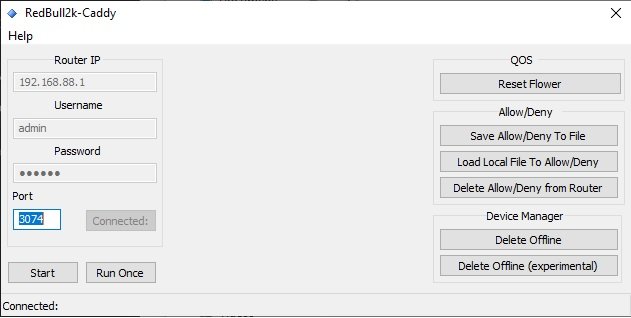
caddy 1.2 here is the latest - added improvments to dialog
-
that is a server, can you confirm that the high priority packets are increasing when playing, if they are increasing while playing then it is correct. i can not speak for 2 games in a row because i have no contrrol in how they are choosen, also your using xr700 so maybe as i do not own this device might be specific to xr700. I can see in my code there is room for improvment in finding the server. I did mention back in other thread that at times it will find wrong server but should correct it self when the game has loaded up. I will improve the code used to detect server, in the coming days, in the meantime i have made an update im not sure if this will do anything to help your situation but i will do my best in the coming days. each button is a script that does a particular task. what is it your wanting to do.
-
Looks to be working.
-
When i made the app i did it while not using geo filter was always no devices added, when i seen it myself the other day the only thing i can remember is that i was using geo in spec and filtering, if this is the case then i can recode the small part. if you have time can you try with out geo, and let me know. can you also take note of the status bar, what port and the other numbers that follow. No it should not, it will still run, which means something else is going on. Is this the first time your trying it?
-
Are you using geo filter?
-
my appologies, its been a work in progress things have changed, and continue to change, so here is an outline The app was made for 1 purpose, some of us believe that instead of using classified games or a range of ports, why not target the individual port being used for that specific game of cod. The port changes with each game played, and i didnt want traffic being prioritized, that was not that specific port. for pc/ps4. in game menu look at connection setting you will see the port being used for example you will see port 3074 for in my app put this in the port box, click start, now when this is running you leave it run untill you stop playing the game(shutdown) etc. But the manual button you can press it once while your in game it will add to hyperlane but then stop running so its like a run once only button. once you have your port set you will not need to change this unless you start using a diffrent port. How you use the app its up to you, but its that simple you have to options, but its up2u when you want to stop using. If you want to target specific game port then use it all the time you game, if you feel you dont need it then that is fine also.
-
First find the source port usually 3074 for ps4/pc and 3075 xbox. Put this port in my app hit start and when the game is starting in will auto add hyperlane specific port. Only tested on cod mw
-
Yes i can fix it. But first have to run tests my end.
-
No not really.
-
Yes i can do that.
-
That is great information. Will help very much.
-
I mean if needed can u get my app not preform the way it should.
-
It's making me wonder why its pulling up one of ur isps ip why would ur ISP be communicating on port 3074. Something is not right. Are u able to reproduce when ever u want
-
When it puts your mate in hyperlane what port/s is it using? are you playing in an online lobby or private? and when it shows Activision/Blizzard does it change when it goes into game, im pretty sure i had seen it happen to me in latest version so it could well be a minor bug.
-
Fantastic.
-
In the cod mw I have not seen any p2p. Just my observation. In short no. Because I only extract information after it's been sent to geo filter, which means if i deny anything it will say disconnected in game and no longer search for another duma os drops it at the firewall at a guess which prevents it from ever connecting, which is why it takes ages and keeps searching. I have in the past games been able to distinguish between servers and p2p, maybe we could explore it more when the game starts using p2p
-
All of the duma os features qos,device manager,geofilter can be automated. The ones u see in my app are the ones I have most use cases for Other wise they can all be a long process doing it manually. What can be done is to your own imagination, and ability. My imagination led me to what if I can get the server ip and run that ip in ping plotter and it just grew from there .
-
No documentation I used Microsoft WinHTTP Services, version 5.1 And I used chilkat activx for some json.
-
It was requested previously for it to remove all hyperlane ports. So yes its deliberate. In my first app that I posted on another thread it only removed the ones I put in there. How would you prefer it?
-
This app was made with cod in mind I have heard it works on other games. Yes put your source port in as displayed on cod connection info.

.png)

