RedBull2k
-
Posts
949 -
Joined
-
Days Won
9
Everything posted by RedBull2k
-
When you decide to use my app to prioritize specific ports, just click start and it will keep running until you stop it.
-
If you have tried on mw then it should be working. You should be entering duma os ip address., delete the file named newsettings and start my app and re enter details. It's either ur understanding of how it works, or something is happening that I'm not aware of. I am more than happy to keep exploring until resolved. So can u tell me what duma os router ur using
-
not tested on blackops4. i did mention it somewhere that i have only tested with MW, as currently that is the only game i have/played recently. Sorry.
-
What you playing cod on? What port is being used by cod in account settings in game? What router ru using?
-
Yes. thats right.
-
Use version 1.1. From that image all you need to do now is search for a game of cod, when it detects a server it will add that specific port to hyperlane
-
Thank you.
-
And when you go into a game it then gets the correct server?
-
Which version? Are you sure it's an ip address from chat party. The main thing though does it get the server when the game has started.
-
About every 8 seconds it searches for a server, if it finds 1 it adds it to hyperlane and continues to search every 8 seconds. It may on times add a matchmaking server but only temporarily. As long as its added a server to hyperlane by game start then it's working as it should.
-
The app disappearing is an uncaught error. Do u happen to notice what it was doing b4 it does that. My next days off is friday and next sunday so wont have much time at all b4 that
-
Did u take note of the ip, it's possible the port had not changed.
-
My app does not update the web page it runs in background you will not see any changes until you refresh, but it is working.
-
I'm in work and I've been thinking about the issue u and 1 other are describing. The more I think about it, I would like you both to run my app dont go in any game just chat party and let me know if if it finds anything, if it does record the ip and port and let me know. Thanks
-
Where did it appear stuck? In my app. What was the port?
-
What servers are good and bad for u might not be the same for others.
-
I see. I have not had chance yet to look at it, it's only happened to 1 person. Chances are slim it will happen to u but if it does let me know
-
Does it not work when your in chat party also?
-
You do not need the web page open, when using app. The port updates in the background. It is not a flaw or bug. Unfortunately I do not refresh web page to show changes, but the changes have been made.
-
When i play, my nat type is open using upnp only. Opening ports has no effect using caddy app, as that is not what its for.
-
are you on ps4? whats your name on there ill come on chat
-
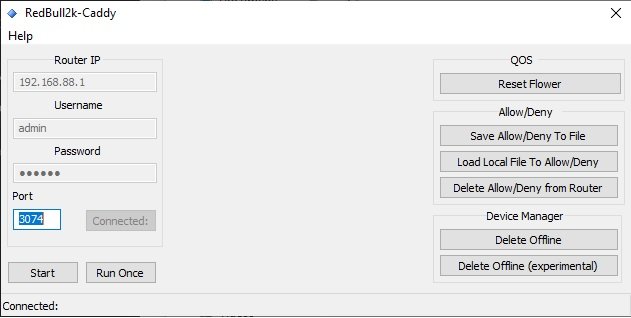
caddy 1.2 here is the latest - added improvments to dialog
-
that is a server, can you confirm that the high priority packets are increasing when playing, if they are increasing while playing then it is correct. i can not speak for 2 games in a row because i have no contrrol in how they are choosen, also your using xr700 so maybe as i do not own this device might be specific to xr700. I can see in my code there is room for improvment in finding the server. I did mention back in other thread that at times it will find wrong server but should correct it self when the game has loaded up. I will improve the code used to detect server, in the coming days, in the meantime i have made an update im not sure if this will do anything to help your situation but i will do my best in the coming days. each button is a script that does a particular task. what is it your wanting to do.
-
Looks to be working.
-
When i made the app i did it while not using geo filter was always no devices added, when i seen it myself the other day the only thing i can remember is that i was using geo in spec and filtering, if this is the case then i can recode the small part. if you have time can you try with out geo, and let me know. can you also take note of the status bar, what port and the other numbers that follow. No it should not, it will still run, which means something else is going on. Is this the first time your trying it?

.png)