


tedrodgers
-
Posts
34 -
Joined
-
Last visited
Everything posted by tedrodgers
-
R2 only getting 750mb on a 1gb virgin connection.
tedrodgers replied to tedrodgers's topic in Netduma R2 Support
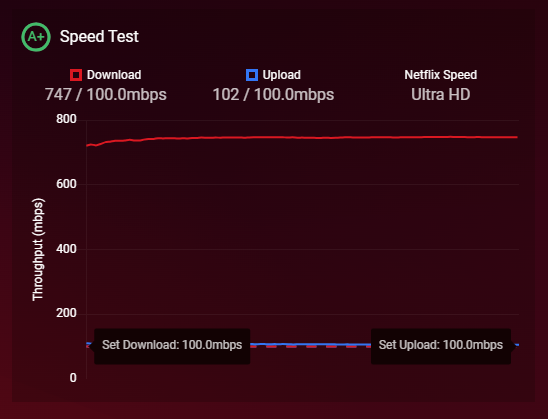
i didnt realise that was a thing, ive changed it and it looks abit better now on speedtest.net. -
hi guys ive just got virgin media (uk) 1gb connection. my hub5 is working at 1gb, showing about 900-950 approx dl speed (using samknows realspeed test) as suggested by the virgin engineer. when i run the dumaos test it shows its getting to about 750mb. I realise i wont get the full 1gb, but connecting directly to the virgin hub5 i got the 900 ish. So my question is, any reason why the R2 doesnt hit that mark? thanks
-
yeh i realise it would take 250 ish to use them up, i dont think we have that many devices, i guess it depends if they get assigned a new ip and then the old one isnt released....it was just a coincidence that its been fine since.
-
just to say that i havent had any similar issues yet. however i did do something that might have been the reason. I noticed that the network spider diagram thing was showing hundreds of disconnected/offline devices, that i guess have just grown over time. so i wondered if that for some reason was causing issues, because when i hovered over each one they still showed ip addresses assigned. now i dont know what the software does in terms of clearing out the dhcp pool but i wondered if my issues were because it had run out of ip's and hence why couldnt connect to the router, even though it was showing online. anyway, i clicked the button (cant remember the exact name) , that supposedly deletes all the offline devices. and once they were gone i rebooted the router and its been fine since. could be a co-incidence, but i thought it was worth mentioning incase someone has anythign similar.
-
Hi fraser Its fine i work in IT so i know how to do this stuff. I presume you are trying to see if this is a dhcp issue? I checked at the time when it last broke and the windows laptop did still have an IP. and im not sure why even a ping wasn't working. I presume you want me to try this the next time it stops working? as of right now its been up since yesterday.
-
thanks for replying but that sounds slightly different to my issue. i cant get to the gui at all. all the lights are on the router as usual when it happens. power/internet/wifi and lan. I have BT FTTC, so i have my old bt openreach modem (white box). that also had all the usual lights on green, DSL etc. so pretty sure the internet connection isnt an issue. I must say, dumaos should really have a better logging system in place. the fact theyre wiped out before a reboot makes them fairly pointless as a restart in most cases is involved during troubleshooting. if this continues i presume i'll have to claim under warranty and have it replaced? i'll see how we get on tomorrow.
-
well no, i couldnt even ping the netduma, so no the internet wasnt available. windows devices via ethernet were showing the globe icon "no connection" instead of the usual monitor(internet access) icon. mobiles just couldnt see the wifi networks at all, no sids listed. i couldnt browse to the netduma via the web interface either, so i wont be able to grab the log file to tell whats going on i presume....
-
I have a very similar problem with my R2. ive had it since last november and on the whole its worked fine. but starting today, ive had to reboot it 3 times. The problem is all of a sudden i cant connect to the netduma via either wifi or ethernet. I cant even ping the router. im on 3.3.280 ive downloaded the log file but it looks to me like when you turn off power to the router it wipes the logs? is that true? any ideas? log-1721761616053.txt
-
Welcome R2 owners! We want your feedback!
tedrodgers replied to Netduma Alex's topic in Netduma R2 Support
ok great, i'll check its on .280. i need to get it working with my tplink so a few things to work out first. -
Welcome R2 owners! We want your feedback!
tedrodgers replied to Netduma Alex's topic in Netduma R2 Support
ive just received my R2. whats the first thing i should be doing? do i need to upgrade firmware to a recommended version or is out of the box version ok to use? -
im with BT for internet. is there anyway i can use this for PC gaming (eth hard wired conn)? or is it just an app for wifi?
-
hi everyone new member here, and also i dont have a duma router yet. I have searched the forum and cant find any mention of either CSGo or CS2, which tbh im amazed about. Could the geo filter work for CS2? and if so, does it need anything specific, do we have to wait for it to be added? sorry im completely unaware of how this works and why we can request games in this section to be added. The reason i would like some sort of geofiltering is that CS going back many years has a known "issue" with toxic players from a certain country (i wont go into the specifics but most people who play the game know what i mean ), so somehow being able to "choose" servers away from this region to lower the chances of being queued with them would be amazing. thanks for any info! Ted
