


DillyDally5549
-
Posts
7 -
Joined
-
Last visited
Everything posted by DillyDally5549
-
When I scan the QR code on the router interface it takes me to an app called Orbi, which seems to have no luck in detecting the router and when I try to scan the QR code on the router interface in the actual Orbi app, it says that the QR code is invalid. When I download the Netgear Armour app which seems to be the app I need to use, I cannot find a way for it to pickup the router and it doesn't seem to detect it automatically. Also it says that there is no subscription available for anything on the Armour app and I can't seem to find a way to get a free trial of the Armour app therefore. Is there a way to actually set this up or is the Netgear Armour advertisement just in the UI for decoration?
-
Virgin Hub is in modem mode. There is also no option for DMZ when it is in modem mode.
-
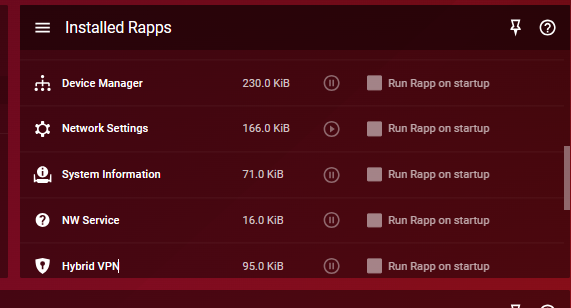
This problem has seemed to appeared probably since the router was accidentally switched off along with the Virgin Modem at the plug, and despite a restart of both router and modem, adding Xbox to DMZ, opening port 3074, having Xbox go directly through a public DNS server as opposed to going through my local DNS server, unblocking UDP 443 and 53, nothing has worked. The same thing seems to be happening on my brother's Xbox and for me the problem is disruptive enough as it causes me to be booted from GTA lobbies. I think I''ll probably move onto another router that's more advanced, less buggy and cheap as well as this router has several unaddressed issues with one of them being the settings icon randomly showing a pause/play symbol and you can't access the settings page without restarting the thing. Pretty poor really. However can anyone advise the possible issue in the meantime?
-
I've had this problem since I got the router 2nd hand, and I've seen at least one other post with the same problem on a more, newer model of router. Is there anyway to get this fixed without having to restart the router? More importantly, would there ever be software update to fix this permanently?
-
I'm trying to setup my Hyrbid VPN so that GTA on my Xbox will connect to American lobbies, whilst all other applications and services go through my ISP internet connection, but can't get it to work. I've added ports: 6672, 61455.61456, 61457 and 61458 (all UDP) as well as ports for Xbox Live core services to 'Only VPN these services', yet the game still tries to connect to European lobbies, and when the added ports are set to 'Do not VPN these services', the game now connects to American lobbies, but now the whole Xbox is on the VPN which I do not want. I added my phone and my PC to the Hybrid VPN, and set 443 TCP to not go through the VPN, yet both devices were showing the VPN IP in the web browser, and showed my ISP IP when set to 'Only VPN these services'. However, when I set all ports 1-65535 UDP and TCP to do not VPN these services option, I get my ISP IP and VPN IP when set to only vpn services, which is what I want, but strangely, random ports that as far as I know have nothing to do with HTTPS can make the HTTPS traffic go through either VPN or main ISP (which ever applicable). Can anyone hel