Raxis
-
Posts
11 -
Joined
-
Last visited
-
NEW XR500 BETA FIRMWARE: 3.3.535
Raxis replied to Netduma Lew's topic in NETGEAR Nighthawk Support (XR range)
Looks like the new one on the netgear site is using dumaos 3.3.539 also they still haven't fixed the wan dhcp bug where every 12 hours or so it kicks you off for a second. do they have a bug reporting thing? its a trailing space in usr/share/udhcpc/default.script line 478, someone did a workaround to fix another bug and put an extra space in which makes it rejig the wan every time it renews even if its the same ip kicking you off. Basically "$router" != "$old_router " needs to be "$router" != "$old_router" got sick of it so I went hunting -
 Netduma Fraser reacted to a post in a topic:
NEW XR500 BETA FIRMWARE: 3.3.535
Netduma Fraser reacted to a post in a topic:
NEW XR500 BETA FIRMWARE: 3.3.535
-
NEW XR500 BETA FIRMWARE: 3.3.535
Raxis replied to Netduma Lew's topic in NETGEAR Nighthawk Support (XR range)
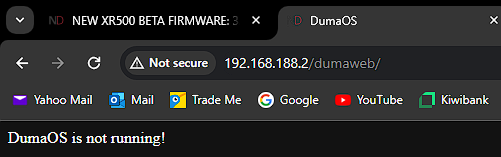
yup, when its setup with default IP and acting as the main router it works/loads as normal, it only errors out when its not the main router/default ip -
NEW XR500 BETA FIRMWARE: 3.3.535
Raxis replied to Netduma Lew's topic in NETGEAR Nighthawk Support (XR range)
routerlogin.net sends it off to the netgear page, because this unit is being used in AP mode atm. but when reset(and not AP mode) routerlogin.net doesn't resolve/work is it possible dumaos isn't running because it expects to be the main router on the default IP range? -
NEW XR500 BETA FIRMWARE: 3.3.535
Raxis replied to Netduma Lew's topic in NETGEAR Nighthawk Support (XR range)
even after a reset (in firmware) a reset(with button for 30 seconds), upgrading to intermediate, RC10, RC14 I get Dumaos is not running(no matter how long I wait) only way I can log into router is to use ipaddresshere/adv_index.htm anyone got a fix for this?