ifell
-
Posts
89 -
Joined
-
Last visited
-
Days Won
1
Everything posted by ifell
-
wifi not working Wifi LED's not working on the NetDuma R3
ifell replied to ifell's topic in Netduma R3 Support
This was unsuccessful, the 5GHz LED still didn't blink while there was active traffic in the 5GHz band, I've yet again turned off the status lights so i can pretend that it isn't an issue -
wifi not working Wifi LED's not working on the NetDuma R3
ifell replied to ifell's topic in Netduma R3 Support
I always factory reset per update, so unfortunately even with a clean slate it's still not quite working as the LED should -
wifi not working Wifi LED's not working on the NetDuma R3
ifell replied to ifell's topic in Netduma R3 Support
interestingly enough the beta didn't fix the LED light fully what happens exactly is when i turned on the router lights in the beta, they all worked as they had all illuminated, but that's not all, because if you were to look at the router lights, on my unit the 5GHz light stays solid when it's suppose to flash when there is network traffic, but in my case it stayed solid white when in the past when i had gotten it, it use to flash whilst there was network traffic on the 5GHz band, so since that stopped working for me, and it's only a visual issue, i opted for turning off all the lights except for power it's not really anything major, it's just cosmetic, the WIFI works so it's alright -
R3 DumaOS 4 - Achieving Open NAT for P2P Hosting (GTA Online)
ifell replied to ifell's topic in Netduma R3 Support
my MTU was always set to 1500, i never changed it, if you have any recommended values to try, i could give that a shot for DNS, I’m currently using my ISP’s DNS, i used to use Cloudflare DNS (1.1.1.1 / 1.0.0.1), but switched back to my ISP’s DNS during that major global outage that affected a large number of online services in the past, and found that my ISP's DNS perform decently with minimal latency -
R3 DumaOS 4 - Achieving Open NAT for P2P Hosting (GTA Online)
ifell replied to ifell's topic in Netduma R3 Support
surprisingly i had the same results on the XR even with nat filtering open, it seems like the updated version of gta online sorts nat differently than the legacy version -
R3 DumaOS 4 - Achieving Open NAT for P2P Hosting (GTA Online)
ifell replied to ifell's topic in Netduma R3 Support
i've made sure my isp isn't blocking any ports heres a list of what ports they do block, but note i have opted out of any blocking and have a static IPV4 address Inbound Blocks TCP 25 (SMTP) TCP 80 (HTTP) TCP 443 (HTTPS) UDP 135 (RPC) UDP 137 (NetBIOS) UDP 138 (NetBIOS) UDP 139 (NetBIOS) TCP 11211 (Memcached) UDP 11211 (Memcached) Outbound Blocks TCP 25 (SMTP) so the only ports that "would of mattered" is the 443 and 80, but these are not blocked as i opted out of port blocking i've tried DMZ but still have the same NAT for gta, i have also gone into firewall settings on my pc and have allowed all traffic in the firewall rules to allow the connection and allow edge traversal for both TCP and UDP rules, in the past with the XR1000 with Nat filtering Open, i had open nat, but this was with GTA Online Legacy, so rockstar could of changed how the current GTA ONLINE ( Grand Theft Auto V Expanded & Enhanced ) works with it's NAT -
R3 DumaOS 4 - Achieving Open NAT for P2P Hosting (GTA Online)
ifell replied to ifell's topic in Netduma R3 Support
Je n'utilise pas du tout le filtrage géographique(i do not use Geo Filtering at all) i've tried both disabling the advanced part with DPI and the regular toggle for smart boost -
R3 DumaOS 4 - Achieving Open NAT for P2P Hosting (GTA Online)
ifell replied to ifell's topic in Netduma R3 Support
given the nature of gta online it's hard to know who the host actually is, the game doesn't out right tell you unless somebody has a mod menu, and the game selects a host on it's own when it's just two players, one of my friends and i, there's a very small chance of the game not allowing us to drive our cars until we respawn them or wait for the game to allow us to, this is abnormal, could it be caused by the way QoS handles how it queues UDP traffic? -
R3 DumaOS 4 - Achieving Open NAT for P2P Hosting (GTA Online)
ifell replied to ifell's topic in Netduma R3 Support
i've got my pc in smart boost, there's still issues with lag set as gaming gta online pc is in smartboost and set as 5.0x getting in vehicles can still act up and not let anybody drive for an extended amount of time as i previously said posted about some NPC's have a small chance to insta kill players is another noticeable issue during gameplay some players desync then teleport into vehicles -
R3 DumaOS 4 - Achieving Open NAT for P2P Hosting (GTA Online)
ifell replied to ifell's topic in Netduma R3 Support
paying for 1000/400mbps getting 937Mbps Download 398 Mbps Upload and QoS was set to always, ping optimizer is set to 93% both download and upload with speedtest results of 2ms idle 3ms download 2ms upload with the household streaming movies/tv shows smart boost has it gaming at 1000 priority and thats it i'm currently testing with it off to see if QoS may be affecting things, but it seems as regardless of it being on or off i'm still having that issue were trying to drive a car/bike it's not moving when holding W/R2/left trigger i've even tried disabling all DPI in advanced settings so the router isn't touching anything at all so i'll check jobs and races and how things react on the job hosting screen and what happens after -
R3 DumaOS 4 - Achieving Open NAT for P2P Hosting (GTA Online)
ifell replied to ifell's topic in Netduma R3 Support
Well, players and sometimes friends end up leaving in groups sometimes. so we have to rejoin one another ( i tested in friends and public lobbies ) and here's what happens( it happens occasionally There is desync. Sometimes players can’t control vehicles. they get into a car/bike but when they press W (or left trigger / R2), the car doesn’t move. Steering also doesn't do anything. I’ve experienced this too Search times for players to join my hosted jobs/heists can take a long while. invites are accepted, but players remain stuck on joining for a long time or never fully enter the session and eventually abruptly disappear When matchmaking is set to open and automatic invites are enabled, there can still be a long delay before players actually appear in the session after accepting. In some cases, they briefly show as joining but it's like they time out or it's rejected I tested UPnP, portforward, and DMZ, didn't really give open Nat either Recently, after completing a race mode and returning to freemode, I was placed into a fresh empty public lobby. Only a small number of players around 4 joined over time, and the session never had more players join. players also left after a while, and the lobby remained low population throughout till it was just me -
R3 DumaOS 4 - Achieving Open NAT for P2P Hosting (GTA Online)
ifell replied to ifell's topic in Netduma R3 Support
I understand it could potentially be a misreading, however it’s quite difficult to reliably verify that in practice. There isn’t really a consistent way for me to confirm whether I’m interacting with players who have a Strict NAT, especially in public sessions. Ideally, the most accurate way to test this would be under controlled conditions—such as having a player with a known Strict NAT attempt to join a hosted job/heist while my setup is reporting Moderate NAT in Grand Theft Auto Online. From my perspective, the concern is less about what the NAT label reports and more about real-world compatibility. In lower-population activities, having a confirmed Open NAT is important to ensure the widest possible connectivity with other players in peer-to-peer sessions. Given the current behavior, it’s difficult to determine whether this is purely a visual misreport or if it’s actually impacting connectivity without more controlled testing. For a controlled test scenario, it would also be important that the player with Moderate NAT is the host. In Grand Theft Auto Online, this would require enabling “Remain as host after next job” on the voting screen, and setting matchmaking to “Closed” before sending invites. This ensures the host is fixed, allowing a consistent test of whether a player with Strict NAT can successfully join. If the Moderate NAT reading is purely a misreport and is effectively behaving as Open, then a player with Strict NAT should be able to join the session under those controlled conditions. If they’re unable to join, that would suggest the NAT type is impacting connectivity rather than just being a visual misread. -
R3 DumaOS 4 - Achieving Open NAT for P2P Hosting (GTA Online)
ifell replied to ifell's topic in Netduma R3 Support
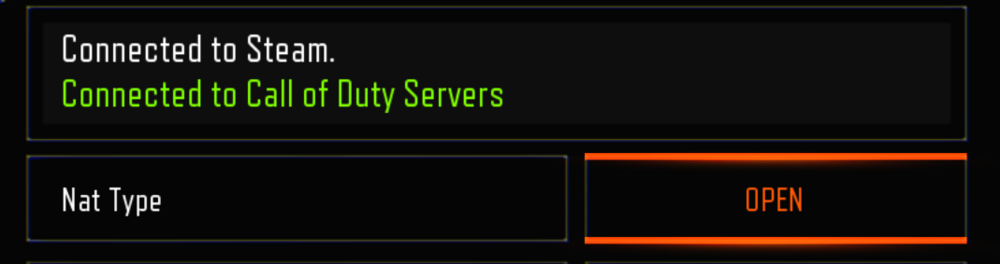
I am currently troubleshooting NAT type issues. My setup is as follows: Rule 1: 3074 UDP Rule 2: 4380 UDP Rule 3: 3478–3480 TCP & UDP Rule 4: 3658 UDP Rule 5: 6672 UDP Rule 6: 27000–27036 TCP & UDP Rule 7: 443 TCP Rule 8: 80 TCP Additional information: My ISP is not blocking any ports There is no CGNAT and no double NAT (direct internet connection, single hop traceroute) UPnP is disabled for testing purposes and will be enabled after this post since the outcome didn't change All ports are manually forwarded as listed above Despite this configuration, NAT type remains Moderate for gta but black ops 2 and black ops 3 are open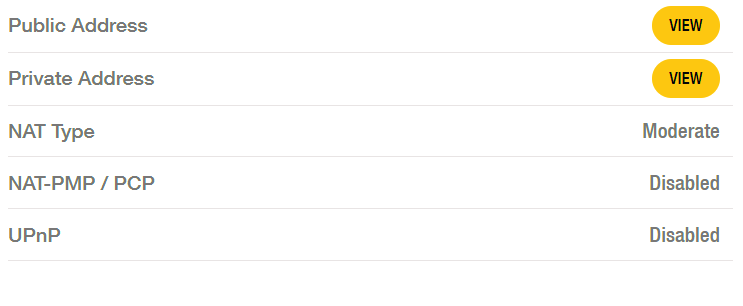

-
R3 DumaOS 4 - Achieving Open NAT for P2P Hosting (GTA Online)
ifell replied to ifell's topic in Netduma R3 Support
Yes, my PC already has a reserved/static local IP assigned, so it isn’t changing and the port forwarding rules remain valid for Call of Duty: Black Ops II, tested and confirmed. I’ve also verified my pc firewall configuration, including allowing Edge Traversal and ensuring the correct rules are in place for both Grand Theft Auto Online and Call of Duty: Black Ops II. I’ve tested both manual port forwarding and UPnP under this setup with reboots to ensure rules are in place after any changes. In Grand Theft Auto Online I consistently get Moderate NAT, even when using manual port forwarding. In contrast, in Call of Duty: Black Ops II the NAT type is inconsistent without port forwarding, but becomes Open when port forwarding is applied. Given that CGNAT and local IP changes are now ruled out, and considering the testing already done, it still seems like this may come down to how NAT is being handled on the router itself. -
R3 DumaOS 4 - Achieving Open NAT for P2P Hosting (GTA Online)
ifell replied to ifell's topic in Netduma R3 Support
Thanks for the suggestion, I understand why you’d want the direct-to-modem test done to fully rule out CGNAT. However, based on my current setup, the Netduma R3 is acting as the main router and is directly connected to the internet (no double NAT). and i'm getting 1 hop as it all is currently configured since it's my public static ipv4 i've covered it up of course It reports the same public IPv4 on the WAN as external checks and consistently shows a single hop, which strongly indicates there’s no CGNAT involved. As an additional note, I have a static public IPv4 assigned with my internet plan. I do have plans this weekend (running heists in Grand Theft Auto Online), and I also need to keep the internet running for other people in the household. Because of that, I won’t be able to disconnect everything and run the direct modem test immediately. I’m happy to carry that out as soon as I can after the weekend.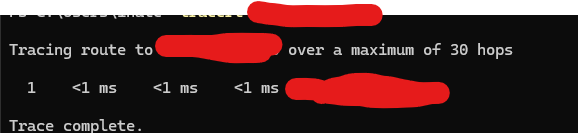
-
R3 DumaOS 4 - Achieving Open NAT for P2P Hosting (GTA Online)
ifell replied to ifell's topic in Netduma R3 Support
Well, my friends can’t always connect, and they don’t have the spare time to troubleshoot these issues with me. The only practical way to diagnose the problem is by asking what NAT type they have—one usually has Moderate, while the other sometimes gets Strict. They’re not tech-savvy, so there’s only so much they can realistically do on their end. Because of these ongoing NAT-related issues, I end up having to reboot everything before even starting a gaming session. For example, when we play Call of Duty: Black Ops II, UPnP doesn’t provide an Open NAT, so I’m forced to manually forward UDP port 3074 just to make it work properly. I’ve also tried manually forwarding the same style of ports for Grand Theft Auto Online, yet I still end up with Moderate NAT. This creates a major issue, especially for jobs or heists that already struggle with low player counts. It results in significantly longer wait times because I’m dealing with both a smaller pool of available players and the added restriction of Moderate NAT limiting who I can actually connect with. I should also mention that I never use the Geo-Filter feature, so this isn’t being caused by any location-based filtering or connection restrictions on my side. These problems are happening under normal router usage. Unfortunately, I can’t really provide logs at this point. I’ve already updated the Netduma R3 to the latest beta firmware and even factory reset it out of frustration, but the situation remains unchanged. Since there’s no difference in Grand Theft Auto Online whether I use UPnP or manual port forwarding, I’ve now deleted all custom rules and gone back to letting UPnP handle everything. However, the game clearly seems to require Full Cone NAT to achieve an Open NAT type. I know this because when I previously used a NETGEAR Nighthawk XR1000 and had the same problems, enabling the Open NAT filter resolved everything immediately. At this point, I really believe the Netduma team should seriously consider adding proper Full Cone NAT / NAT filtering options to the R3, because for gaming-focused hardware, these connection issues are causing far more trouble than they should. -
R3 DumaOS 4 - Achieving Open NAT for P2P Hosting (GTA Online)
ifell replied to ifell's topic in Netduma R3 Support
i've had lots of disconnects happen, and by comparison this didn't happen with i had a xr 1000 with nat filtering open, and my friends didn't disconnect or lag out, but with this R3... not having nat filtering open is seriously causing headaches after headaches, can't stress that enough -
R3 DumaOS 4 - Achieving Open NAT for P2P Hosting (GTA Online)
ifell replied to ifell's topic in Netduma R3 Support
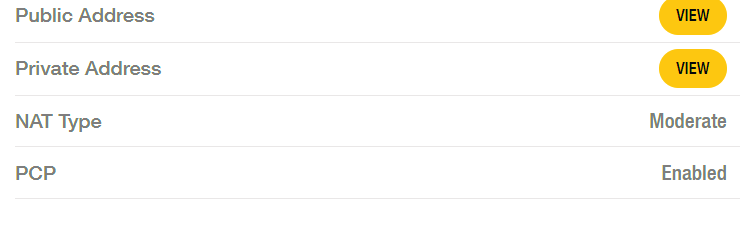
i would to Feature Request an Addition of "Full Cone NAT" / "NAT Filtering: Open" Toggle The Problem is Currently, the Netduma R3 (DumaOS 4) lacks an explicit "NAT Filtering: Open/Secure" toggle. While the R3 supports PCP and UPnP, these protocols often result in a "Moderate" NAT type on PC for games with Peer-to-Peer (P2P) architectures, most notably Grand Theft Auto V. Symmetric vs. Full Cone NAT: By default, the R3 appears to use "Restricted" or "Symmetric" NAT filtering. While this is secure, it is incompatible with many P2P matchmaking systems. Even when ports (like UDP 6672) are opened via PCP, the NAT remains "Moderate" because the router only allows incoming traffic from the specific IP/Port that the PC first contacted. The "Full Cone" Requirement: For an "Open" NAT in GTA V, the router must support Full Cone NAT (Endpoint Independent Mapping). This allows any external host to send packets to the internal PC via the mapped port, regardless of whether the PC has messaged them first. Regional Necessity (Australia/Oceania): For players in Australia, the player pool is smaller. A "Moderate" NAT limits the number of successful P2P handshakes, leading to much smaller or empty lobbies, "Timed Out" errors, and increased latency. when playing with some other friends i previously had no issues with, since i had a router that allowed me to set Nat filter to open. An "Open" NAT is not just a label; it is a requirement for stable connectivity in isolated regions. The Solution here is I am requesting the addition of a "NAT Filtering" toggle in the WAN settings (similar to those found on Netgear, ASUS, and TP-Link hardware) that allows users to switch from "Secured" to "Open". because DMZ is not an answer: Using the DMZ is a "sledgehammer" approach that exposes the entire device to the internet. A "Full Cone NAT" or "Open Filtering" option provides the same connectivity benefits for gaming while maintaining a higher level of security by only affecting how active port mappings are handled. so for goodness sakes add this feature, it would actually help MANY people out with the multitude of complaints about Nat type open and especially for an issue like one console having open Nat and the other 2 having moderate or strict
-
I am trying to achieve an Open NAT in GTA Online (PC) to host lobbies for achievements. Despite a perfect setup, the game consistently reports Moderate NAT. Netduma R3 Firmware: v4.0.540 Connection: Direct NBN Fiber (FTTP) to NTD (No ISP modem/Bridge mode issues) Ports: All Rockstar-required ports (6672, 61455-61458 UDP, etc.) are manually forwarded. UPnP is disabled to avoid conflicts. I cannot find a toggle for 'NAT Filtering: Open' or 'Endpoint Independent Mapping' in the DumaOS 4 interface. It appears the R3 is performing Symmetric or Address-Restricted NAT by default, which is preventing me from being the primary session host.
-
wifi not working Wifi LED's not working on the NetDuma R3
ifell posted a topic in Netduma R3 Support
NetDuma R3's Current Firmware v.4.0.540 i mainly use 5GHz wifi, and have disabled the 2.4GHz as soon as i set up the R3 so the LED shouldn't be worn out, and was working at the time of disabling it. i noticed on a previous update v.4.0.290 or v.4.0.236 i was just wondering " why is it not using the LED's? " and " why isn't it showing on the hardware's LED's that 5GHz & 2.4GHz isn't working yet the wifi is" another thing is.. and this is kind of a big deal, on the mobile speed test APP from speedtest Ookla .. it kills off the wifi entirely and it kicks off ALL WIRELESS DEVICES completely, entirely.. and on the phone it says connection failed : cannot be resolved by logging into the router on the PC to disable and re-enable the 5GHz wifi, the whole router needs to be restarted in the GUI or power cycled.
-
Will do, I did stumble on something in another forum somewhere, it mentioned how if QoS is set to auto, the speeds would be in a bugged state until the xr was factory reset It was either the auto QoS mode " always, auto enable, never" for context using auto enable might of bugged the speeds, or it could have been the auto detect speeds, I'm not sure which it was, but I'll be keeping QoS as Always, and completely disabling it with the congestion control three lines menu as a way to toggle it for full speeds when not gaming
-
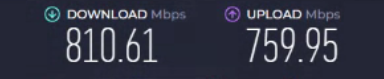
speeds are finally as at an acceptable range now through the XR after a factory reset after getting out of AP Mode
-
update: after discovering that the cmd ipconfig way didn't give the correct IP, showed 192.168.1.128 it had changed to 130 was able to log in to the XR and exit AP mode
-
it's stuck in AP mode... i could NOT even log into the XR at all, i've tried finding it's ip address, which was 192.168.1.128 put it in the web browser, and absolutely no luck what so ever, tried a factory reset with a absolute no luck at all in getting into the log in page tried the default gateway 192.168.1.1 didn't work tried to unplug the XR and to isolate it, only had the pc connected to it, tried on LAN ports, tried WAN can't access the login at all to return to normal
-
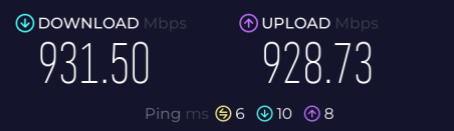
yeah the XR gets full speeds while in AP mode, but how does one go about getting that to come through the XR with all those useful QoS features?
.png)