
UK_Wildcats_Fans
-
Posts
1303 -
Joined
-
Days Won
1
About UK_Wildcats_Fans

Recent Profile Visitors
6773 profile views





-
.png "Like") UK_Wildcats_Fans reacted to a post in a topic:
Ireland Server 1FD98CG
UK_Wildcats_Fans reacted to a post in a topic:
Ireland Server 1FD98CG
-
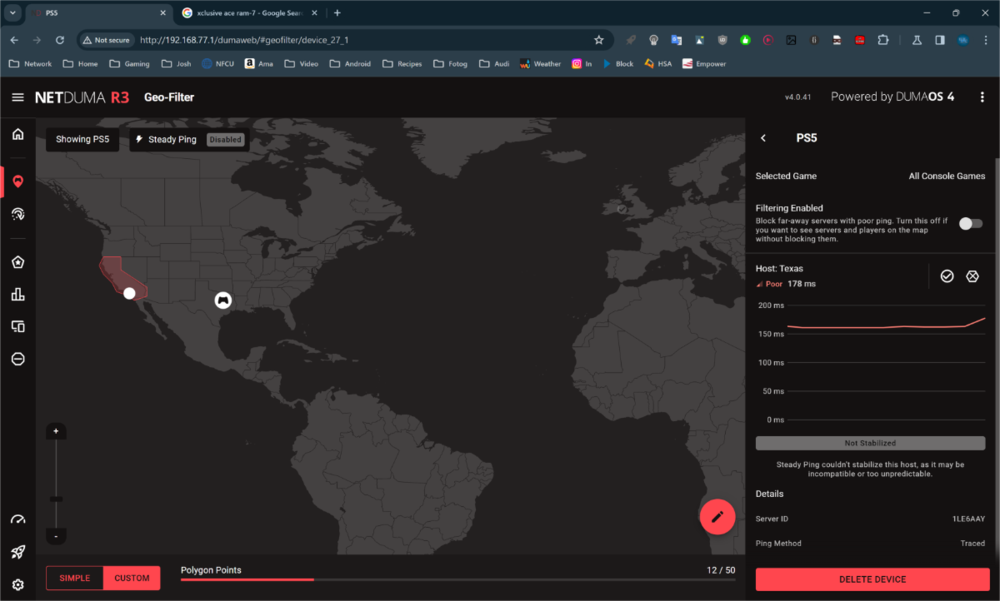
I am in San Diego, California. If I start the BO7 game with the geo-filter enabled, I cannot find a game. I noticed that the subject server was being hit. Therefore, I added it to the allow list and was able to start the game. Is this a Netduma server? If so, why is it not automatically on the allowed list?
-
Please add me
-
UK_Wildcats_Fans reacted to a post in a topic:
Status Update on Firmware
-
At this point, a general status would be helpful. For example, "As part of our testing, we have found a few major and minor bugs that have now been fixed, and we are doing full retests."
-
Do any other routers have location filtering?
-
Over my 12+ years of playing COD, I have recorded gameplay live (Elgato) with kill cams, watched in theater mode, and compared it to kill cams. The kill cams are often incorrect (similar to your video) and do not apply the lag compensation in the kill cams accurately as shown from the live gameplay or theater mode versions.
-
UK_Wildcats_Fans reacted to a post in a topic:
Netduma r3 is the best gaming router!
-
There are two main server locations in California - Los Angeles and San Jose. The ping heat only shows San Jose.
-

Trello or Similar Publication
UK_Wildcats_Fans replied to UK_Wildcats_Fans's topic in Netduma R3 Support
It is more about documenting known issues and letting everyone know that you are aware of them. -
There seem to be lots of repetitive posts about similar issues. I think it would be very helpful to have a Trello board or similar post about known issues. A lot of people are hoping that the next firmware will fix their issues. It would be disappointing to wait all that time and not have your issue resolved. This way people will have a chance to review to ensure that their issues are known and being worked. If not, they have a chance to bring up their issue(s).
-
UK_Wildcats_Fans reacted to a post in a topic:
What's has a "fix" on the "NEW" firmware ?
-
I set the DHCP lease to 10080 minutes (1 week) and then rebooted the R3. I was using my Chromebook (192.168.77.64 reserved IP). The DCHP default range is 100-250. While actively using the Chromebook, I noticed the WIFI drop. After WIFI returned, I captured the log that is attached. R3_2024-03-05T15_27_36.765Z_logs.txt
-
What is the maximum lease time?
-
I see the same issue with WIFI. I can see it disconnect on my Chromebook and work laptop along with random disconnects of my wifi light switch. I had occasional issues with the wifi switch using the R2 but never had problems with the Chromebook and work laptop.
-
It did not feel like a 170ms server gameplay. It felt more like a game with lots of packet loss. It was very inconsistent. Sometimes it felt good, and then there would be periods of lag. I have the in-game ping, packet loss, etc. network tools always displayed on the screen. I did not see any packet loss displayed on the screen.
-
Using tracert, I did see some timeouts. I messaged you the results from the tracert for the Texas server and one to www.google.com as a comparison.
-
When this happens, the ping is always around 170ms. This makes me wonder whether it is getting confused with an authentication server in the UK
-
Playing COD MW3 and my in-game ping was 47ms. The other people in my party had similar in-game pings. It was definitely a Texas server. I don't know why I had a 178ms ping with R3. The game played terribly. This is the first time seeing this with Steady Ping disabled.