
Oguzhan
-
Posts
35 -
Joined
-
Last visited
Everything posted by Oguzhan
-
How can I obtain the actual game server IP for an active PS5 match on R2 firmware 4.0.258? The Geo-Filter only shows the host location and Server ID. I want to compare traceroute and latency measurements to the same endpoint over my FTTH connection and mobile hotspot.
-
Hi, I’m experiencing inconsistent gameplay and a significant feeling of delay in Call of Duty on PS5. I would appreciate help diagnosing the cause rather than changing settings without knowing what is responsible. My setup: Fiber-to-the-home (FTTH) connection in Istanbul, Turkey: 1000 Mbps download / 50 Mbps upload. ZTE H3600 router → Netduma R2 WAN port → PS5 connected to an R2 LAN port by Ethernet. DumaOS version: 4.0.258. Only the PS5 is connected to the R2, with no other household internet activity during testing. The R2’s WAN IP is configured as the DMZ host on the ZTE. UPnP is enabled on the R2. The old manual UDP 3074 forwarding rule targeting the PS5’s former Wi-Fi address has been disabled. In-game NAT now shows Open. Geo-Filter filtering and Steady Ping are both disabled for the latest tests. The problem: Offline gameplay feels completely smooth and responsive. Online, some matches feel reasonably good, while others feel noticeably heavy and delayed. I often die before I can aim when encountering an opponent, or lose despite firing first. It feels as though I am behind what the opponent is seeing, although I have no measurement of that delay. The game typically reports 45–60 ms ping and 0% packet loss. In the latest comparison, one match felt acceptable at 45–46 ms, while the next felt much worse at approximately 50 ms. Tests so far: Fixing NAT from Moderate to Open did not noticeably improve the gameplay. The issue persists with filtering and Steady Ping disabled. Restarting the upstream router did not resolve it. I previously experienced similar symptoms when playing directly through the ZTE without the R2. Two matches through a mobile hotspot felt more responsive despite higher ping of 85–100 ms. However, that connection was less stable, and I cannot confirm whether those matches used the same servers as the fiber connection. What measurements or logs can I collect to distinguish between ISP routing, jitter, game-server behavior, and any contribution from the R2? Can the R2 capture useful latency variation or game-traffic diagnostics during an affected match? Please let me know the specific data and screenshots you need. Thank you.
-
I've tried it, not much things changed.
-
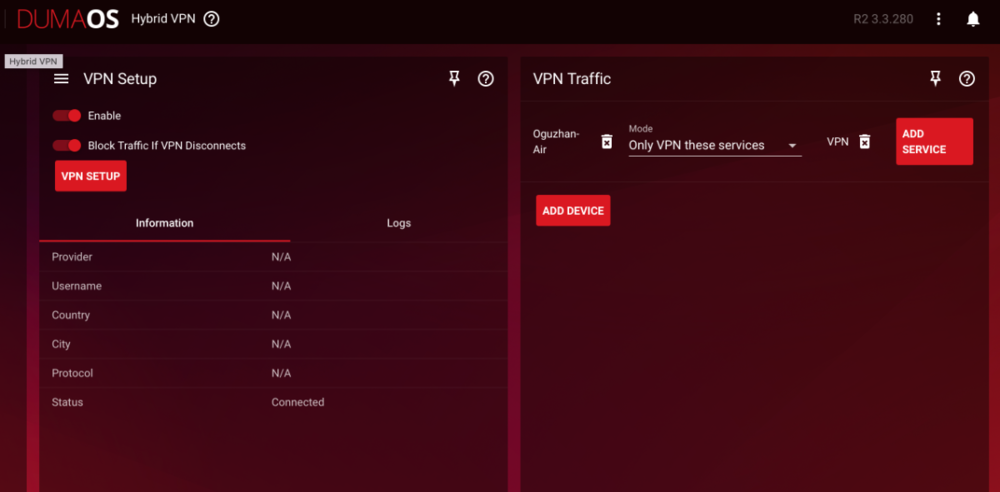
First of all, I added the MacBook I use to my device list and only marked VPN from the services. thanks.
-
Hello, I want to create my own VPS server via Hetzner Cloud and set it up with the hybrid VPN feature. However, even though I made the necessary settings, my IP address on the device I am connected to is not the location I selected (e.g. Germany/Frankfurt), but my current location and my own IP address. Can you help me? thanks
-
Thanks, it worked.
-
Hi , is there anyone could help me ? when I try to log in to Geo-Filter section I see "unmatched device " warning. BTW I can not add any device , when I push the Add Device button , it doesn't work. Thx.

-
I am living in turkiye , from bad ISP to worst
-
Hi , i am experiencing same issue about 8 months. In game ping around 34 to 65 but I am barely one second behind the enemy, never get a gun fight with win. I tried different things but nothing really changed, then I change my ISP and most of my problems solved.
-
sometimes open sometimes moderate, i dont know why it changes.
-
I'll make another video at war zone 2.0 because that is the way I can explain my in game experience thanks btw guys.
-
Of course not troll, look i am not a newbie at cod. there is real delay and bad hit reg in the game.
-
Hello guys, I was mentioned before I am experiencing latency in game. It just feels like I'm one second behind the enemy and bad hit reg.then I changed my isp and solved. But stills thing goin on. here's a few examples, do you have any advice? i'v actually have good connection, 100mb dn /20mb load fiber , wired connection. my isp says all your connection values are good enough to play.i'v sent them to trace route and pings to cod servers. my monitor is samsung odyssey g7 / 120 hz 4K. 18c101c2f3792-master_playlist.MP4 18c101d1f4d79-master_playlist.MP4 18c101e21d744-master_playlist.MP4