steb
-
Posts
20 -
Joined
-
Last visited
-
.png "Like") Netduma Fraser reacted to a post in a topic:
r3 keeps disconecting daily threw the night
Netduma Fraser reacted to a post in a topic:
r3 keeps disconecting daily threw the night
-
Devastate reacted to a post in a topic:
r3 keeps disconecting daily threw the night
-
done it . thanks
-
well kind of . got it working but its super slow . tried difrent connections udp /tcp / verry slow through duma but using the app am getting near my speeds .. been reading online its saying am better of using wire guard? . but dont have a clue how to set it up been trying but failed . any surgestions? thanks
-
done it . thanks :))
-
i dono what going on mate . i spent hours trying but to no avail .. any ideas? cheers .
-
no mate . Sun Jul 19 08:08:57 2026 OpenVPN 2.4.9 arm-buildroot-linux-gnueabi [SSL (OpenSSL)] [LZO] [LZ4] [EPOLL] [MH/PKTINFO] [AEAD] Sun Jul 19 08:08:57 2026 library versions: OpenSSL 1.1.1f 31 Mar 2020, LZO 2.10 Sun Jul 19 08:08:57 2026 NOTE: the current --script-security setting may allow this configuration to call user-defined scripts Sun Jul 19 08:08:57 2026 OpenSSL: error:09091064:PEM routines:PEM_read_bio_ex:bad base64 decode Sun Jul 19 08:08:57 2026 Cannot load CA certificate file [[INLINE]] (no entries were read) Sun Jul 19 08:08:57 2026 Exiting due to fatal error Error: CONNECTION TIMEOUT
-
morning mate .. says .. Sat Jul 18 09:19:25 2026 OpenVPN 2.4.9 arm-buildroot-linux-gnueabi [SSL (OpenSSL)] [LZO] [LZ4] [EPOLL] [MH/PKTINFO] [AEAD] Sat Jul 18 09:19:25 2026 library versions: OpenSSL 1.1.1f 31 Mar 2020, LZO 2.10 Sat Jul 18 09:19:25 2026 NOTE: the current --script-security setting may allow this configuration to call user-defined scripts Sat Jul 18 09:19:25 2026 OpenSSL: error:09091064:PEM routines:PEM_read_bio_ex:bad base64 decode Sat Jul 18 09:19:25 2026 Cannot load CA certificate file [[INLINE]] (no entries were read) Sat Jul 18 09:19:25 2026 Exiting due to fatal error Error: CONNECTION TIMEOUT
-
@fraser any chance of help again please carnt seem to suss it out . basicly using proton vpn free how can i add that to r3 i dont understand what your suppost to do you done it last time for me . # ============================================================================== # Copyright (c) 2023 Proton AG (Switzerland) # Email: [email protected] # # The MIT License (MIT) # # Permission is hereby granted, free of charge, to any person obtaining a copy # of this software and associated documentation files (the "Software"), to deal # in the Software without restriction, including without limitation the rights # to use, copy, modify, merge, publish, distribute, sublicense, and/or sell # copies of the Software, and to permit persons to whom the Software is # furnished to do so, subject to the following conditions: # # The above copyright notice and this permission notice shall be included in all # copies or substantial portions of the Software. # # THE SOFTWARE IS PROVIDED "AS IS", WITHOUT WARRANTY OF ANY KIND, EXPRESS OR # IMPLIED, INCLUDING BUT NOT LIMITED TO THE WARRANTIES OF MERCHANTABILITY, # FITNESS FOR A PARTICULAR PURPOSE AND NONINFRINGEMENT. IN NO EVENT SHALL THE # AUTHORS OR COPYRIGHT HOLDERS BE LIABLE FOR ANY CLAIM, DAMAGES OR OTHER # LIABILITY, WHETHER IN AN ACTION OF CONTRACT, TORT OR # OTHERWISE, ARISING # FROM, OUT OF OR IN CONNECTION WITH THE SOFTWARE OR THE USE OR OTHER DEALINGS # IN THE SOFTWARE. # ============================================================================== # The server you are connecting to is using a circuit in order to separate entry IP from exit IP # The same entry IP allows to connect to multiple exit IPs in the same data center. # If you want to explicitly select the exit IP corresponding to server CA-FREE#8 you need to # append a special suffix to your OpenVPN username. # Please use "LUjAxA5eUX3FPJS7+b:0" in order to enforce exiting through CA-FREE#8. # If you are a paying user you can also enable the ProtonVPN ad blocker (NetShield) or Moderate NAT: # Use: "LUjAxA5eUX3FPJS7+b:0+f1" to enable anti-malware filtering # Use: "LUjAxA5eUX3FPJS7+b:0+f2" to additionally enable ad-blocking filtering # Use: "LUjAxA5eUX3FPJS7+b:0+nr" to enable Moderate NAT # Note that you can combine the "+nr" suffix with other suffixes. client dev tun proto tcp remote 149.22.82.28 7770 remote 149.22.82.28 8443 remote 149.22.82.28 443 remote-random resolv-retry infinite nobind cipher AES-256-GCM setenv CLIENT_CERT 0 tun-mtu 1500 mssfix 0 persist-key persist-tun reneg-sec 0 remote-cert-tls server auth-user-pass <ca> -----BEGIN CERTIFICATE----- MIIFnTCCA4WgAwIBAgIUCI574SM3Lyh47GyNl0WAOYrqb5QwDQYJKoZIhvcNAQEL BQAwXjELMAkGA1UEBhMCQ0gxHzAdBgNVBAoMFlByb3RvbiBUZWNobm9sb2dpZXMg QUcxEjAQBgNVBAsMCVByb3RvblZQTjEaMBgGA1UEAwwRUHJvdG9uVlBOIFJvb3Qg Q0EwHhcNMTkxMDE3MDgwNjQxWhcNMzkxMDEyMDgwNjQxWjBeMQswCQYDVQQGEwJD SDEfMB0GA1UECgwWUHJvdG9uIFRlY2hub2xvZ2llcyBBRzESMBAGA1UECwwJUHJv dG9uVlBOMRowdelightfulDVQQDDBFQcm90b25WUE4gUm9vdCBDQTCCAiIwDQYJKoZIhvcN AQEBBQADggIPADCCAgoCggIBAMkUT7zMUS5C+NjQ7YoGpVFlfbN9HFgG4JiKfHB8 QxnPPRgyTi0zVOAj1ImsRilauY8Ddm5dQtd8qcApoz6oCx5cFiiSQG2uyhS/59Zl 5wqIkw1o+CgwZgeWkq04lcrxhhfPgJZRFjrYVezy/Z2Ssd18s3/FFNQ+2iV1KC2K z8eSPr50u+l9vEKsKiNGkJTdlWjoDKZM2C15i/h8Smi+PdJlx7WMTtYoVC1Fzq0r aCPDQl18kspu11b6d8ECPWghKcDIIKuA0r0nGqF1GvH1AmbC/xUaNrKgz9AfioZL MP/l22tVG3KKM1ku0eYHX7NzNHgkM2JKnBBannImQQBGTAcvvUlnfF3AHx4vzx7H ahpBz8ebThx2uv+vzu8lCVEcKjQObGwLbAONJN2enug8hwSSZQv7tz7onDQWlYh0 El5fnkrEQGbukNnSyOqTwfobvBllIPzBqdO38eZFA0YTlH9plYjIjPjGl931lFAA 3G9t0x7nxAauLXN5QVp1yoF1tzXc5kN0SFAasM9VtVEOSMaGHLKhF+IMyVX8h5Iu IRC8u5O672r7cHS+Dtx87LjxypqNhmbf1TWyLJSoh0qYhMr+BbO7+N6zKRIZPI5b MXc8Be2pQwbSA4ZrDvSjFC9yDXmSuZTyVo6Bqi/KCUZeaXKof68oNxVYeGowNeQd g/znAgMBAAGjUzBRMB0GA1UdDgQWBBR44WtTuEKCaPPUltYEHZoyhJo+4TAfBgNV HSMEGDAWgBR44WtTuEKCaPPUltYEHZoyhJo+4TAPBgNVHRMBAf8EBTADAQH/MA0G CSqGSIb3DQEBCwUAA4ICAQBBmzCQlHxOJ6izys3TVpaze+rUkA9GejgsB2DZXIcm 4Lj/SNzQsPlZRu4S0IZV253dbE1DoWlHanw5lnXwx8iU82X7jdm/5uZOwj2NqSqT bTn0WLAC6khEKKe5bPTf18UOcwN82Le3AnkwcNAaBO5/TzFQVgnVedXr2g6rmpp9 gdedeEl9acB7xqfYfkrmijqYMm+xeG2rXaanch3HjweMDuZdT/Ub5G6oir0Kowft lA1ytjXRg+X+yWymTpF/zGLYfSodWWjMKhpzZtRJZ+9B0pWXUyY7SuCj5T5SMIAu x3NQQ46wSbHRolIlwh7zD7kBgkyLe7ByLvGFKa2Vw4PuWjqYwrRbFjb2+EKAwPu6 VTWz/QQTU8oJewGFipw94Bi61zuaPvF1qZCHgYhVojRy6KcqncX2Hx9hjfVxspBZ DrVH6uofCmd99GmVu+qizybWQTrPaubfc/a2jJIbXc2bRQjYj/qmjE3hTlmO3k7V EP6i8CLhEl+dX75aZw9StkqjdpIApYwX6XNDqVuGzfeTXXclk4N4aDPwPFM/Yo/e KnvlNlKbljWdMYkfx8r37aOHpchH34cv0Jb5Im+1H07ywnshXNfUhRazOpubJRHn bjDuBwWS1/Vwp5AJ+QHsPXhJdl3qHc1szJZVJb3VyAWvG/bWApKfFuZX18tiI4N0 EA== -----END CERTIFICATE----- </ca> <tls-crypt> -----BEGIN OpenVPN Static key V1----- 6acef03f62675b4b1bbd03e53b187727 423cea742242106cb2916a8a4c829756 3d22c7e5cef430b1103c6f66eb1fc5b3 75a672f158e2e2e936c3faa48b035a6d e17beaac23b5f03b10b868d53d03521d 8ba115059da777a60cbfd7b2c9c57472 78a15b8f6e68a3ef7fd583ec9f398c8b d4735dab40cbd1e3c62a822e97489186 c30a0b48c7c38ea32ceb056d3fa5a710 e10ccc7a0ddb363b08c3d2777a3395e1 0c0b6080f56309192ab5aacd4b45f55d a61fc77af39bd81a19218a79762c3386 2df55785075f37d8c71dc8a42097ee43 344739a0dd48d03025b0450cf1fb5e8c aeb893d9a96d1f15519bb3c4dcb40ee3 16672ea16c012664f8a9f11255518deb -----END OpenVPN Static key V1----- </tls-crypt>
-
hi mate / yes all devices are connected to the r3 / i get 60mb and yes my speeds are entered in my network speeds / i only have gaming selected `on my priority list / like i say watching plex / playing cod / ping is all over or when a torrent is playing/downloading /
-
hi mate am back again / i have serious problems now were bye at first getting ping fluchating when in game / when swiching iptv chanells over .. it will go from 10ms to 50 and slowly back to 10 flick station over and same thing happens if i download something my in game ping/ pc is all over // its set to 80% congestion/ i have downgraded but the problem sitll on going been messing since friday it never use to like this all use to be good but now its like so how do i fix it? i have tried turning off my vpn / reset device / downgraded . its still doing the same thing . its odd as youtube 4k streaming is fine when playing cod my ping stays on 10ms / but not iptv . tested my isp modum doing the same thing and thats solid on 10ms so its telling me its something to do with the r3 it went like this friday / tried disabling / smart boost no difrence still bounces about when swiching chanell .. i hope theres a fix its next to useless at the mo thanks
-
whats geo latency?? weres that ? thats why its going out of radius?.. odd its only fortnite being like this ..
-
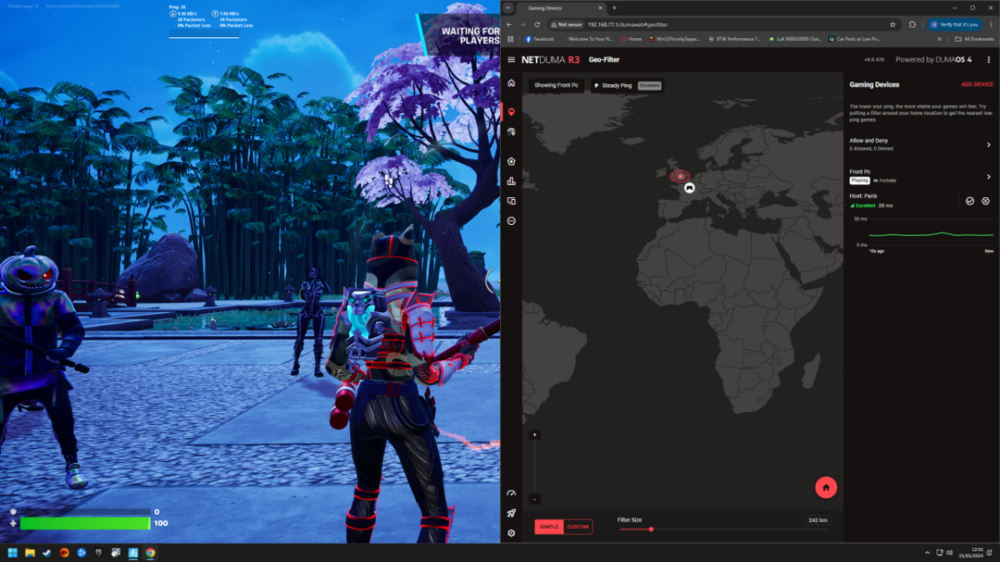
yes am on the latest early acesss version / next problem i seem to have is playing fortnite . my geo location is set around the uk . can play one or 2 games at first there at london / then suddenly will start to put me in france.. frankfukt .. i tried blocking them . but they seem to just come back on blocked .. realisticly i dont understand why is alowing to go out the uk .. for instance cod it just takes a while sometimes for a game searching coz am only in uk .. if you circle is set to small it just says unable to find a data center /// so am baffled whats going on with fortnite / is there any way to fix it so it will not go out the uk?? cheers
-
hi mate / pick your brains again .. so say i play plants v zombies gw2 a few others . how do i go about prioritising games what aint prioritised arnt on the list ?? i read another post you were helping someone same problem 2 years ago tho and i dont understand properly to be able to do it so thought id ask .
-
cheers mate . sure its only gone that like latley . . other main thing was testing it last night .. this has been like this for a ili while .. so on my geo filter in game its not lighting up / its not showing any server / info / nothing / " it use to work perfectley weather its the new fw or not i dono" just know it will never show anything / noticed some times games are not being prioritized when they should be ..
-
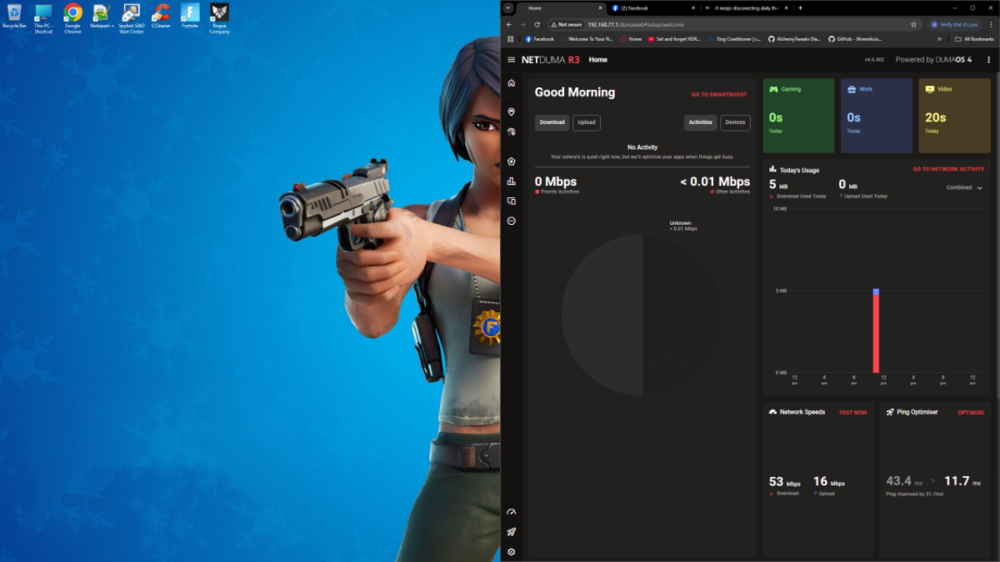
hi mate . yes that worked fine . i have a couple of niggles / my smart boost radar map / seems to of gone half black / sure its not always been like that / whats happend there ? i have reset modum but it never fixes thought id ask .. my vpn would not work for days . but tried again just now and its working so thats that .
-
cool i try that with the ports later . il have attached config folder . see if you can make heads or tales of it //on enigma i just add my password to that what i pasted put in my certificate and away i go . thanks configs.zip