Jump to content

Jackal235

XR1000 Beta Testers
  • Posts

    120
  • Joined

  • Last visited

Everything posted by Jackal235

  1. Obviously they pushed new firmware to the routers they're selling 'cause those bring them money. Supporting existing ones would be secondary priority.
  2. So...why it was so much easer to write a new firmware for a router with a new chip and to pass Netgear testing than it is for existing router with already so many firmwares behind?
  3. Why would anybody change hardware on the same model that requires different firmware? And how does it make it a "negligible?
  4. Such information would be confidential, only known to developers and Activision bosses. There is a reason why they never show pings of other players. I'm sure that the determination of lag comp. must take place in the lobby, before the game and it can be adjusted later, especially when new player joins it in the middle. I've seen hundreds of times how the game changes me from hero to zero within seconds. There is also jitter involved since the pings can jump up and down. Despite that, it seems, they're also using some kind of skill compensation, basically giving time advantage to players with lower stats. The idea besides all of it to target and satisfy most common customers.
  5. Usually I'm looking at in-game ping, so that's what I meant. My router shows only 10ms less on average. In addition I took some settings from Kfetish's post (above), which seem to help. "Factory reset, upnp enabled, no rules in traffic prio, duma classified games and work from home are both off. No ports forwarded, nothing in dmz. My congestion control sliders are both set to 70 and always".
  6. The game is really bad for me too. Instant deaths, sometimes I don't even see my enemies (except kill cams). The only way to be positive is use geo filter to find 50-80ms games. Unfortunately in my location they are not easy to find. Looks like devs did something to make it more suitable for Xmas players. Anything they're doing is to boost sales not to improve gaming experience.
  7. If HDR is enabled on the console these settings will be locked in the game. Any HDR adjustments can be done on PS5 screen & video menu. Only If you disable HDR on PS5 then you can change brightness in the game.
  8. Might be one of your apple devices randomly changing MAC address (new security feature) Use private Wi-Fi addresses on iPhone, iPad, iPod touch, and Apple Watch - Apple Support (CA)
  9. SBMM is another factor screwing this game. Now the server matching priority isn't the ping but rather skills. Leaving low latency players on mercy of the lag comp. Also, if you play with cross play enabled cheaters are roaming with no shame in almost every single game. Disabling the cross-platform games means longer waits and more mixed pings.
  10. I remember the PS3 MW days. Planty of hackers but lag was minimal. Today they want to sell this game to everybody, either it's 5ms guy on fiber or 100ms 10 years old on his mommy's wifi. I also remember (long time ago) conversation in Activision COD forums with one of their employees. He said that "you no longer will have the advantage because of your internet". When I asked why, he closed the entire thread.
  11. I've just changed my ISP from cable (75/10mbps) to fiber (1.5/1.5Gbps). Now tests on speedtest.net show 3ms ping. My in-game ping also improved by about 15ms. Should it improve my gaming experience? I hoped so. Unfortunately, not...in fact it got much worse. One on one is an instant death. I don't even see them shooting. I die by what I call look of death. I struggled like this for a week trying different settings on xr1000, PS5 without results. Today, I decided to force my games by geofencing to Europe. Playing 100ms + games made the difference. Now I can see the enemy and have time to react. This is just another example of lag compensation screwing this game. It works by intentionally delaying information about positions of the high ping players in the lobby to low ping players.
  12. I changed my MTU to 750 on XR1000. To my surprise it run very well. Playing MW2 on PS5 (did not touch PS5 settings). I lowered it before (not as much though), I can definitely say it helps in my case.
  13. Let me to chip into this with some of my own findings. I had the same problems, tried different combinations, with a little success. I checked my MTU settings number of times, always coming up to 1500. Then...I decided not to add 28 bytes after highest number without fragmentation, which is 1472. To my surprise the game run much better, it seemed, like now, I have more time to react then before. I know, there is no much proof, that lowering MTU would improve gaming experience, however it does in my case both in Vanguard and MW2.
  14. I did... back in November last year: XR1000 1.0.0.58, 1.0.0.52 - DumaOS on NETGEAR Nighthawk Support - Netduma Forum
  15. I'm a XR1000 owner and the firmware support at this time is NOT EXISTING. The last time they released the update was in July 2021, it was full of bugs from day one. There is an obvious problem with software support. Everybody should stay away from this model for now.
  16. I'm sorry... are you speaking on behalf of the developers? Are you saying that the firmware was released without the test? What kind of input are you talking about?
  17. "This Rapp is not loaded yet, please try again in a minute" Same BS here!!! This is the 2nd time I'm installing 1.00.58 on my XR1000. 1st...it was upnp problem and now it can't load the geo filter. I bought this router only for the geo filter!!! Now again, I have to downgrade to 1.00.52. Are you f... 10 years old working on these firmware? So disappointed !!!
  18. I bought XR1000 for only one reason - the Geo-Filter. This feature has not disappointed me. Now... I know where is the server I'm connected to. In case of laggy games i can force my games to West coast or Europe and see how it's performing there. Before I was on the mercy of Activision shitty lag compensation. Having the lowest ping will not guarantee you the best game performance. Remember... they want to sell this game to as many customers as possible (not only people with the fastest low ping ISPs).
  19. Monitor refresh has nothing to do with ping...However, to enable 120Hz on Ps5 for COD you have to select "performance" over the "resolution" in PS5 settings. I believe this reduces processing time when game calculates the ping. I change this settings many times and each time I'm in resolution mode (60hz) my in game ping jumps 20ms compering to ping calculated by geo filter. Going back to performance mode (120Hz) both pings are almost the same.
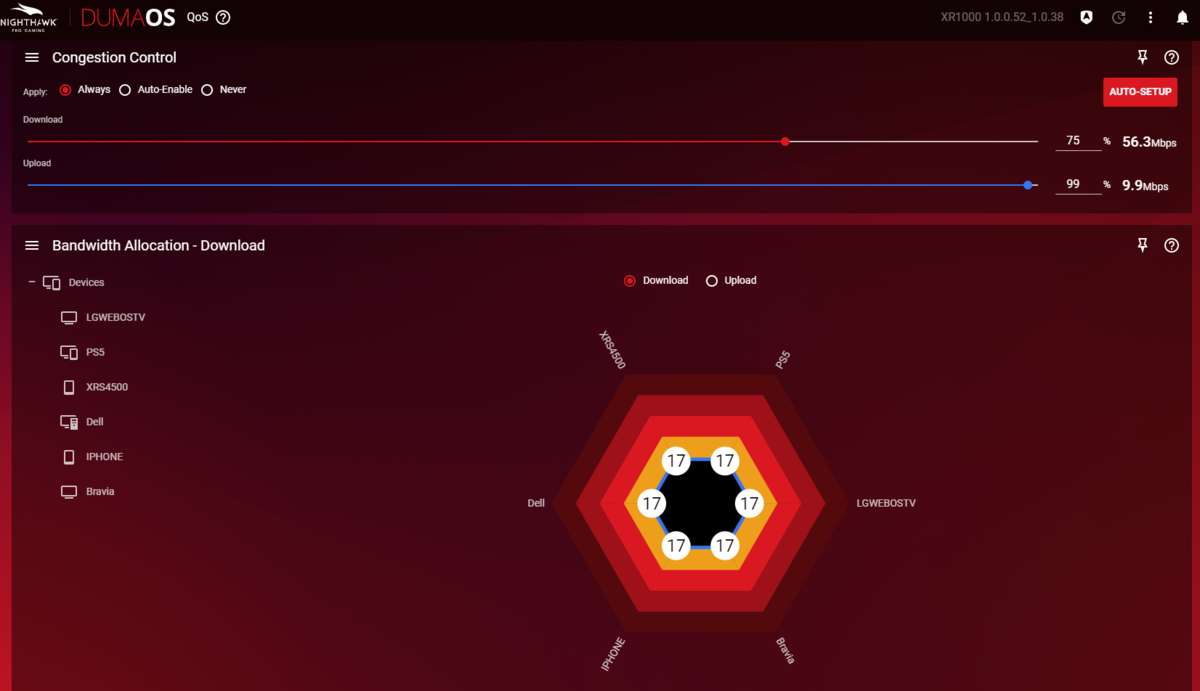
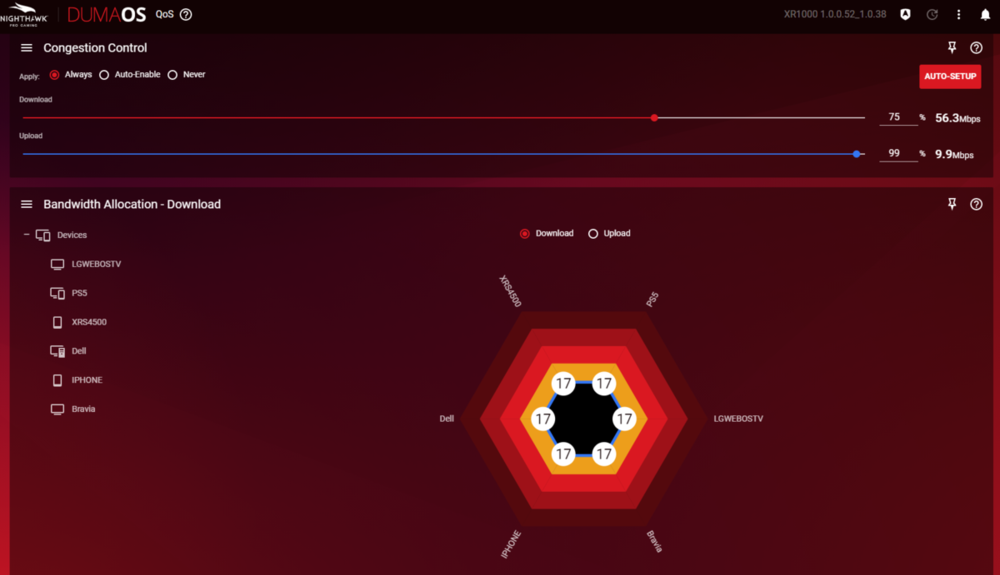
  20. My network is not that congested, so I gave equal bandwidth to all my devices. To get steady triple A+ score in connection benchmark, I had to check "always" in congestion control. 4 Also... running the game in 120Hz (compatible Tv/monitor necessary) helps a lot. I noticed that... when playing in 120Hz mode, the ping in geo filter is almost the same as the in game ping. When in 60Hz, the in game ping was about 20ms higher than the one in geo filter.
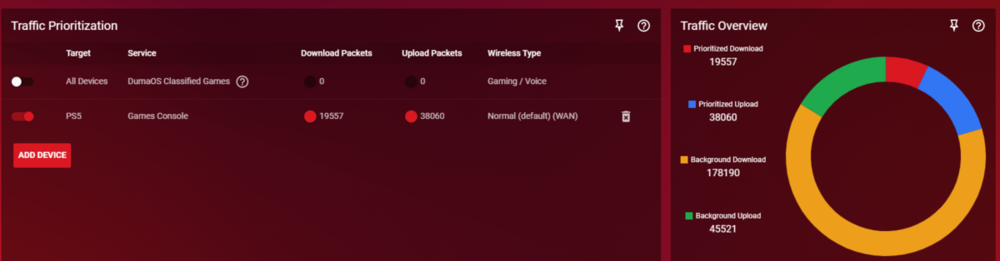
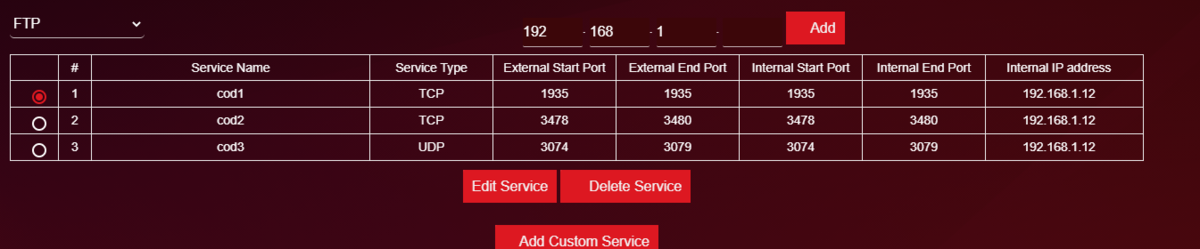
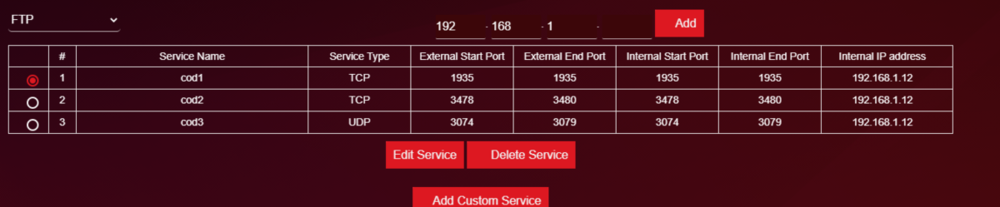
  21. Hi there, I'm running PS5 connected to XR1000 (wired), After few months of applying different settings, this what works the best for me: -Upnp off -make sure to give static ip for your PS5 in Lan setup -port forwarding as per picture, this will get you open NAT -When prioritizing traffic to the same ports as with the forwarding, the rule seems to affect only UDP traffic. So I added prio to whole consle : add device, basic, game console, normal default. This way I see more packets being prioritized than any other way. There is no silver bullet for hit detection, it varies from game to game, server to server or peer to peer. However, with above settings I'm having the best results.
×
×
  • Create New...