Devastate
-
Posts
57 -
Joined
Everything posted by Devastate
-
Not connecting to my nearest server
Devastate replied to ShinyShelvey's topic in NETGEAR Nighthawk Support (XR range)
Do you ever connect to that peer connection? -
Not connecting to my nearest server
Devastate replied to ShinyShelvey's topic in NETGEAR Nighthawk Support (XR range)
When you tried reducing the filter circle to include only the London servers, were you just infinitely searching for a game? -
Not connecting to my nearest server
Devastate replied to ShinyShelvey's topic in NETGEAR Nighthawk Support (XR range)
This is about Ultimate Team, right? If so, when I found an opponent on Division Rivals, then the server would appear. -
Not connecting to my nearest server
Devastate replied to ShinyShelvey's topic in NETGEAR Nighthawk Support (XR range)
I am able to connect to the London servers just fine, so the servers aren't currently down. When using filtering mode, try reducing the filter size of the circle to exclude the non-London servers. -
Thanks for trying to help; however, I am currently using bridge mode on a modem. That's fantastic. Hopefully, the issue can be fixed and released soon.
-
Hey, I'm just checking to see if the team was able to reproduce this or if this is an isolated issue.
-
I have an issue with the R3 WAN connected via PPPoE. When the modem resyncs or restarts, the R3 doesn't automatically reconnect to the modem. This requires me to manually reconnect the connection via changing connection type and changing back, disconnecting and reconnecting the WAN Ethernet cable from the R3, or restarting the R3. I believe this issue is related to the latest firmware (v4.0.219). To my knowledge, this didn't affect me on the previous firmware (v4.0.41). I have tried factory resetting the R3 to resolve the issue, but it still occurs when I restart the modem.
-
When I tried, the error message said, "Gateway is not reachable on the LAN network," which I assume isn't reachable because I was trying to reach it through the WAN port. Could the ability to static route through the WAN port be added to the R3 in the future?
-
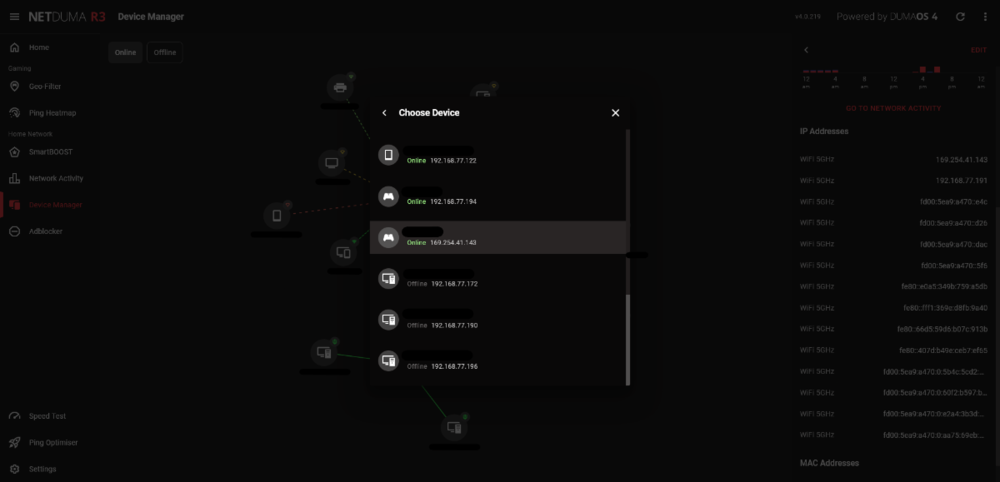
I have a bug with features that require you to choose a device by the device's name and IP address, such as hybrid VPN, internet rules, etc. If the device has a local link address, this takes priority over the private IP address, resulting in the features not working on the device. Additionally, is a device supposed to have that many IPv6 addresses? Edit: Restarting the R3 has fixed the issue by removing the local link address and reducing the IPv6 addresses to two.
-
My hope was to be able to see the DSL status and statistics without having to lose access to the internet whilst looking, due to only one LAN port on the modem. So to bring up my previous reply, is it right to assume the R3 isn't capable of doing either of them?
-
The user guide doesn't mention Wi-Fi anywhere in it, and it is titled "Vigor130 Series VDSL2/ADSL2/2+ Modem User’s Guide." Also, 192.168.2.1 is unreachable whilst behind the R3.
-
I wish it was that simple. Unfortunately, that doesn't seem to be the case with this modem, as I've searched this forum and others have had difficulties accessing the web user interface as well albeit not through the R3. The modem is the Vigor 130.
-
Thank you for the response. I am trying to access the modem's web user interface from behind the R3. The solution from the manufacturer's website is to create an untagged virtual WAN interface. Or a different solution from the web is to create a static route from the modem's LAN port to the router's WAN port and vice versa. Is it possible to do either of these with the R3?
-
Does the WAN port of the R3 have an IP address, or can you assign one to it?
-
May I also receive access to Early Access, please?
.png)