


Wantox81
-
Posts
85 -
Joined
-
Last visited
Everything posted by Wantox81
-

IPv6 errors and net-cgi not found in R2 logs
Wantox81 replied to Wantox81's topic in Netduma R2 Support
Thank you for the clarification regarding the IPv6 and net-cgi: NOTFOUND messages. I understand that these can be ignored and that the IPv6 messages should not appear when IPv6 is disabled. While reviewing the complete R2 log, however, I noticed another event that looks different: At 22:44:53, the kernel started reporting: nf_queue: full at 1024 entries, dropping packets(s) This was not a single occurrence. The message was repeatedly logged from approximately 22:44:53 to 22:45:14, with multiple net_ratelimit messages such as: 230 callbacks suppressed 388 callbacks suppressed 351 callbacks suppressed Could you clarify what can cause the R2 nf_queue to become full at 1024 entries and start dropping packets? Is this something I should investigate further, or can this also be considered normal log noise? I have the complete R2 log available if it would be useful. -
Hello NetDuma team, I would like to ask for some clarification about two recurring types of messages in my R2 logs: IPv6-related errors and “net-cgi not found” My current setup is: ONT → FRITZ!Box 7490 (fw7.62) → NetDuma R2 (fw3.3.280) → GL.iNet AR750 (Only Access Point fw4.3.25) The FRITZ!Box handles the Internet connection, the R2 handles routing, and the AR750 is used only as a Wi-Fi Access Point. Wi-Fi is disabled on the R2. After several tests, we found that the R2 works better when its workload is reduced by having the FRITZ!Box handle the Internet connection and the AR750 handle Wi-Fi separately, allowing the R2 to focus mainly on routing and its gaming-related functions. However, even with IPv6 disabled on both WAN and LAN, the R2 continues to generate IPv6-related errors. I am also seeing recurring “net-cgi not found” entries in the logs. Could you please explain: ● Why does the R2 generate IPv6-related errors when IPv6 is disabled on both WAN and LAN? ● What exactly does “net-cgi notfound” mean, and what causes this message to appear in the logs? I can provide the relevant log entries and timestamps if required. Thank you.
-
Initially I had a static ip, then I asked for the dynamic one, thinking it was better for other online services such as streaming. By asking for a static ip what are the pros and cons?
-
I have no modem, R2 connected LAN directly to the ont
-
Time 1PM - router loses internet connection, always the same devices, always the same configuration, only difference is that I did not reboot it before playing… R2_2025-06-08T11:00:59.415Z_logs.txt
-
I have also said in previous posts that after a few days the speedtests and latency tests are all out of whack and I have to reboot, what more can I say?
-
are simply feelings, in practice the router does not perform as well as when I reboot it, but I do not understand why since I do not change any configuration, let alone add devices
-
after a few days, the router stops performing, even if I increase the devices, it is as if a thousand devices are connected at the same time and therefore the router goes under stress and not performing at its best, so I have to reboot it
-
Hello Fraser, then I did not try firmware 4 on netduma r2, because I think I found the right balance between down and up in the qos with firmware 3.3. The only problem is that after a few days, as mentioned above, the router gets flooded and I have to reboot it, so to avoid having it flooded, I always reboot it before playing, although it's a nuisance, but in this way it's all very performant! Can you tell me why this happens?
-
The beta last version is 4.0.258? Thank you
-
This weekend I will try the DumaOS 4 beta again and let you know. Thank you
-
Latency is visible on speedtest and on bufferbloat, magically almost disappeared after restarting the router. The latency was also visible when playing online with efootball
-
Both before reboot with a latency of over 100ms and after reboot with a latency of between 10ms and 15ms the device activities on the router are zero
-
Why do I have to restart the router to get my connection to stabilise? Basically I do the speedtest and the line is unstable, especially in download there is a lot of latency, then I reboot the router and without touching any router settings, the test is stable and the latency is minimal (so acceptable). It's as if the router gets flooded after a few days of activity and I have to systematically reboot it? Thank you
-
I would like to inform you that after rebooting the router, the Internet connection has been working perfectly for two days without interruption. Thank you very much 👍🏻
-
Yesterday it happened again (around 23h37)... it disconnected right in the decisive game! 😭 R2_2025-05-03T21:38:45.694Z_logs.txt
-
Immediately afterwards I generated the log, so around 00.25
-
Unfortunately, all of a sudden while playing my R2 (3.3.280) disconnects. I attach log so you can tell me how and if I can solve the problem. Thank you! R2_2025-04-30T22:28:19.580Z_logs.txt
-
Unfortunately, all of a sudden while playing my R2 (3.3.280) disconnects. I attach log so you can tell me how and if I can solve the problem. Thank you! R2_2025-04-30T22:28:19.580Z_logs.txt
-
indeed, after set reserved ip addresses for devices, the router seems to work better! Thank you
-
last thing: now my r2 has disconnected from the internet, lately it does this a lot, either while watching TV or, worse, when I'm playing. I just have to restart R2 to solve it I'll send you the log, can you tell me what's wrong? Thanks log-1744140358779.txt
-
Thank you for you reply so can I manually enter 500mbs down in the R2? Have I any problems with QoS? other thing: in the geofilter, with the app, when I connect to a game server it no longer pings me, it says: could not ping host, why?
-
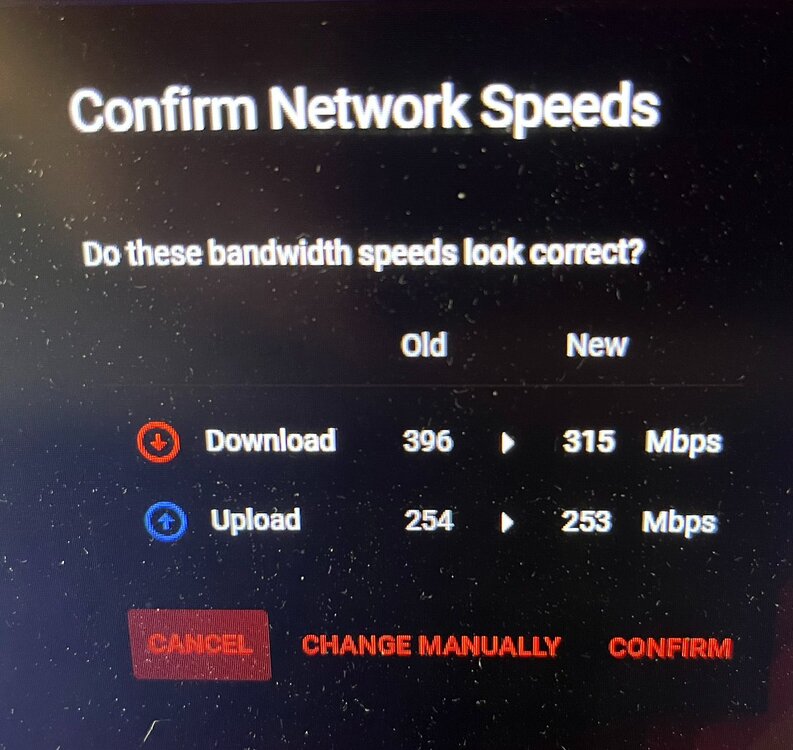
Hello everyone, I have had a speed test problem for several days now: if I do the speed test from the R2's (3.3.280) internal utility I get: - 335mbps down et 255mbps up. If I do the speed test on Ookla I get the correct speeds from my provider: - 500mbps down and 250mbps up I have also tried doing a factory reset and reconfiguring everything, but the problem remains, how can I solve it? Thank you



-
That's ok! thank you Fraser
-
my optimal configuration on netduma R2 lasts about 1 month. Let me explain: I do the setting by stabilising the line and lowering the bufferbloat. I start playing efootball and it plays great, after about a month the game fluidity worsens to the point of being unplayable, even though I don't touch anything in the settings. So I have to find a new configuration that will allow me to play fluidly. Why? Thank you


.png)