Detanye
-
Posts
16 -
Joined
-
Last visited
-
Seems to be much happier after a reset, havent been able to replicate any of the issues so far.
-
I have just dont it now, should i just leave all the settings the way they are and see what happens? Or should i change my DNS settings and set IPs <.50 again?
-
No not that I can think of, we changed to a newer powerstrip but I'm almost positive it was doing this before that.
-
With that setting off it has made the network much worse. Completely lost the ability to look for any Websites on PC and phone. Maybe a factory restart may help?
-
Gave this a go this evening and managed to get it to replicate the DNS issues straight away. Ill keep the setting off to see if it was a one off or not. Starting to think there is just an issue with my router.
-
I will give this a go when I get back from work today. Would turning off IPv6 help do you think? It has been recommended a few times but I haven't tested yet
-
Happening a lot now with more people using the network, this is all the log says. [DHCP IP: (192.168.1.5)] to MAC address F0:72:EA:D7:B1:ED, Wednesday, Mar 18, 2026 19:49:09 [DoS attack: RST Scan] from source 23.211.125.73,port 443 Wednesday, Mar 18, 2026 19:48:55 [DoS attack: RST Scan] from source 192.178.187.94,port 443 Wednesday, Mar 18, 2026 19:48:55 [DoS attack: ACK Scan] from source 54.186.23.98,port 443 Wednesday, Mar 18, 2026 19:47:08 [DHCP IP: (192.168.1.8)] to MAC address AE:BD:1C:97:5C:2A, Wednesday, Mar 18, 2026 19:44:36 [DoS attack: RST Scan] from source 20.43.111.112,port 443 Wednesday, Mar 18, 2026 19:44:06 [Time synchronized with NTP server] Wednesday, Mar 18, 2026 19:43:33 [Internet connected] IP address: 100.100.113.119, Wednesday, Mar 18, 2026 19:43:32 Seem to be unable to search for anything for longer amounts of time aswell, sorry for the spam.
-
Just happened when i turned my pc on again. This was what my logs were at the time [DHCP IP: (192.168.1.2)] to MAC address 48:68:4A:4C:DC:DB, Wednesday, Mar 18, 2026 19:13:05 [DHCP IP: (192.168.1.8)] to MAC address AE:BD:1C:97:5C:2A, Wednesday, Mar 18, 2026 19:13:00 [DHCP IP: (192.168.1.10)] to MAC address C2:61:51:C7:98:4E, Wednesday, Mar 18, 2026 19:09:15 [DoS attack: ACK Scan] from source 184.28.9.100,port 80 Wednesday, Mar 18, 2026 19:09:15 [DHCP IP: (192.168.1.8)] to MAC address AE:BD:1C:97:5C:2A, Wednesday, Mar 18, 2026 19:02:43 [DHCP IP: (192.168.1.11)] to MAC address 9A:3A:8B:6E:22:D2, Wednesday, Mar 18, 2026 19:02:21 [DHCP IP: (192.168.1.11)] to MAC address 9A:3A:8B:6E:22:D2, Wednesday, Mar 18, 2026 19:02:18 [DHCP IP: (192.168.1.11)] to MAC address 9A:3A:8B:6E:22:D2, Wednesday, Mar 18, 2026 19:02:17 Cant really see anything out of the ordinary, this one had everything disconnect and give me a 'No Internet Access' error.
-
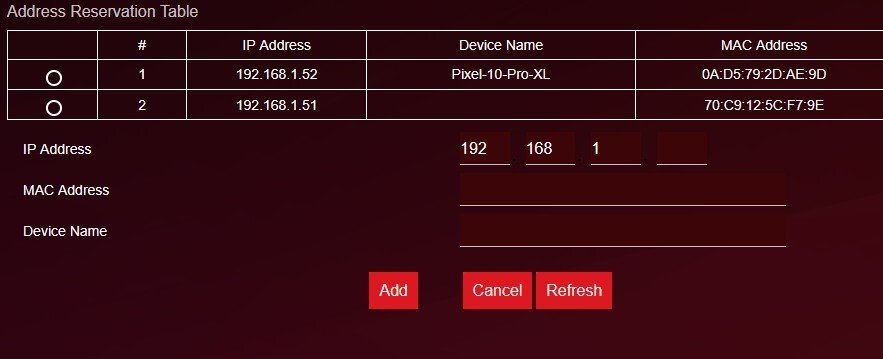
My phone seems to keep changing its ip even though im saving it as a device. Could that be the issue?

-
[admin login] from source 192.168.1.2, Wednesday, Mar 18, 2026 10:09:53 [DHCP IP: (192.168.1.2)] to MAC address 48:68:4A:4C:DC:DB, Wednesday, Mar 18, 2026 10:09:15 [DHCP IP: (192.168.1.8)] to MAC address AE:BD:1C:97:5C:2A, Wednesday, Mar 18, 2026 10:04:00 [DHCP IP: (192.168.1.8)] to MAC address AE:BD:1C:97:5C:2A, Wednesday, Mar 18, 2026 10:00:29 [DHCP IP: (192.168.1.15)] to MAC address DA:81:47:BE:43:67, Wednesday, Mar 18, 2026 09:51:39 [DHCP IP: (192.168.1.5)] to MAC address F0:72:EA:D7:B1:ED, Wednesday, Mar 18, 2026 09:50:18 [DHCP IP: (192.168.1.5)] to MAC address F0:72:EA:D7:B1:ED, Wednesday, Mar 18, 2026 09:50:17 [DHCP IP: (192.168.1.10)] to MAC address C2:61:51:C7:98:4E, Wednesday, Mar 18, 2026 09:47:11 does this look correct now?
-
I feel like it's less but It could be placebo.
-
Seems to still be doing it every now and then. I have tried disabling IPV6 to see if I can replicate it
-
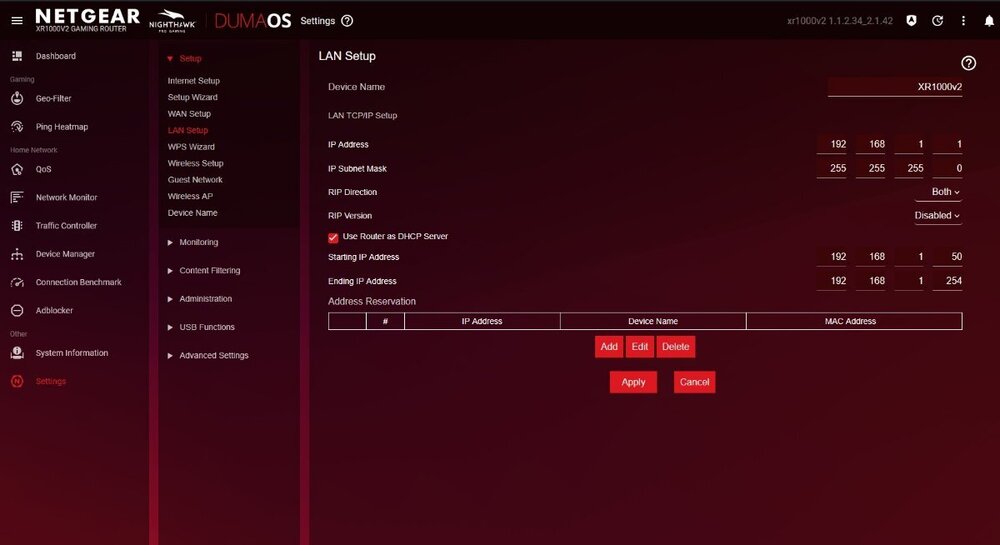
Does this look correct? i dont seem to have many options in the reservations list, things like my chromecast didn't show up. Rebooting now and will tell you if anything changes
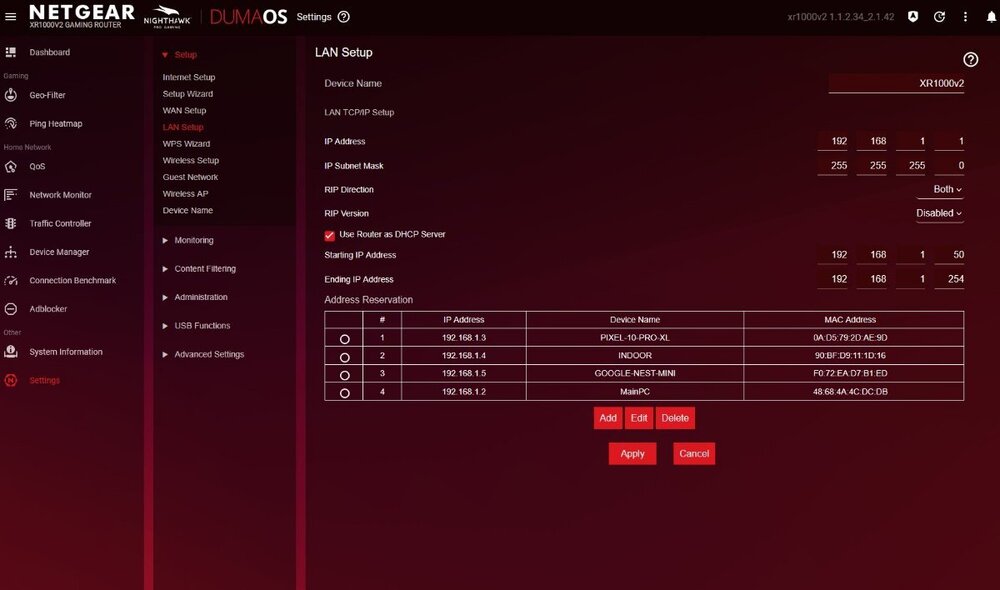
-
Is PPPoe a IPv6 thing? I have internet connection type in that page set to Auto if that helps? It actually happened as soon as i turned my pc on just now and here are the logs. [DHCP IP: (192.168.1.12)] to MAC address C2:61:51:C7:98:4E, Tuesday, Mar 17, 2026 10:28:08 [DoS attack: RST Scan] from source 20.43.111.112,port 443 Tuesday, Mar 17, 2026 10:27:18 [admin login] from source 192.168.1.13, Tuesday, Mar 17, 2026 10:25:20 [DHCP IP: (192.168.1.13)] to MAC address 48:68:4A:4C:DC:DB, Tuesday, Mar 17, 2026 10:25:10 [DHCP IP: (192.168.1.14)] to MAC address 0A:D5:79:2D:AE:9D, Tuesday, Mar 17, 2026 10:25:07 [DHCP IP: (192.168.1.4)] to MAC address F0:72:EA:D7:B1:ED, Tuesday, Mar 17, 2026 10:25:04 [DHCP IP: (192.168.1.4)] to MAC address F0:72:EA:D7:B1:ED, Tuesday, Mar 17, 2026 10:25:03 [DHCP IP: (192.168.1.14)] to MAC address 0A:D5:79:2D:AE:9D, Tuesday, Mar 17, 2026 10:25:03 [DHCP IP: (192.168.1.14)] to MAC address 0A:D5:79:2D:AE:9D, Tuesday, Mar 17, 2026 10:25:02 [DoS attack: RST Scan] from source 20.43.111.112,port 443 Tuesday, Mar 17, 2026 10:23:42 [DHCP IP: (192.168.1.9)] to MAC address AE:BD:1C:97:5C:2A, Tuesday, Mar 17, 2026 10:21:01 [DHCP IP: (192.168.1.9)] to MAC address AE:BD:1C:97:5C:2A, Tuesday, Mar 17, 2026 10:03:59 Is it maybe that DoS attack log?
-
Webpages won't load but things like voice calls remain okay. I would 10 times a day at least. They fix themselves after a few minutes. I'm in Australia, so I'm plugged straight from our network distribution terminal. I have a Fibre to the Premises connection. I'm unsure how I check the traffic flow?